October 22, 2026 · 13 min read · Pineflows team
Automated Trading Platform: What It Is and How It Works
Learn what an automated trading platform is, how it executes orders safely, and how to choose one. Covers features, security, and integration flows.
You're watching a TradingView chart when a strategy alert fires. You're away from your desk, so you don't see it until the price has moved. Even if you could have placed the order in time, you're left wondering whether the alert arrived, whether the broker accepted it, and what position you now hold.
An automated trading platform can connect a strategy's signal to a broker order, reducing the need to place each trade manually. But the important question isn't only whether the platform can act quickly. It's whether you can tell what happened when an alert is late, repeated, rejected, or disconnected from the broker.
Table of Contents
- What Is an Automated Trading Platform
- How Automated Trading Platforms Execute Orders
- Essential Features of a Modern Automated Trading Platform
- Security Considerations for Automated Trading
- How to Choose an Automated Trading Platform
- Example Integration Flow From TradingView to Broker
- Final Thoughts on Automated Trading Platforms
What Is an Automated Trading Platform
An automated trading platform is software that helps turn trading instructions into broker orders. A trader's strategy decides when a condition is met, such as a price crossing a moving average. The platform receives that signal, checks its contents, and routes an order to a connected broker.
Think of a trader who has tested a TradingView strategy and wants to act on its alerts while away from a screen. Without automation, the trader must notice each alert and enter the order themselves. With a connected platform, the alert can be processed and sent to the broker according to configured rules. That can reduce manual handling, but it doesn't decide whether the strategy is sensible or guarantee a fill at the expected price.
Signal and execution are different jobs
A useful distinction is signal generation versus order execution. The strategy generates an instruction, such as “enter this position” or “close it.” The platform handles the next part: translating that instruction into an order the broker can understand and checking the response.
Keeping those jobs separate makes it easier to troubleshoot. If an alert didn't arrive, that's a signal-delivery problem. If the broker rejected a correctly received order, that's an execution or account issue. If the order filled but the strategy's position record didn't update, the system needs reconciliation. A trustworthy workflow should help you see which stage needs attention rather than treating every failure as a vague “automation error.”
Automation isn't new to financial markets. A U.S. Commodity Futures Trading Commission study of automated trading in Chicago Mercantile Exchange futures found that automated trading appeared across a wide range of contracts, often accounting for well over half of activity. It reported automated participation of 80% in foreign-exchange futures, 67% in equities futures, and 62% in interest-rate futures. The CFTC also noted that automated trading tools had been used in foreign exchange since at least the early 1980s, when Reuters began offering an electronic platform.
Retail tools make parts of this established model more accessible. They don't remove the need to understand what a strategy does, what orders it can send, or how you'll respond when something goes wrong. The right starting point is to follow an alert through the full path, from strategy decision to broker confirmation.
How Automated Trading Platforms Execute Orders
The order pipeline is easier to understand if you compare it to a kitchen. A recipe represents the trading strategy, an incoming order ticket represents the alert, and a quality check helps make sure the kitchen serves the intended dish. If someone skips the check or the ticket is duplicated, the kitchen can produce the wrong result, even if the recipe itself is correct.
From strategy alert to broker response
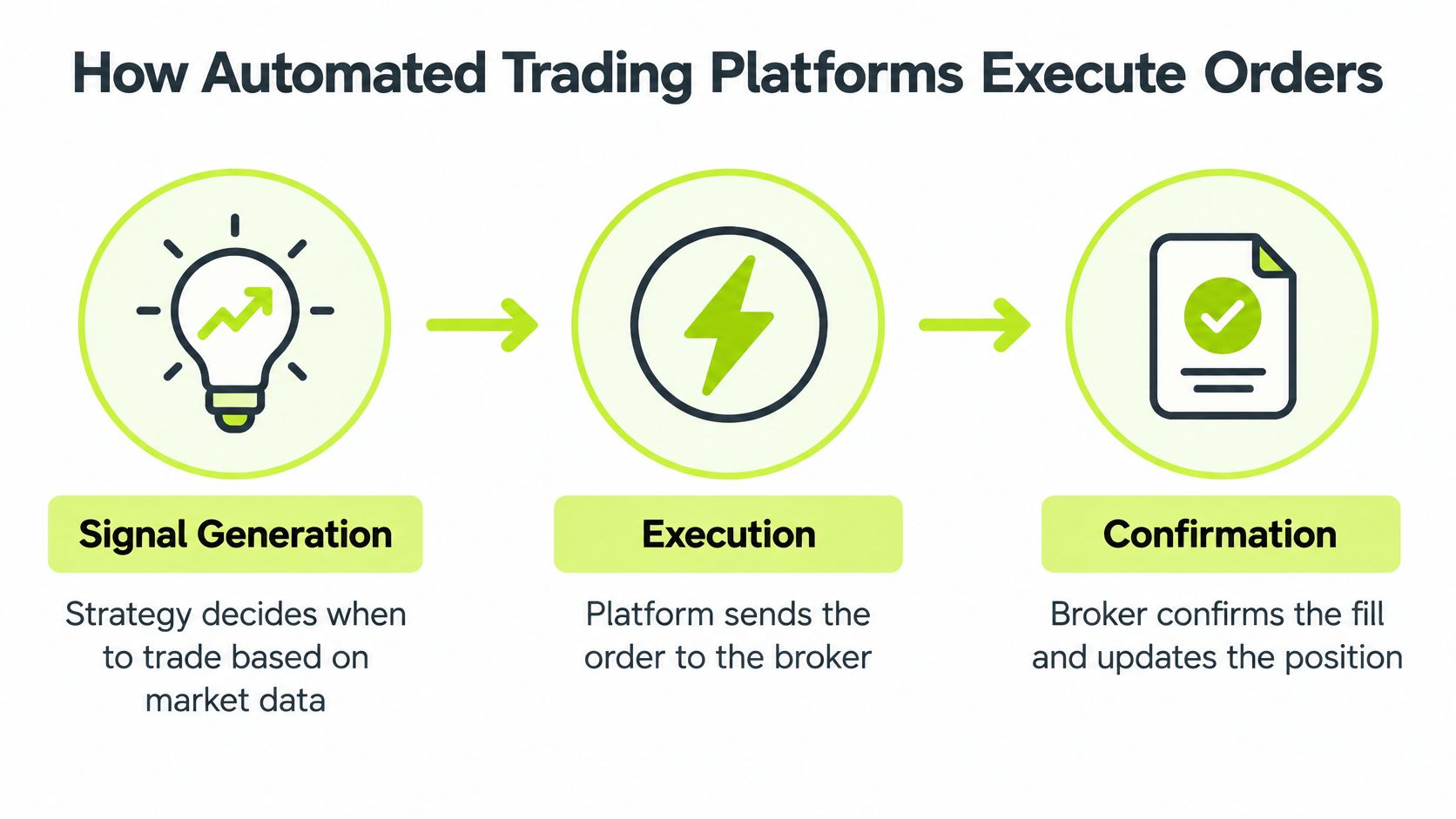
The strategy creates a signal. A script or set of rules checks market data and determines that a condition has been met. It might generate an entry or exit alert. At this point, the strategy has expressed an intention, not necessarily placed an order.
The alert travels to the platform. A webhook can transmit the alert from a service such as TradingView. The message needs to identify what the strategy wants to do and include the details required for processing. If delivery is delayed, repeated, or incomplete, the receiving platform needs a way to detect and handle that condition.
The platform validates and translates the message. It checks that the event has a supported instrument, side, and order parameters. It can also check whether the same alert has already been handled. This step is like checking an order ticket before the kitchen starts cooking. A message that looks valid at a glance might still contain stale information or describe an unintended order.
The broker receives the order. After validation, the platform routes an order to the connected broker. The broker may accept, reject, partially fill, or fill it. Sending an order isn't the same as confirming that it filled, so the platform should report the broker's response and update the position state based on that response.
Practical rule: Treat the broker's acknowledgement and fill status as part of the order, not as optional follow-up information.
For a visual walkthrough of this pipeline, the video below complements the process diagram. The key point is that every handoff is a place where information can be delayed, rejected, or misunderstood.
Essential Features of a Modern Automated Trading Platform
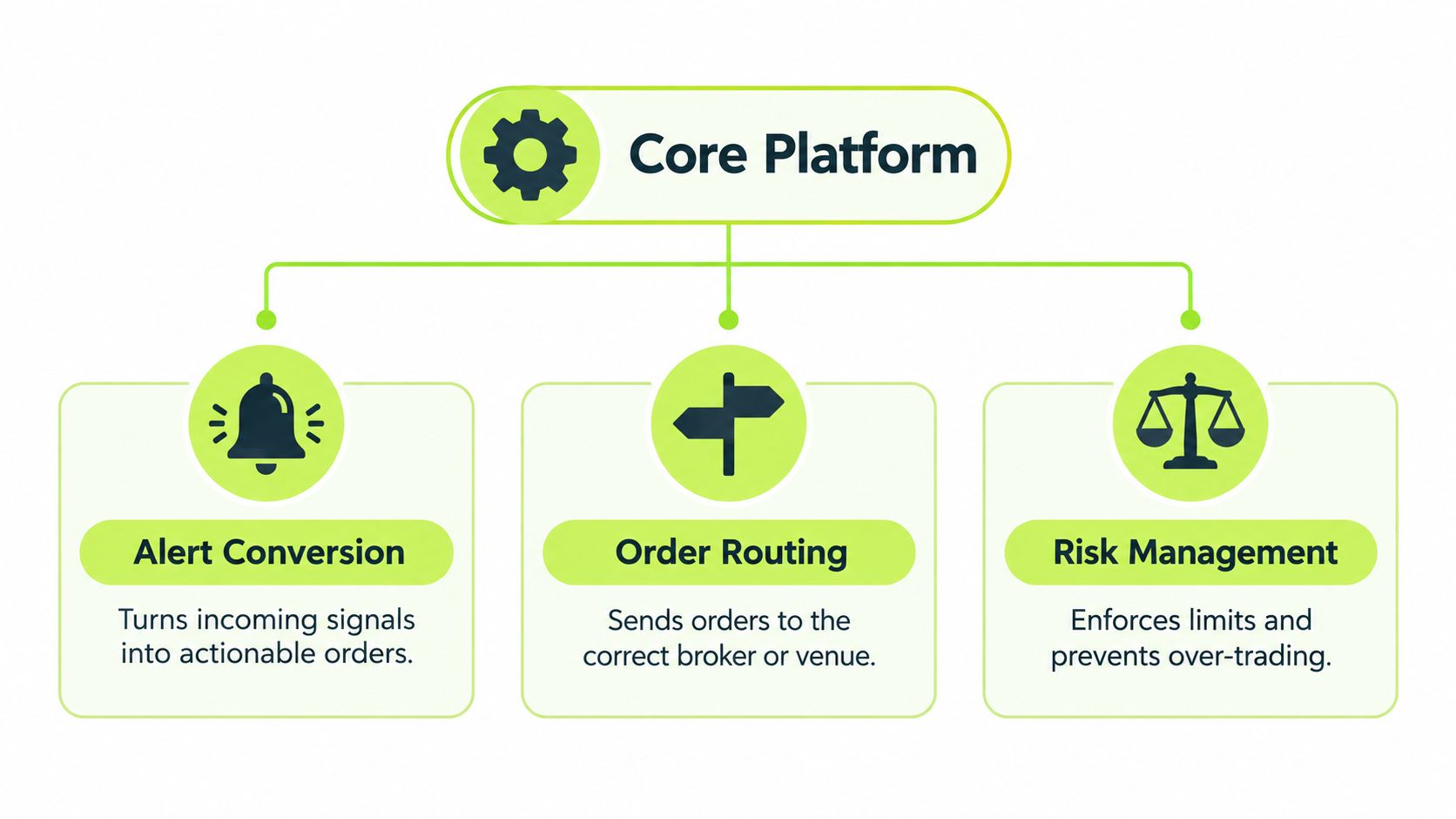
Product demos tend to show the happy path: alert in, order out. Live trading tests the opposite. The feature that matters most on an automated trading platform is controlled failure, meaning what the system does when an alert is wrong, late, sent twice, or cut off before the broker answers. A platform that handles those moments predictably protects an account better than one that is merely fast.
Core execution and safety checks
Start with status honesty. An alert received, an order submitted, an order accepted, and a fill confirmed are four different events, and a platform should report each one separately. Collapsing them into a single "successful" label works like marking a package "delivered" when the driver has only left the depot: the tracking looks reassuring while nothing has arrived.
Test mode is the next layer. It works like a flight simulator for the strategy: incoming alerts get recorded and displayed, but no order reaches the broker until live trading is deliberately switched on. That gap gives you room to inspect the payload and confirm the platform read the intended instrument, action, and sizing correctly. Execution safety and strategy quality are separate questions, though. A platform can route orders perfectly while the strategy behind it still loses, which is why the strategy needs its own evaluation, covered in this overview of backtested trading strategies.
Duplicate prevention is where ordinary retries turn dangerous. If a webhook resends after a delayed response, the platform should recognize the alert as already handled rather than placing a second order. The SEC's analysis of algorithmic trading risks describes operational risks from malfunctioning or incorrectly deployed algorithms and from connected market infrastructure. Durable event records and broker-status checks make those retries observable instead of doubling a position.
The remaining controls each map to a specific failure mode:
- Order limits contain a wrong instruction: validate the instrument and side, and cap quantity or notional value before submission.
- Stale-signal checks contain a late one: reject an old alert rather than acting on information that no longer reflects the strategy's current state.
- Pause controls contain an ongoing incident: stop new entries while keeping explicitly authorized exits available for risk handling.
- Post-deployment review contains slow drift: record meaningful changes and monitor the strategy after activation or modification.
FINRA's guidance on supervision and control of algorithmic trading strategies names risk assessment, development and implementation, pre-production testing, post-deployment review, and compliance as control areas. Read together, they describe a single standard: a platform earns trust by failing in ways you can see, pause, and trace.
Security Considerations for Automated Trading
A platform handling trade alerts needs to protect both account access and the records that explain each decision. Security isn't just about keeping an account out of the wrong hands. It's also about being able to establish what the system received and whether it acted as intended.
Keep account access and trading records clear
Treat a request for broker credentials as a serious warning sign. A service shouldn't ask you to send a broker password or reusable token in a chat or ordinary form. Prefer an authentication flow that leaves account credentials with the broker, and understand what permissions the connection grants before enabling it. A sign-in button alone doesn't explain how access is controlled, so check what information is requested and whether you can revoke access.
Good audit records make investigation possible. For each event, look for a unique event ID, the received payload or a verifiable payload hash, timestamps, the platform's decision, the broker response, and the final fill status. A status that says only “processed” doesn't tell you whether the broker accepted the order or whether it filled.
Ask before connecting an account: Can I inspect the alert, see each processing step, verify the broker's response, and pause new entries without disabling authorized exits?
Pineflows is one example of a tool for a specific workflow: it converts TradingView Pine Script alerts into Robinhood market orders, logs incoming alerts in test mode by default, and provides event-level status and fill details. It uses Google sign-in and states that it doesn't request or store Robinhood credentials. Traders considering an integration should still review its permissions, test its behavior, and confirm that its controls suit their own account and strategy.
For more context on broker connectivity, see this guide to Robinhood API trading. Whatever service you consider, look for clear documentation on account access, event retention, error handling, and revoking a connection. Those details help you assess whether you can maintain both security and a usable record of what occurred.
How to Choose an Automated Trading Platform
A platform earns its keep on its worst day. Fast order placement is easy to advertise. The harder question is how the system behaves when an alert arrives twice, arrives late, or reaches a broker that is temporarily unreachable. A well-built platform contains those failures so a single bad event stays a single bad event.
Before comparing candidates, decide whether automation fits the strategy. Reliable execution can make a sound strategy's instructions more consistent. It cannot make a weak strategy profitable, and a backtest cannot guarantee that live orders will behave the same way when prices gap, liquidity thins, or a broker applies restrictions.
That gap between a tested idea and a live account shows up in regulatory data. A Reuters report on a SEBI proposal concerning algorithmic trading and retail investor protections states that India's securities regulator reported nearly 91% of retail traders lost money in derivatives in 2024, with total losses of 524 billion rupees. No statistic predicts one trader's outcome. The figures do show that easier access to automated execution is separate from the merit of what gets executed.
Compare platforms against your actual needs
Run every candidate through the same set of questions. Does it support your broker, your instrument, and your intended order types? What does it do when the same alert arrives twice, or when an alert arrives after the price has already moved? Can you run it in test mode, set order limits, and pause activity without disconnecting the account? Check the authentication model, the pricing terms, and whether support can help when an integration fails.
| Criteria | What to Look For | Why It Matters |
|---|---|---|
| Reliability | Clear alert receipt, order status, and fill reporting | Lets you distinguish a delivered message from an executed trade |
| Failure handling | Test mode, duplicate prevention, order limits, and a pause control | Keeps a faulty or repeated alert from creating unintended exposure |
| Broker support | Explicit compatibility with your broker and order types | Prevents choosing a service that cannot carry out your workflow |
| Security | Broker-controlled authentication, clear permissions, and revocation options | Limits the damage if access ever needs to be cut quickly |
| Transparency | Readable payloads, event logs, and clear pricing terms | Makes incidents easier to reconstruct and costs easier to judge |
| Support | Usable documentation and a real path to help during failures | Shortens the time an unresolved problem can keep running |
Before live use, test the failure paths alongside the normal ones. If the platform cannot show whether an order was accepted, rejected, or filled, a confirmed alert delivery only proves the message arrived. A service such as Pineflows is designed for TradingView alerts routed to Robinhood, and the same questions apply to any provider you evaluate.
Example Integration Flow From TradingView to Broker
Consider a trader who has a Pine Script strategy in TradingView and wants its alerts to create orders at a connected broker. The safest way to picture the integration is as a traceable event, not a magic connection. Each handoff should leave evidence that the next system received and understood the instruction.
Follow one alert through the pipeline
The strategy detects its configured condition and creates an alert. The alert message describes the intended action and relevant order details. TradingView sends that message through a webhook to the platform. A trader can learn more about the mechanics in this guide to automating TradingView alerts.
The platform should first record the incoming event rather than immediately treating it as a live order. In test mode, the trader can inspect the human-readable payload and confirm that it refers to the intended instrument and action. If the message is missing information, describes an unsupported instruction, or is no longer current, the system should make that visible before the broker is involved.
Next, the platform checks the event ID. If the same alert has already been processed, a repeated delivery should resolve to the existing event instead of creating a second order. If the event passes validation and live trading is enabled, the platform sends the order to the broker and records the broker's response.
The final check is position reconciliation. The trader needs to see whether the broker accepted or rejected the order and, if accepted, whether it filled. A submission receipt alone isn't a fill confirmation. If the acknowledgement is delayed, the system should check the order's status before retrying; otherwise, a retry could turn uncertainty into duplicate exposure.
Decide what should happen during a fault
A well-designed setup also defines how it behaves when something stops working. If connectivity is interrupted, the platform should show the last known event status rather than implying that an order reached the broker. If a trader pauses new entries, the control should make clear whether it also cancels outstanding entry orders and whether authorized exits remain available.
A practical verification sequence is straightforward:
- Review: Inspect the alert payload and confirm that its action matches the strategy's intent.
- Test: Observe how the platform records the alert without transmitting a live order.
- Enable deliberately: Switch to live trading only after the alert and routing behavior are understood.
- Reconcile: Compare the platform's event status with the broker's order and fill information.
- Pause when uncertain: Stop new entries until unresolved alerts and position states are understood.
This flow doesn't validate the strategy's profitability. It helps the trader see whether the automation followed the intended path and gives them a way to contain errors before they spread.
Final Thoughts on Automated Trading Platforms
An automated trading platform is more than a bridge between a chart and a broker. It becomes part of the trading system itself, and its quality shows most clearly under stress: delayed alerts, duplicate delivery, broker rejections, incomplete fills, and interrupted connections.
Before relying on automation, make sure you can answer a few practical questions. Can you trace each alert from receipt to broker response? Can the platform stop a repeated event from creating a second order? Can you pause new entries while keeping the exits you have authorized available? Do you know what the system will display when it cannot confirm an order's status?
Speed gets the attention in most platform marketing. Containment deserves yours. The most useful platform is the one that makes the route from alert to fill visible, lets you test before going live, and gives you a clear way to stop and investigate when something looks wrong. Keep strategy quality separate from execution reliability, and remember that clean automation cannot rescue a weak strategy or guarantee that a backtest holds up in live conditions.
Pineflows turns TradingView Pine Script alerts into Robinhood orders with a test-first workflow, event tracking, and controls to pause new entries. If you are evaluating a safer path from strategy alert to broker execution, visit Pineflows to review how its workflow fits your setup.