October 15, 2026 · 11 min read · Pineflows team
How to Automate TradingView Alerts Into Robinhood
Learn how to automate TradingView alerts into live Robinhood orders. Step-by-step webhook setup, test mode, deduplication, pause controls, and fill
Most guides to automate TradingView alerts stop at the easy part: they show how to paste a webhook URL and call it a day. That's not automation, it's delivery. A webhook can arrive, get logged, and still never become a broker order, which is where most beginners get surprised and most bad setups break.
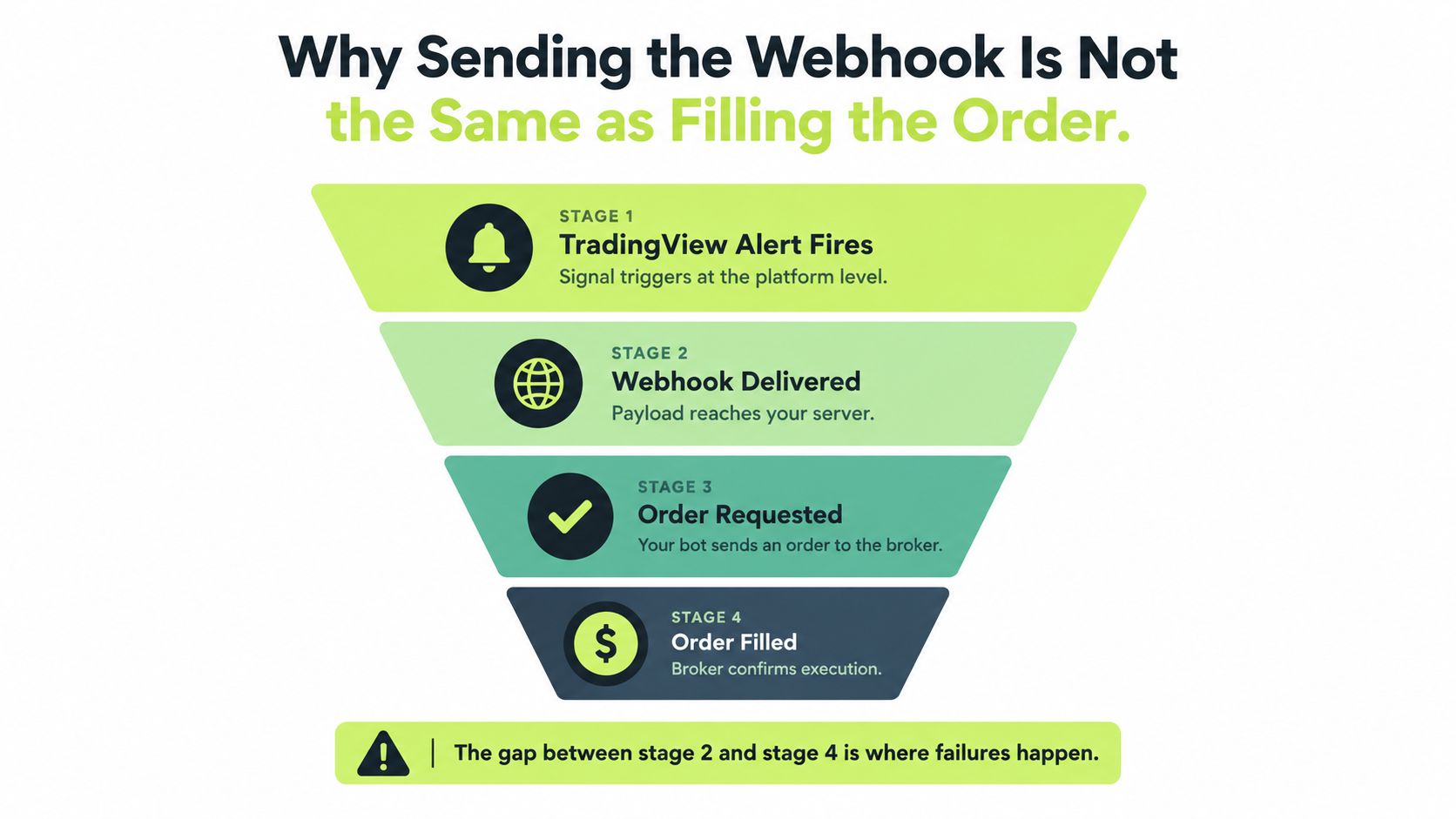
The right way to think about automate TradingView alerts is as an evidence chain. An alert fires in TradingView, the webhook is delivered, the payload is parsed, the order is requested, the broker accepts it, and only then do you get a fill. If any link is weak, the whole workflow is weak, even if the chart looks clean and the alert log shows activity.
That's why the practical questions aren't “Can I send the webhook?” but “Can I prove what happened after it left TradingView?” and “Can I stop a duplicate or bad signal before it becomes a second order?” The traders who get this right build for delivery, validation, idempotency, and monitoring, not just for a green checkbox.
This guide treats automation as a chain you can inspect, not a black box you trust blindly. For a related execution mindset, see automated trade execution.
Table of Contents
- Why Sending the Webhook Is Not the Same as Filling the Order
- Prerequisites You Need Before Automating TradingView Alerts
- Building the Alert Payload and Wiring the Webhook
- Running Your First Signal in Test Mode
- Deduplication, Rate Limits, and the Pause Control
- Going Live and Verifying Fills End to End
- Monitoring After Activation and Common Failure Modes
Why Sending the Webhook Is Not the Same as Filling the Order
A webhook firing is only the first proof point. TradingView confirms that an alert triggered and a request was sent, but that still leaves broker acceptance, routing, and fill status unresolved.
Treat the pipeline as separate proof points
A solid setup needs evidence at each step. TradingView's webhook system sends an HTTP POST to your endpoint, marks valid JSON as application/json, and only reaches publicly exposed HTTP or HTTPS services on ports 80 and 443 TradingView webhooks. That confirms delivery to your endpoint, not execution at the broker.
Practical rule: a webhook log is a transport receipt, not a trade receipt.
The missing pieces are usually inside your own stack. The receiver still has to parse the payload, validate the fields, map the signal to an instrument, choose an order type, and submit it downstream. Any weak check here can turn a valid alert into a bad order, or a bad alert into a live one.
What actually has to happen after the alert
Evidence matters more than optimism. The alert needs a valid payload, the receiver needs to acknowledge it quickly, the order-intent record needs to be written, and broker status needs to be checked until the outcome is known. If the order is rejected, that rejection needs to be visible immediately, not hidden in a log nobody reviews.
The practical fix is to verify each handoff on its own. Test mode proves receipt before real capital is involved. Deduplication stops repeated alerts from becoming repeated orders. Pause control gives you a manual brake when a strategy starts firing noisy signals or the market behaves in a way your rules do not handle well.
That is also why automated trade execution is best treated as a workflow, not a single API call. If you cannot tell whether an event was delivered, parsed, submitted, and filled, you do not have automation yet. You have notification with extra steps.
Prerequisites You Need Before Automating TradingView Alerts
Before you wire anything up, the basic checks matter more than the script. Your endpoint has to be publicly reachable over standard HTTP or HTTPS on ports 80 or 443. If it isn't, TradingView has nowhere to send the alert, no matter how clean the Pine code looks.
Readiness checklist
- TradingView access: confirm a paid TradingView plan with two-factor authentication enabled before wiring the webhook.
- Broker account in good standing: the broker still decides whether an order is accepted, rejected, or delayed.
- A strategy with real signals: your Pine Script must already produce entry and exit conditions. If the strategy cannot fire on the chart, it cannot fire through automation.
- Enough chart history: the script needs enough bars to generate a signal. A lot of “broken webhook” reports are really “no signal ever happened.”
The script itself also needs a clean alert path. Some strategies use alert() calls, others use strategy.entry() and strategy.exit() with alert_message, and both can work if the downstream system knows how to interpret them. The point is not to rewrite a strategy unnecessarily. Keep the logic intact and route its signals in a way the receiving system can parse.
One setup detail worth checking early is the trust model. Pineflows uses one-click Google sign-in and does not store Robinhood credentials, which reduces what you have to hand over and where it lives. That is not a magic fix, just a simpler operational setup than scattering broker passwords across odd places.
If the strategy has not produced a clean alert in chart history, do not route it live yet. Get the signal first, then automate it.
For webhook delivery docs, use the Pineflows webhook setup guide as the operational reference while you build. If the prerequisites are wrong, the rest of the stack will waste your time.
Building the Alert Payload and Wiring the Webhook
The payload is where automation either stays readable or turns into a pile of half-parsed text. JSON is the right choice because it gives the receiver explicit fields instead of a blob of prose, and TradingView will tag valid JSON as application/json. Plain text can work for simple notifications, but it is a poor fit for order routing.
Use explicit fields, not implied meaning
A usable payload should name the instrument, side, size, and any strategy metadata the receiver needs. Keep it simple and consistent, for example:
- symbol: the ticker or route target
- side: buy or sell
- quantity: the size you intend to trade
- strategy_id: a stable label for the strategy
- event_id: a unique identifier for deduplication
- timestamp: when the signal was created
If you use Pine Script strategies, keep the existing logic and pass the alert message through intact instead of rewriting the strategy around the broker. That keeps the backtest closer to the live flow and avoids adding new failure points to old logic. The receiving side should still treat the alert as untrusted until it validates the event ID, symbol, side, and timestamp.
Wire one alert, not a zoo of alerts
Create one TradingView alert, paste the JSON into the message field, and point the webhook to the automation service's URL. Do not split one strategy across a pile of overlapping alerts unless you want duplicate fills and messy logs. A single structured message is easier to reason about and easier to test.
The useful layer sits in the receiving system. A rule engine can map the incoming TradingView signal into broker-specific entries, exits, and position sizing without changing the script itself. That lets you keep the strategy stable while adapting execution rules around it.
For setup steps, use the Pineflows webhook setup guide as the operational reference while you build.
The target state is simple. One alert fires. One JSON payload arrives. One event record gets created. If a human has to interpret any step in the middle, the payload is not ready yet.
Running Your First Signal in Test Mode
The first run should prove the pipeline, not the position size. Test mode exists for that reason, it lets you receive alerts, inspect the payload, and confirm the event trail without sending broker orders. That is the safest way to catch malformed JSON, missing fields, and routing mistakes before money is involved.
What a healthy first run looks like
Trigger one deliberate alert and watch the receiving side. You want the raw event to land, the parsed fields to appear cleanly, and the strategy metadata to stay intact. If the payload loses its symbol, side, or event ID on arrival, fix that before you even think about live trading.
The alert log matters here too. TradingView exposes a Webhook status column in the alert log so you can inspect whether the request was delivered. That is useful, but only as evidence of delivery, not proof of execution. A green delivery status still does not mean the broker accepted the order.
Acknowledge fast, then process asynchronously
TradingView cancels a webhook when the receiver takes longer than 3 seconds to respond TradingView alerts FAQ. The receiver should acknowledge quickly, then handle order submission asynchronously after the event has been safely recorded. Waiting to process the order before replying creates dropped webhooks when servers slow down.
Record the event first, acknowledge immediately, then submit the order from a worker.
That sequence gives you an audit trail even if the broker side fails later. It also makes test mode useful, because you can compare what TradingView says it sent with what your system says it received. If those two records disagree, the first bug is already in view.
The first successful test alert is the milestone. Not live mode, not a fill, just a clean proof that the signal reached the system and was interpreted correctly.
Deduplication, Rate Limits, and the Pause Control
Automation breaks fastest when a strategy gets noisy. That's why deduplication, rate limits, and a pause control belong in the application layer, not as afterthoughts. TradingView can deliver the signal, but your receiver has to decide whether that signal is new, valid, and safe to act on.
Why duplicates are your problem
TradingView alerts are not the same thing as broker orders, and the delivery path can include retries. Independent technical write-ups report that qualifying HTTP 5xx responses, excluding 504, can trigger up to three resends after five-second intervals, which means one alert can produce up to four deliveries Tradoki webhook retries. If your receiver doesn't deduplicate, one trigger can become multiple orders.
That's why a stable per-alert event ID matters. Store it with a unique constraint, record the raw payload, and make repeated deliveries return the same result. If the event ID is missing or changes between attempts, quarantine it. Don't guess.
Respect the platform throttle
TradingView also automatically halts further alerts if more than 15 alerts occur within any three-minute period TradingView alerts FAQ. For short-timeframe or volatile strategies, that can stop signals before they reach the endpoint. A bursty script that looks fine in backtests can become silent in live conditions if it trips the cap.
Use a pause control like a real kill switch
A global pause control is not decoration. It blocks new entries, cancels Pineflows-originated entry orders, and keeps valid exits available for risk handling. That separation matters because you want a way to stop fresh exposure without cutting off your ability to exit existing positions.
A useful control stack looks like this:
- Deduplication: one event ID, one order-intent record, one downstream action.
- Rate awareness: watch alert volume before TradingView's throttle bites.
- Pause control: stop new entries when the strategy or market conditions turn ugly.
- Exit preservation: don't trap yourself by blocking the only order that reduces risk.
The job of automation isn't sending alerts. It's proving that every alert became exactly the action you intended, once and only once.
Going Live and Verifying Fills End to End
Going live should feel deliberate, not casual. Treat it as an activation step, then immediately confirm that the delivery, broker submission, and fill status are all visible in the audit trail. If anything looks off, stop and inspect before the next signal arrives.
Re-check the live path immediately
Right after activation, verify the account link, confirm the paid TradingView setup is still active, and make sure two-factor authentication is still on. Then trigger a known signal and follow it through the event record. You're looking for the webhook delivery receipt, the order submission record, and the broker's final status.
Reconcile the broker outcome, not just the webhook
The order can end up rejected, partially filled, filled, or cancelled. That outcome is the thing that matters, not the fact that the alert arrived. If the webhook landed but the broker rejected the order, the system should tell you why instead of leaving you to infer it from a missing position.
One common failure mode is a signal landing during a fast move and the broker rejecting the order because the account state no longer supports it. The alert was fine, the transport was fine, but the execution context wasn't. That's exactly why the audit trail has to span the full chain.
For a broader execution setup on the brokerage side, the Robinhood API trading guide is the useful companion reference. Once the live path is active, the job shifts from setup to monitoring, because a real trading pipeline is only as good as its latest status check.
Monitoring After Activation and Common Failure Modes
Automation doesn't end when the first order goes through. It becomes an operations problem after that. The main thing to watch is whether alert volume, received events, order submissions, and fills all stay in a believable relationship over time.
The failure modes that matter most
If a webhook never arrives, check TradingView's Webhook status column first. If the payload arrives but the broker rejects it, look at account state, buying power, and any broker-side restrictions. If you see duplicate orders, the deduplication layer isn't doing its job. If the strategy goes quiet unexpectedly, check the 15 alerts in three minutes throttle and the pause control state.
The first week after activation is where most hidden issues show up. That's when you want to compare alert volume against order volume, scan for reconciliation exceptions, and confirm that fills are being captured in the same place every time. A system that can't explain gaps is not production-ready.
Healthy automation has a boring audit trail. Every alert has a destination, every destination has a status, and every status has a reason.
The goal is not to eliminate every failure. The goal is to make failures visible, distinct, and recoverable before they turn into accidental exposure.
If you want a test-first TradingView workflow with delivery logs, pause controls, and idempotent event handling, take a look at Pineflows. It's built to turn TradingView alerts into executable Robinhood orders while keeping the chain auditable from alert to fill. If you're ready to move from signal delivery to actual execution proof, start there.