October 24, 2026 · 14 min read · Pineflows team
Automated Investing App Compared: Fees, Automation, Fit
Compare automated investing app options by fees, automation level, and trader fit, then choose the setup that matches how you invest.
You've got money you want to invest, a phone full of financial apps, and little interest in watching prices throughout the day. Or you've already tested a TradingView strategy and are tired of translating its alerts into brokerage orders manually. Both situations can lead you toward an automated investing app, but they call for different products.
The useful comparison isn't which app promises the most automation. It's which decisions you want to delegate, which responsibilities remain yours, and how you'll verify what happened. Fees matter, but so does the ability to distinguish a correctly executed strategy from an unnoticed operational failure.
Table of Contents
- Why Automated Investing Apps Are Growing So Fast
- How Robo-Advisors and Automated Trading Apps Differ
- Side-by-Side Comparison of Fees, Automation, and Control
- How Much Control You Keep When Automation Takes Over
- Choosing an App for Passive Investors and Active Traders
- Verifying Execution Before and After You Go Live
- Picking Your App and Taking the Next Step
Why Automated Investing Apps Are Growing So Fast
Consider a hypothetical investor who wants to invest regularly without choosing every trade. Their practical problem isn't access to another chart. It's finding a repeatable process that fits around work, family, and other demands.
A trader with a tested strategy has a different problem. They've already decided what should trigger an entry or exit, but they don't want to sit beside a brokerage screen waiting to act. These investors share a desire to reduce manual work, not necessarily a desire to surrender the same decisions.
Digital access changed investor expectations
An OECD study reported that four trading-app firms opened 1.15 million accounts in France during the first four months of 2021, almost twice the number opened by all other retail investment services combined; it also found that digital tools were used for stock transactions by 83% of investors aged 18–24 and 61% of those aged 50–64 (OECD research on new retail investors).
Those findings describe digital investing, not demand for any particular automation product. Still, they help explain why a phone-accessible investment workflow feels familiar rather than experimental.
My interpretation is that convenience changes the comparison standard. If an investor can open an account digitally, it's reasonable for them to expect understandable account status and accessible controls afterward. A polished onboarding experience, however, doesn't establish that the underlying investment process suits them.
Practical rule: Choose the responsibility you want to delegate before choosing the interface you prefer.
Growth doesn't make products interchangeable
A useful comparison starts with the job the investor wants done:
- Portfolio decisions: Do you want help translating financial goals into an investment portfolio?
- Order execution: Have you already defined a strategy and want software to carry out its instructions?
- Ongoing oversight: Can you monitor an execution workflow, or do you need a service designed around broader portfolio management?
These distinctions matter more than a shared automation label. A saver could buy advanced execution software and still have no investment strategy. A trader could choose an advisory service and discover that it doesn't implement their rules.
The category's appeal is understandable: less repetitive work and a more standardized process. The better question is whether that process removes the task you dislike without concealing a responsibility you still need to handle.
How Robo-Advisors and Automated Trading Apps Differ
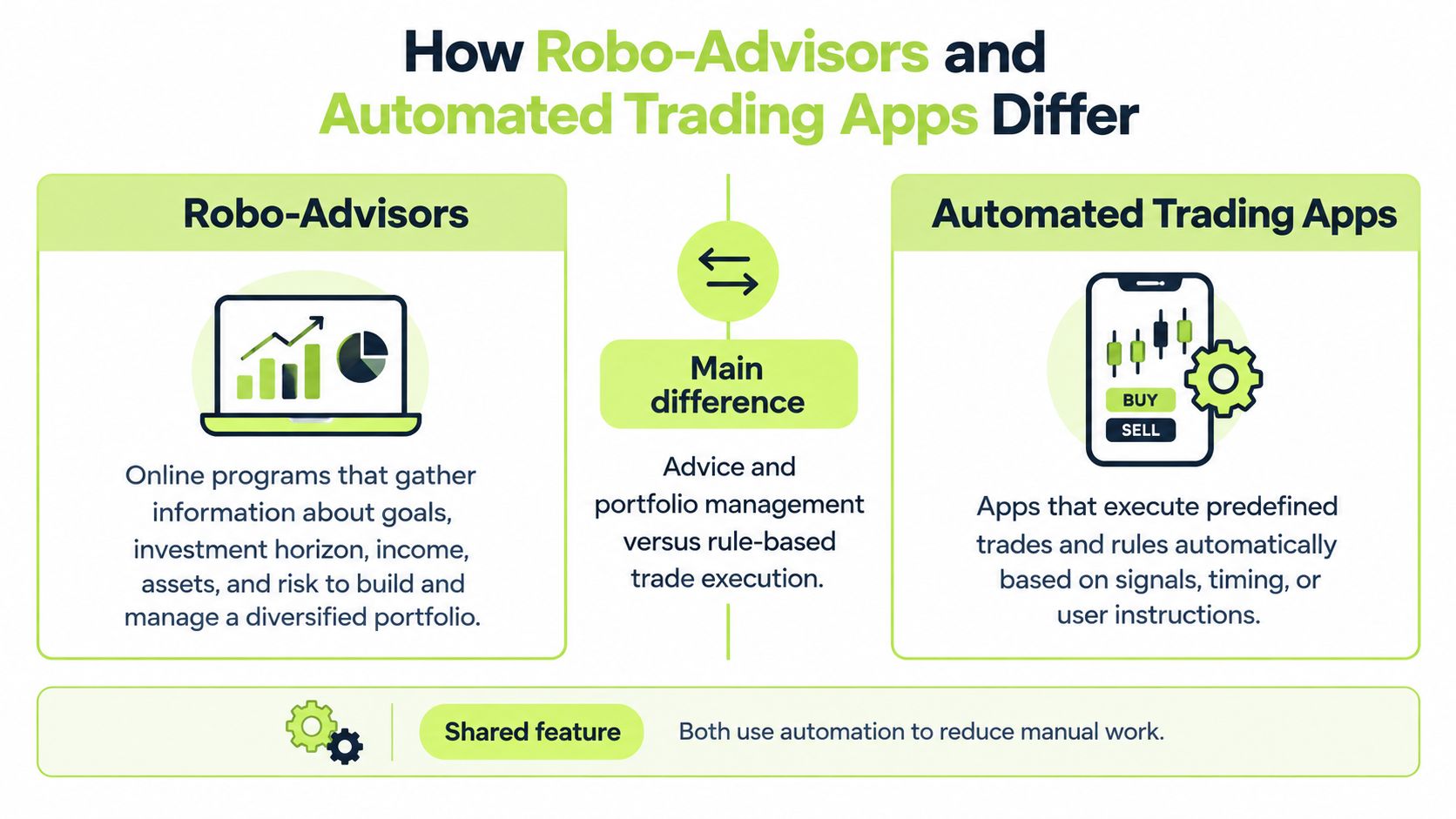
Robo-advisors automate investment advice and portfolio management. Automated trading apps automate the execution of predefined instructions. The distinction concerns who supplies the investment reasoning, not merely who clicks the order button.
The SEC's 2017 investor bulletin describes robo-advisors as online programs that typically collect information about goals, investment horizon, income, assets, and risk tolerance, then use algorithms to provide portfolio-management services (SEC investor bulletin on robo-advisers). That definition places the investor questionnaire at the center of the service, rather than treating it as administrative paperwork.
The contrast is easier to see when advice and execution are separated visually.
Who supplies the strategy
With a robo-advisor, the investor supplies information about their circumstances and objectives. The service uses that information within its portfolio-management process. The investor's central judgment is whether the service's approach fits their needs.
In an execution-focused workflow, the investor supplies the trading logic. For example, a user-authored Pine Script strategy can generate an alert that instructs connected software to submit an order. Automating that handoff doesn't independently establish whether the strategy is appropriate.
The distinction between manual trading and automated trading is therefore about more than speed. Moving from manual execution to automated execution changes how instructions are implemented, but it needn't change who owns the underlying investment decision.
What remains with the investor
The categories leave different review tasks behind:
- For portfolio advice: Examine whether the information you supplied is accurate and whether the proposed approach matches your objectives.
- For strategy execution: Examine whether your rules express your intentions and whether the software implements them correctly.
- For either model: Understand the limits of the service before assuming that an automated action received additional human scrutiny.
A useful thought experiment is to remove the automation. Would you still know what should be bought, sold, or held? If not, execution software alone doesn't answer your investment question.
Conversely, if you already have explicit trading instructions, a portfolio-management service may solve a different problem. More automation isn't necessarily a closer fit. The relevant boundary is between delegating judgment and delegating implementation.
Side-by-Side Comparison of Fees, Automation, and Control
The table compares service models, not independently tested investment outcomes. Category entries describe the distinction to evaluate; they aren't claims that every provider offers identical features or pricing.
Automated investing options compared by key criteria
| Criteria | Robo-advisor | Automated trading app | Pineflows |
|---|---|---|---|
| Main automation | Algorithmic portfolio management | Execution of configured trading instructions | TradingView alerts converted into connected Robinhood orders |
| Strategy responsibility | Investor supplies goals and suitability information | Investor supplies or approves rules | User-authored strategy and user-approved configuration |
| Fee comparison | Review the provider's disclosed advisory charges | Review software charges and required services | One monthly Pilot plan, at the amount shown at checkout |
| Control to evaluate | Portfolio approach and available investor choices | Rule editing, activation, and stopping behavior | Test-first workflow, configuration review, and pause controls |
| Evidence to examine | Portfolio holdings and management explanations | Alert records, order status, and broker outcomes | Delivery receipts, payload inspection, status checks, and audit records |
| Investor oversight | Whether the managed approach remains suitable | Strategy validity and execution behavior | Alert flow, connection status, buying power, and broker outcomes |
Compare the whole workflow's cost
Our monthly plan is billed in advance through Stripe and renews automatically until cancelled. A 7-day free trial starts when onboarding finishes, with no card needed. Use the amount displayed at checkout rather than assuming a price from an older comparison.
The subscription is only part of the evaluation. Required connected services belong in your budget, too. For any alternative, distinguish charges for advice, software access, and dependencies instead of treating them as equivalent expenses.
A fee can be reasonable for the wrong product. Paying for portfolio management makes little sense if your actual need is to route your own strategy's alerts. Equally, inexpensive execution software isn't a substitute for investment guidance you haven't developed.
Control has a cost beyond the invoice
Consider these questions alongside the disclosed charges:
- What work disappears? Identify the manual task the service replaces.
- What work remains? Include configuration review, account maintenance, and monitoring in your decision.
- What evidence is available? Prefer records that let you reconcile instructions with outcomes.
- What ends the commitment? Read renewal and cancellation terms before activation.
A lower subscription fee isn't a saving if you buy a tool that leaves your original problem unsolved.
My assessment is that cost comparisons become more useful once the responsibility boundary is clear. A long-term saver should evaluate the price of suitable portfolio management. A rules-based trader should evaluate the price of dependable implementation and the oversight it still requires.
Neither should interpret an attractive fee as evidence of better investment performance.
How Much Control You Keep When Automation Takes Over
AI-assisted setup and AI-controlled investment decisions aren't the same thing. An assistant can interpret an existing strategy without receiving permission to invent a different one.
Reviewing the configuration is where that boundary becomes practical.

A 2025 Hong Kong investor study found that more than 80% of investors surveyed had heard of AI investment tools that select stocks and execute transactions, while only 4% used them (IFEC research and evaluation report). That gap doesn't prove why people abstain, but it cautions against equating awareness with willingness to delegate financial decisions.
Define the assistant's authority
A bounded setup gives the assistant a specific task: interpret the user's strategy and propose its configuration. Our Claude connector reads the user's Pine Script and builds the automation's instrument, sizing, entries, and exits. Users must verify that configuration before live activation because AI can make mistakes.
Review should resolve concrete questions:
- Instrument: Does the configured symbol match the intended strategy?
- Position sizing: Does the proposed quantity express the exposure you intended?
- Entry and exit rules: Were the original conditions preserved rather than guessed?
- Ambiguity: Has an unclear instruction been resolved by you instead of accepted?
If you can't explain the proposed configuration, don't approve it merely because the generated explanation sounds confident. Treat ambiguity as unfinished setup, not as permission for the assistant to decide.
For a connected brokerage workflow, our discussion of Robinhood stock trading provides additional context. Review any demonstration as a workflow explanation, not evidence that a strategy will succeed.
Control includes what you refuse to delegate
Account access belongs in the same decision as trading authority. In our setup, the investor connects a Robinhood account they hold themselves, alongside the TradingView and Claude accounts the workflow requires. If a Robinhood token expires, usually after a password change or revoking app access, live automations stay paused until the user reconnects. Pausing by default keeps reactivation in the investor's hands rather than letting an automated chain restart on its own.
Each connected provider operates under its own terms and privacy practices. Investors remain responsible for meeting the conditions of TradingView, Robinhood, and Claude, including Robinhood's rules for Agentic Trading, and for any local law that applies to their trading. Delegating execution does not delegate those obligations.
Oversight also continues after approval. Alerts can arrive late, arrive twice, or fail to arrive, and brokers can reject orders, so an automation still requires watching and sufficient buying power in the account. The realistic objective is explicit authority: the assistant proposes, the investor reviews, and the approved configuration defines what the execution software may do.
Choosing an App for Passive Investors and Active Traders
A useful recommendation begins with the investor's existing process. Someone who hasn't chosen a portfolio needs a different service from someone who has already written and tested trading rules.
Passive investors need portfolio fit
If your aim is diversified investing with limited involvement in individual trade decisions, start by evaluating the robo-advisor model. Concentrate on the suitability questions, portfolio explanation, disclosed charges, and what happens when your circumstances change.
The service should address your investment objective, not just offer automatic transactions. An execution tool can remove order-entry work while leaving every allocation decision unresolved.
For this investor, paying for a well-matched management process may be more relevant than paying for detailed webhook controls. The judgment is about the task purchased, not a promise that an advisory fee produces superior returns.
Active traders need implementation fit
A trader who already writes rules should examine whether the execution tool supports the actual strategy, broker, instruments, and order type.
Our software receives alerts configured in TradingView, applies rules set up by the user or Claude, and places market orders in a connected Robinhood account. It supports US equities and ETFs only. Webhooks require a paid TradingView plan with two-factor authentication enabled.
Those boundaries narrow the suitable audience:
- Existing Pine Script users: The workflow fits traders who already express their strategies through TradingView.
- Market-order strategies: The supported order type must match the instructions you intend to execute.
- Connected-account users: You must maintain sufficient buying power and a valid brokerage connection.
A trader who needs a different order type shouldn't treat that limitation as a minor inconvenience. It changes whether the software can implement the intended process.
Quant hobbyists need continuity from testing to execution
For a backtester, the key comparison is between the strategy as tested and the configuration used for execution. Examine whether symbols, sizing, entries, and exits remain understandable across that transition.
The attraction of automation is strongest when it removes repetitive implementation without adding unexplained decisions. But the trader still owns the strategy and must comply with the connected services' terms and applicable local law.
Fit test: If the product requires you to change the purpose of your strategy merely to use it, it's probably the wrong product.
There's no universal winner across these profiles. A passive investor may reasonably prefer delegated portfolio management, while an active trader may prefer precise rules and greater oversight. The right choice matches both the work you want removed and the work you're prepared to retain.
Verifying Execution Before and After You Go Live
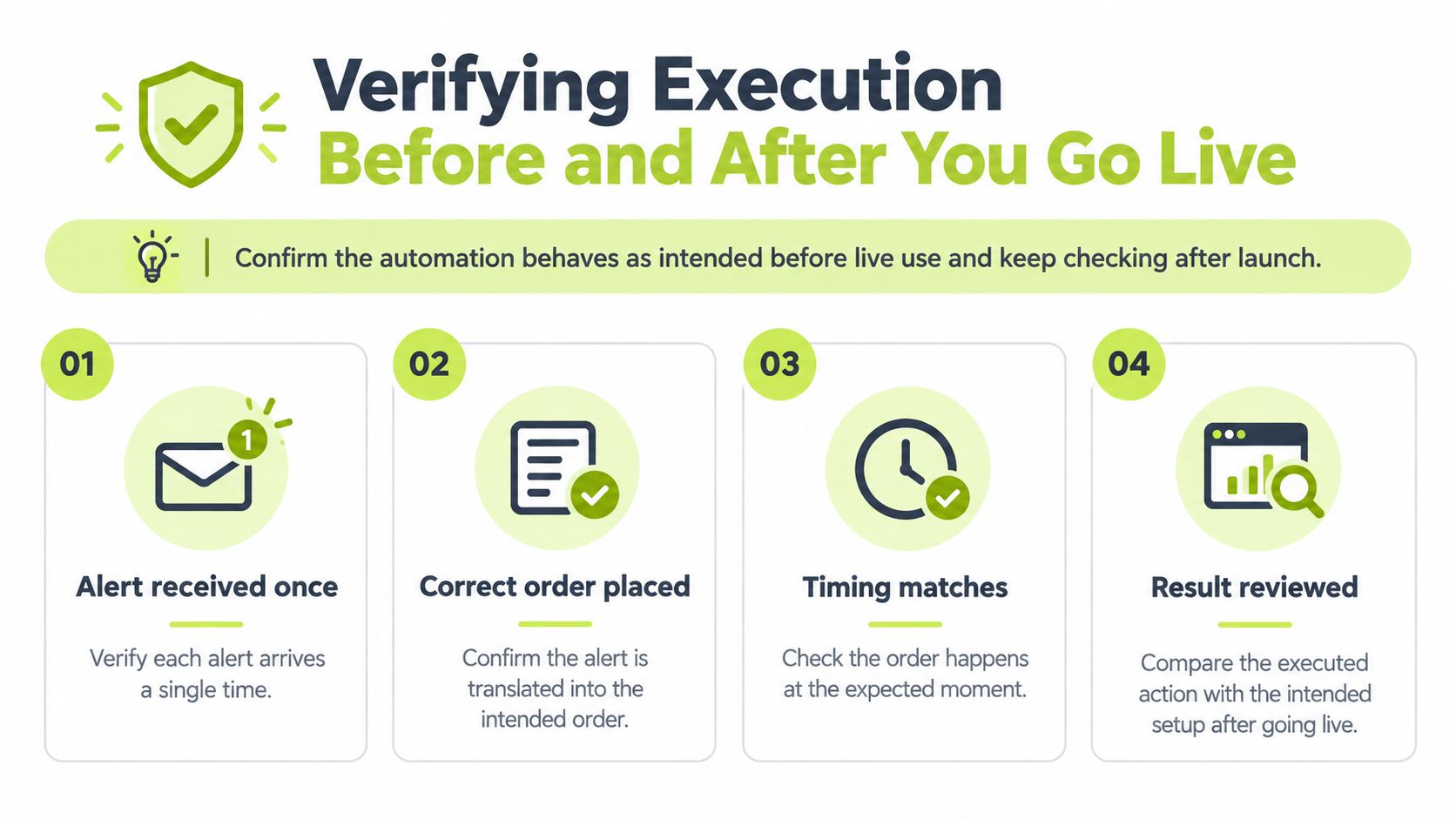
An alert receipt isn't a completed trade. Verification should trace the intended action through receipt, interpretation, broker submission, and the final order outcome.
FINRA warns that auto-trading arrangements can expose investors to unsuitable trades, unverified profitability claims, and requests for brokerage credentials (FINRA guidance on auto-trading with unregistered entities). That makes operational visibility part of investor protection, not merely a developer convenience.
Use the following sequence to keep the intended action and recorded outcome connected.
Inspect the complete event lifecycle
- Start without broker transmission. Review the alert log in test mode. Check that the payload expresses the intended symbol, action, and sizing before enabling live execution.
- Trace the event. Match the incoming alert to its interpreted instruction and recorded status. Timestamps should help you investigate sequence and delay.
- Reconcile with the broker. After activation, distinguish submission from acceptance and acceptance from a fill. Investigate rejected or partially filled orders rather than treating every submitted instruction as complete.
- Record exceptions. Identify what happened when an instruction didn't produce an order. Our signal log names reasons including paused, duplicate, test mode, plan needed, or Robinhood not connected.
Test retries and stopping behavior
Duplicate protection should use a stable event identifier and processing state. Independent technical guidance describes this idempotent-consumer pattern as a way to prevent repeated webhook side effects (technical explanation of idempotent endpoints). Timestamps alone aren't an adequate substitute for identifying the same logical event.
Our per-alert event-ID deduplication is designed so that a logical alert produces at most one order-side effect. Test duplicate delivery, concurrent retries, broker timeouts followed by retries, and delayed exits. Inspect both the resulting order count and the audit records.
Don't confuse duplicate protection with protection against every sequencing problem. An old exit instruction still needs review in the context of the current position.
Our pause control blocks new entries, cancels entry orders originating from our software, and keeps valid exits available. Understanding that distinction matters when you want to stop adding exposure without obstructing risk-reducing actions.
For a broader evaluation, use these checks when comparing trade execution software. Users must continue watching their automations: alerts can arrive late, twice, or not at all, and brokers can reject orders.
Picking Your App and Taking the Next Step
Choose an automated investing app according to the responsibility you want it to assume. If you want help building and managing a portfolio, prioritize suitability, an understandable investment approach, and transparent charges. If you already own the strategy, prioritize faithful implementation and evidence you can inspect.
My recommendation is conditional rather than brand-led. Delegate portfolio judgment only when that's the service you intend to buy. Delegate execution only when you can define the instructions and review the results.
Make activation an evidence-based decision
For our workflow, live mode is refused until a real alert has been verified, Robinhood is connected, and the trial or plan is active. Those requirements establish readiness conditions. They don't certify the strategy's investment merit.
There's also an important distinction between a real strategy event and TradingView's test-alert function. Sending a test alert leaves placeholders blank, so it doesn't count as a real fill. Don't mistake a successful connectivity check for confirmation that complete strategy data has traveled through the workflow.
Before deciding to proceed, retain a clear review record:
- Approved configuration: The instrument, sizing, entry conditions, and exit conditions you intended.
- Verified event: A real alert whose interpreted details you've examined.
- Operational readiness: A valid connection, sufficient buying power, and an active trial or plan.
- Personal readiness: Time and willingness to inspect exceptions after activation.
Separate correctness from profitability
A correctly executed losing trade is different from an incorrectly executed trade. Execution records help you distinguish them; they don't make either outcome profitable.
Pineflows executes the user's strategy but doesn't make it profitable. The service isn't investment advice, trading involves risk of loss, and a backtest isn't a forecast. This article is an evaluation framework, not a recommendation to buy or sell investments.
This week, choose a strategy you can explain, keep it in test mode, and inspect a real alert against your approved configuration. Only consider live activation after you can account for what the software received and what it was configured to do.
Pineflows connects TradingView strategy alerts to Robinhood market orders through a test-first workflow with inspectable event records and pause controls. Visit to review the setup requirements and decide whether execution automation fits your existing strategy before enabling live trading.