October 14, 2026 · 13 min read · Pineflows team
TradingView Pine Script for Automated Trading
Master TradingView Pine Script for automated trading. Learn to build reliable alerts, handle execution gaps, and route strategies to brokers safely.
Most advice about TradingView Pine Script gets the dangerous part wrong. Writing the condition is the easy part; the core problem is that a backtest, an emulator fill, and a live broker order are three different events, and if you treat them as one, you'll eventually ship a strategy that looks clean on a chart and behaves badly in production.
The language itself is built for chart-side analysis and hosted execution on TradingView's servers, not for local order routing. That means your job isn't just to make Pine code compile, it's to design a signal path that survives latency, retries, duplicate alerts, and the difference between simulated fills and executable orders. The gap is where most automation breaks.
Table of Contents
- The Hidden Gap Between Backtests and Live Execution
- Core Architecture and Cloud Constraints
- Building Reliable Strategy Alert Payloads
- Reconciling Emulator Fills with Real Market Liquidity
- Engineering Alert Reliability and Deduplication
- Routing Webhooks to Broker Execution Adapters
- Troubleshooting Execution Failures and Audit Trails
The Hidden Gap Between Backtests and Live Execution
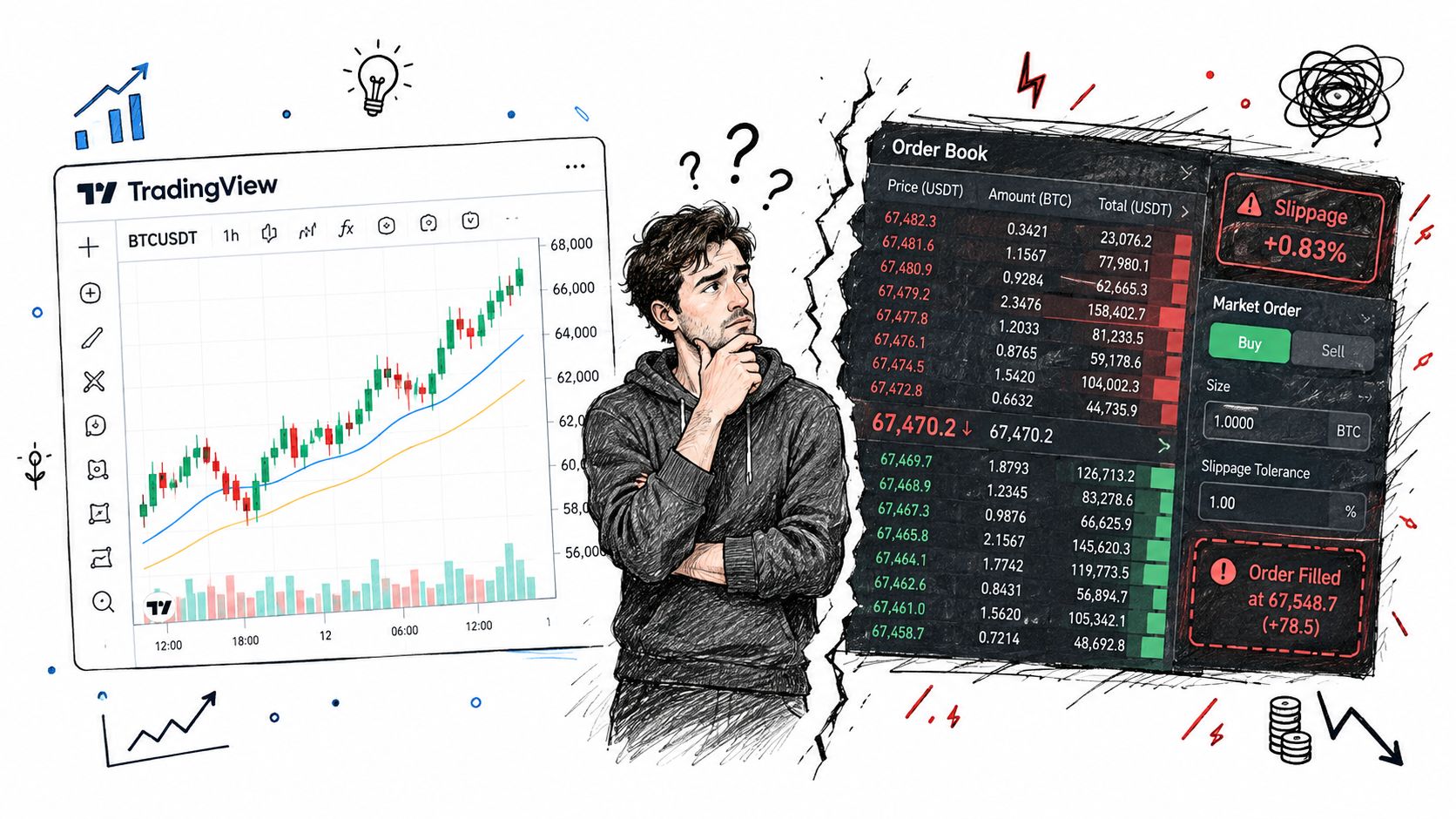
A strategy that prints handsome equity curves on TradingView is not automatically ready for live trading. The chart shows what the broker emulator could do with chart data, not what a matching engine will do with real liquidity, and TradingView is explicit that strategies use simulated orders rather than placing exchange orders directly. That distinction is where a lot of trader frustration starts.
Signal, fill, and order are not the same event
In practice, a signal is just the script deciding something happened. A simulated fill is the broker emulator deciding the order would have filled under its chart-based rules. A real order is the external broker accepting and executing a live transaction. TradingView's own docs separate these stages, and that separation matters if you're sending webhooks to an execution adapter like the ones discussed in the Pineflows strategy routing guide.
Practical rule: don't let a script event pretend to be a broker confirmation.
That's the mistake I see most often when teams move from paper results to live automation. They build the Pine condition, wire up an alert(), and assume the webhook is now “the trade.” It isn't. The chart can show an order-fill event inside the emulator, but your downstream system still has to verify whether a live broker accepted the order, rejected it, partially filled it, or ignored it because the account state had already changed.
Why more Pine logic usually doesn't fix execution failure
When live behavior diverges from backtest behavior, the instinct is to add more code inside Pine. That rarely solves the root problem. The better fix is to preserve the strategy logic and add a verification layer outside the script, where you can check event identity, broker state, and position consistency before money moves.
The useful mental model is simple. Pine decides, TradingView simulates, your router validates, and the broker executes. If any of those layers is missing, you don't have automation, you have optimism.
Core Architecture and Cloud Constraints
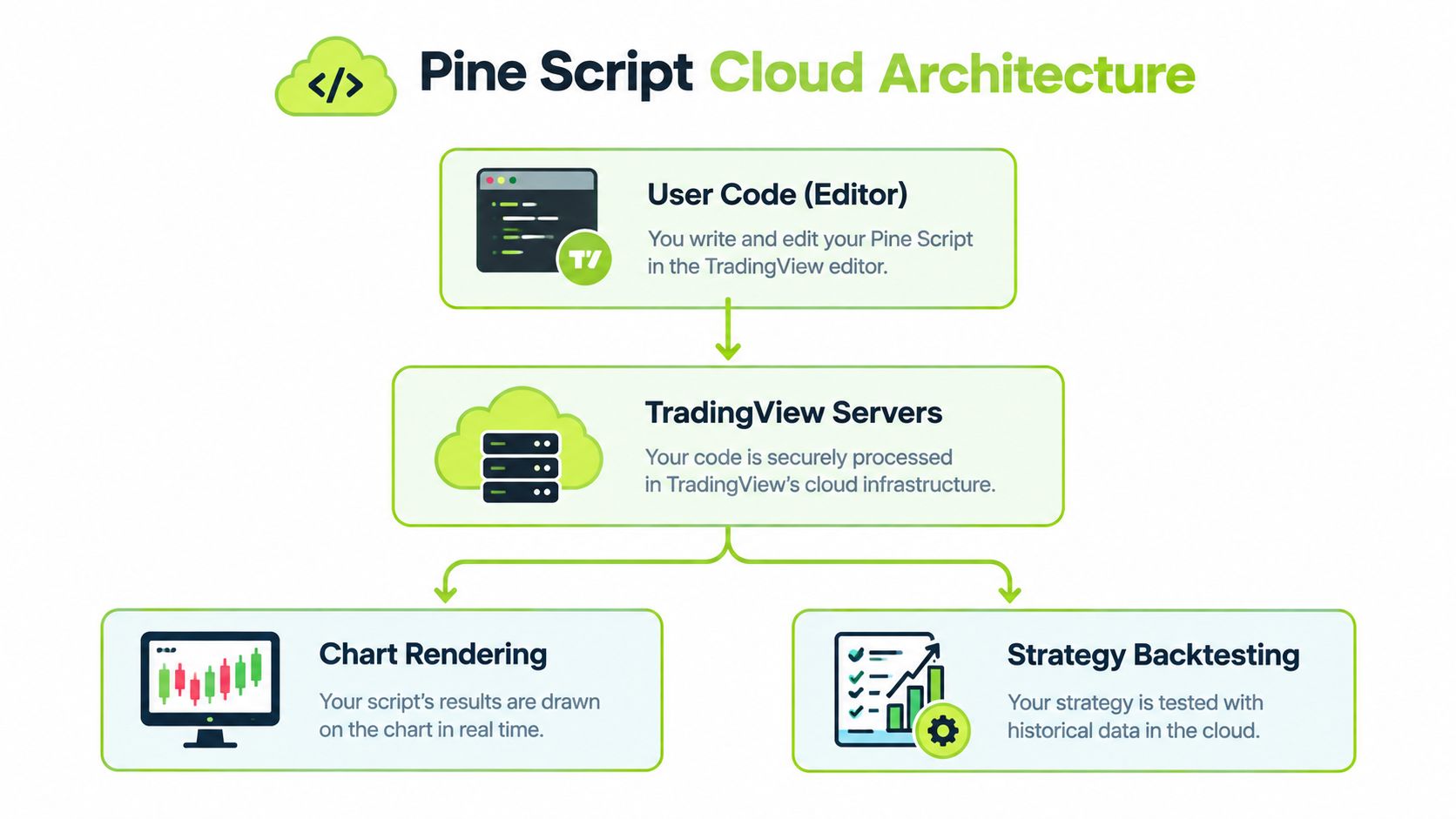
Pine Script runs inside TradingView's hosted environment, so the script never turns into a local process you can fully control. TradingView states that Pine Script is its proprietary language for indicators and strategies, and that it runs on TradingView's servers as part of a cloud-based workflow for analysis and backtesting. That setup keeps Pine lightweight, but it also imposes hard operating boundaries.
What the hosted model changes
The shared runtime comes with limits on execution time, memory, script size, and additional-symbol data requests. Those limits are not cosmetic. They determine how much context a strategy can inspect, how complex a calculation chain can become, and how dependable a script stays when markets move fast. TradingView also says most of its built-in indicators are written in Pine Script, which shows how central the language is to the platform's normal workflow, not just to niche automation.
Pine works well for technical analysis, strategy development, and historical testing. It is a poor fit for heavy multi-symbol logic, deep intrabar state, or wide data pulls. Once a strategy pushes hard against those limits, the failure mode is usually operational brittleness, not a clean syntax error. A diagram illustrating the Pine Script cloud architecture, showing the flow from user code to TradingView servers, then rendering and backtesting.
A strategy can be syntactically correct and still be operationally brittle if it is too close to the platform's resource ceiling.
Versioning matters more than most traders expect
A script pinned to v4 can break without warning after a platform upgrade if a function's behavior changes. TradingView has released at least six language versions, and its documentation tells you to match your script version to the correct reference manual. That becomes a production issue the moment an older strategy has to keep running after the platform shifts under it.
Syntax changes are only part of the risk. Compatibility differences and function behavior changes can alter a script even when the trading idea is still valid. Treat version checks like dependency checks in any other production system, because that is what they are.
The code is one half of the job. The other half is tracking the version, the runtime, and the server-side limits your script has to survive.
Building Reliable Strategy Alert Payloads
A webhook that only fires on a bar close is a slow webhook. In fast markets, that delay is enough to turn a clean signal into a stale entry. TradingView's order-fill alerts are the better primitive for automation because they're tied to the emulator's fill event, and TradingView says they execute immediately regardless of script execution settings, including calc_on_every_tick.
Use the fill event, not the generic alert, as your trigger
For automated routing, the most stable pattern is to let the strategy generate the order, then use the order-fill event as the alert trigger. That gives you an event that is closer to the actual simulated transaction than a plain alert() call, which can inherit the timing of bar-based calculation. If you're using a webhook pipeline, this is the event you want to build around.
The payload should carry enough context for the receiving system to make an independent decision. TradingView's docs call out the need for an event ID, symbol, side, quantity, strategy order ID, and timestamp. Those fields are not decoration, they're the minimum needed for downstream validation, deduplication, and auditability.
- Event ID: lets your router identify one unique event and reject repeats.
- Symbol and side: tell the broker adapter what instrument and direction to trade.
- Quantity: keeps sizing explicit instead of inferred.
- Strategy order ID: links the fill back to the original Pine order.
- Timestamp: gives you a durable marker for reconciliation and logs.
Keep the downstream system responsible for the live decision
TradingView's fill is still an emulator event, not proof that a Robinhood order was accepted or filled. That means the adapter has to submit the live order, record the submission status, and retain the final fill details separately. Pineflows fits that pattern as one execution adapter option because it routes TradingView alerts into Robinhood orders while preserving logs and status checks, but the principle is broader than any single tool.
A clean pipeline looks like this, TradingView emits the event, your webhook receives it, the adapter validates it, and the broker gets the order only after those checks pass. That's the kind of boring reliability you want.
Watch how the handoff works in practice:
For a TradingView-to-broker setup, the alert integration notes are the right place to review message handling and routing expectations.
Reconciling Emulator Fills with Real Market Liquidity
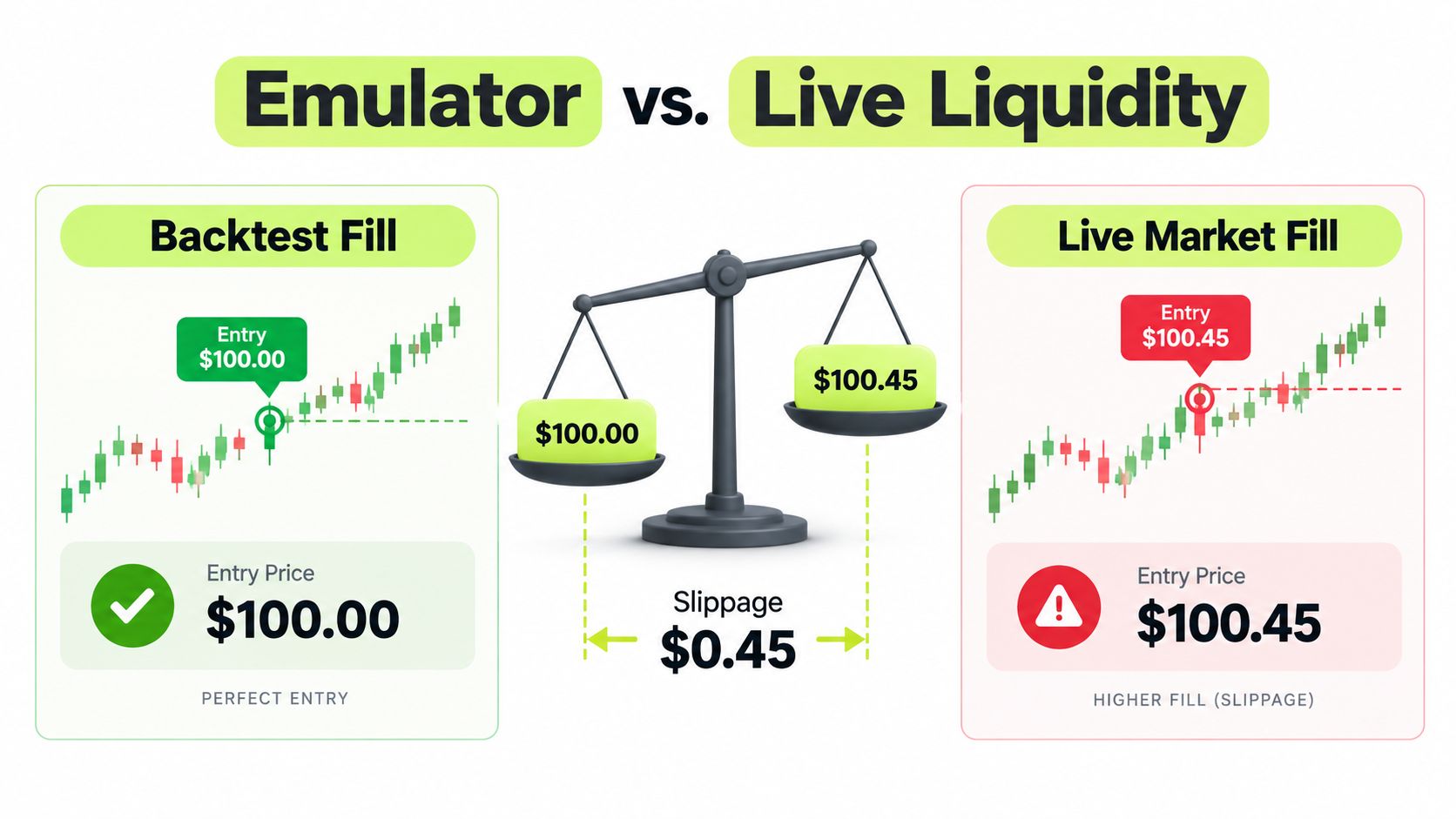
Backtests are useful, but they're not a matching engine. TradingView documents that strategy orders don't fill on the same calculation tick by default. In forward testing, they're typically filled on the next tick, while in historical backtesting they're filled on the next bar or later after the strategy calculates. That means the fill you see on the chart is an approximation, not a promise.
The emulator is chart-based, the market is not
The broker emulator works off chart data, and its fill logic is shaped by the bar structure you're testing against. Real markets don't care about your bar boundaries. They care about liquidity, queue position, spread, routing, and whether your order arrives during a moment of actual available size.
TradingView also documents backtest_fill_limits_assumption, which can require price improvement by a specified number of points or pips before the emulator considers a limit order filled. The reported execution price can still remain the limit price, which creates a useful but incomplete picture of execution quality. That's fine for studying logic, but it's not enough for live routing.
What to carry into production routing
A production adapter should preserve the original order type and timestamp, separate signal time from fill time, and treat backtest pricing as informational rather than guaranteed. That matters because a live market-order adapter can face slippage and partial fills even when the historical chart looked precise.
Here's the core comparison:
| Backtest assumption | Live reality |
|---|---|
| Chart-based fill | Exchange-driven matching |
| Reported price can look exact | Actual fill may move with liquidity |
| Strategy timing is deterministic | Routing latency adds uncertainty |
| One bar can imply one outcome | Real orders can split or miss |
If your live system can't tolerate that gap, the answer isn't more Pine math. It's explicit risk checks outside Pine, where you can decide whether the route still makes sense before the order leaves your system.
Engineering Alert Reliability and Deduplication
Alert reliability is a systems problem before it is a scripting problem, and TradingView's own limits prove it. Script alerts are driven by alert() calls, and TradingView says an alert that triggers more than 15 times within three minutes stops automatically. It also recommends “Once Per Bar Close” where intrabar behavior could create unwanted alerts. That is a clear signal that burst control matters as much as signal logic.
Build for retries, duplication, and ordering problems
A webhook pipeline should assume messy delivery. Network retries happen. Order can shift in transit. A broker adapter may receive the same event twice, or a stale event after a newer one. If every payload becomes an order, overtrading follows.
The fix is idempotency. Use the event ID so one alert can create only one broker action. If the event already exists in the log, the router marks it as seen and skips submission. That rule protects the live route without making the Pine strategy carry extra complexity.
If the receiver cannot prove an event is new, it should not trade.
Logs matter as much as alerts
A useful alert pipeline does more than show “sent” or “received.” It records the event ID, the payload body, the validation result, the broker submission, and the final status. That lets you compare what Pine signaled with what the broker did in the end. It also gives you a clean recovery path after a stoppage, because a stopped alert stream is not the same thing as a closed position.
A practical operational checklist stays short:
- Reject duplicates: match on event ID before you submit anything.
- Track state transitions: log whether the event is new, submitted, acknowledged, rejected, or filled.
- Prioritize exits: when in doubt, let risk-reducing orders take precedence over new entries.
- Keep human-readable logs: dense JSON helps machines, but operators need readable context during a live issue.
Skip this layer and a logically sound strategy becomes an operational mess the first time a webhook retries.
Routing Webhooks to Broker Execution Adapters
Once the payload is reliable, the next job is moving it into a broker-specific adapter without creating hidden risk. Pineflows is one option here, because it turns TradingView alerts from Pine Script strategies into Robinhood market orders and keeps the workflow test-first, with a default mode that logs alerts before live transmission. It also supports single-alert routing, duplicate detection, and status tracking, which is the shape you want for a controlled deployment.
Start with a test-first pipeline
The safest setup is boring on purpose. First, send TradingView alerts to the webhook endpoint and confirm that the payload lands exactly where you expect it. Then inspect the logged event, verify the symbol and order direction, and only after that enable live transmission. That approach lets you validate the connection without exposing capital to an untested route.
For a Robinhood-specific integration, the connection guide is the relevant reference point for setup behavior and supported routing patterns.
Keep the adapter narrow
A broker adapter should do less, not more. It should interpret the alert, validate the event, calculate the order size if that's part of your rule set, and submit the order with a clear record of what happened. It should not rewrite the strategy into something else without notice, because the moment the adapter changes the meaning of the signal, your backtest and your live execution are no longer describing the same system.
That's why pause controls matter. A good pause mechanism blocks new entries while keeping valid exits available for risk handling. In a volatile market, that separation is critical. You don't want a new signal forcing fresh exposure while you're trying to manage an existing position.
Keep the credential surface small
One more point that matters in real deployments, credentials should stay with the broker where possible, not with the router. A narrow integration surface is easier to audit, easier to revoke, and easier to trust. That's the difference between a clean execution path and a fragile one.
Troubleshooting Execution Failures and Audit Trails
The first live issue usually isn't dramatic. It's a missed alert, a duplicate webhook, a stale signal, or a broker rejection that didn't match the chart. I've seen strategies look fine in backtest, then fail operationally because the team couldn't tell whether the problem was in the signal, the webhook, or the broker handoff.
Start by separating signal time from fill time
Those two timestamps solve half the confusion. Signal time tells you when Pine decided to act. Fill time tells you when the emulator or broker executed the order. If you don't keep them distinct, every post-trade review turns into guesswork.
When a position is off by one entry or one exit, check the event trail in order. Confirm the alert left TradingView, confirm the router received it, confirm the adapter accepted it, and confirm the broker status. A good audit trail should make each of those steps visible without decoding raw log noise.
Common failure modes need different responses
A burst of alerts can hit TradingView's rate ceiling and stop the stream. A duplicate delivery can create a double entry if idempotency is missing. A broker rejection can leave the script and the account out of sync. Those are different failures, and they need different recovery steps.
Recovery rule: don't patch the Pine code first, trace the event path first.
Human-readable payload inspection makes that possible because it lets you compare the exact message content against the executed result. If the payload says exit, but the broker has a new long, the issue isn't theoretical. It's in the routing or the status handling. If the payload never left the alert layer, the fix sits in TradingView configuration or alert reliability, not in order sizing.
The advantage of an observable system is that you can pause, inspect, and resume without rewriting the strategy. That's the point of treating TradingView Pine Script automation as an execution system instead of just a charting script. The code can stay stable while the routing layer carries the operational burden.
If you want a routing layer that keeps Pine alerts testable, deduplicated, and visible from signal to broker status, take a look at Pineflows. It's built to turn TradingView strategy alerts into Robinhood orders with audit trails, pause controls, and a test-first default, which is exactly the kind of separation you need when live execution starts to matter.