October 27, 2026 · 16 min read · Pineflows team
Algorithmic Trading App Guide: What to Test Before Live
Compare algorithmic trading apps on backtesting, execution reliability, broker links and safety controls, with a test-first checklist before going live.
Popular advice about an algorithmic trading app often starts with the strategy: find an edge, backtest it, then automate the entries. That order misses a more basic question. When an alert fires, can you prove whether the app received it, what it sent to the broker, and what happened to the order?
Treat automation as a transaction system, not just a signal generator. A polished chart or promising backtest can't tell you whether an alert was duplicated, a broker rejected an order, or an entry filled while its exit failed. Before going live, test the entire order path and make sure every result is visible and understandable.
Table of Contents
- How an Algorithmic Trading App Turns a Signal Into an Order
- Algorithmic Trading App Types Compared at a Glance
- Backtest Quality Checks Before Going Live
- Execution Reliability Failure Modes and Fixes
- Broker Integrations and Account Access
- Safety Controls and AI-Assisted Setup to Demand
- Trader Situations and Which App Suits Them
- Confirm the Order Path Before Going Live
How an Algorithmic Trading App Turns a Signal Into an Order
An algorithmic trading app watches for a condition, checks it against rules you set, and sends an order to a broker without manual entry. The signal might come from an indicator, a script, or an alert from a charting platform. The app's job isn't finished when it forwards that signal. It must also validate the request, track the broker's response, and record the outcome.
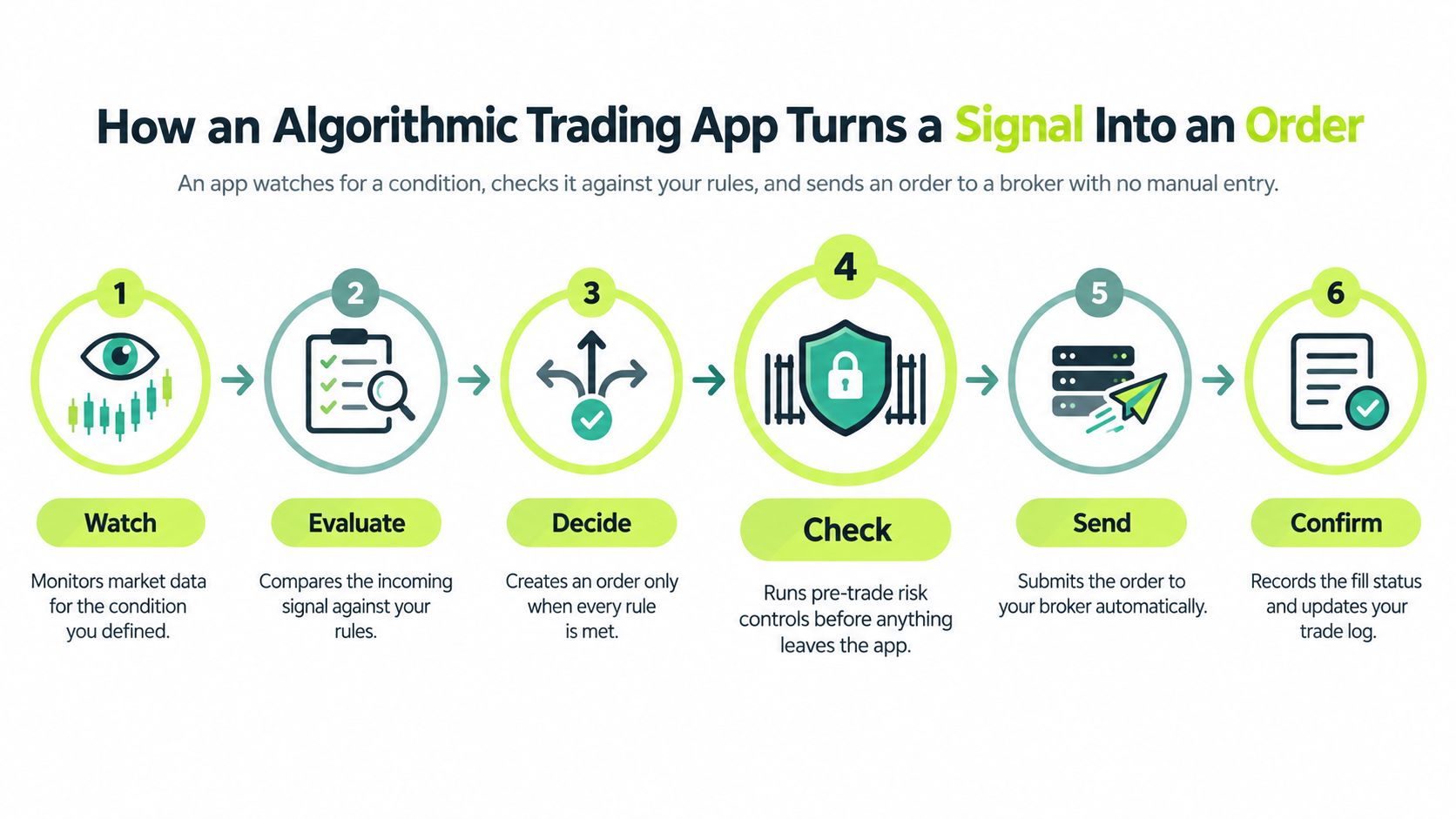
Follow the order through six stages:
- Signal: A strategy condition fires.
- Validation: The app checks the instrument, side, size, and timing against your rules.
- Submission: The app sends a request to the broker.
- Acknowledgment: The broker accepts or rejects the request.
- Fill: The order fills fully, fills partially, or doesn't fill.
- Record: The app logs the signal, checks, broker response, and resulting status.
Suppose a Pine Script alert fires at the daily close for an ETF. The alert carries a unique event ID, and a second copy arrives moments later. A well-built app blocks the duplicate. The first order then reaches the broker but is rejected for insufficient buying power. Its log should show the rejection at the acknowledgment stage, rather than implying that the trade went through.
The biggest differences between apps often appear in validation, broker-status handling, and recordkeeping, not in how elegantly they display a signal. Automation changes the trader's task from clicking to verifying. The SEC's discussion of algorithmic trading describes how automation became a significant part of U.S. equity trading and highlights the role of systematic execution. For an individual trader, the practical lesson is to demand safeguards and evidence alongside order placement.
Algorithmic Trading App Types Compared at a Glance
| App type | Who it suits | Backtesting | Execution control | Safety controls |
|---|---|---|---|---|
| Charting-platform alert bridge, such as Pineflows | Traders who already write Pine Script alerts | Done in the charting platform before connecting | Market orders only, long-only, U.S. equities and ETFs | Test mode, global pause, event-ID duplicate blocking |
| Broker API platform, code-first | Developers building custom logic | Own backtest engine or third-party library | Order types exposed by the broker API | User writes the risk checks in code |
| Built-in strategy builder inside a broker app | Beginners with simple rules | Limited historical testing | Usually a narrow set of order types | Check for a kill switch and position limits |
| Hosted bot or copy-trading service | Users wanting passive exposure | Often shows past performance only | Controlled by the provider | Verify supervision and disclosures |
| Retail FX/CFD automation platform | Forex and CFD traders | Strategy tester, often with spread modeling | Platform-specific order handling | Check margin, leverage, and stop-out rules |
Each row is an app category, not a brand, and each column is a criterion to test before choosing. Read from the top down by asking how much of the strategy and execution you control, then check the actual app documentation rather than assuming a feature exists.
A charting-platform bridge suits traders who already have rules in Pine Script and want a defined route from alert to broker. In this example, Pineflows receives TradingView alerts, applies rules set up by the user or Claude, and places market orders in a connected Robinhood account. Its supported orders are limited to U.S. equities and ETFs, and its execution is long-only.
A broker API platform gives developers more control over order logic and the types of orders available through the broker. The trade-off is that the developer must build and test the safety layer too. A broker's built-in strategy builder can be easier to start with, but a narrow set of order types or weak pause controls may make it unsuitable for more complex rules.
With a hosted bot or copy-trading service, the provider controls more of the logic, so you depend more heavily on its disclosures, supervision, and performance reporting. A retail FX/CFD platform may offer testing tools, but its margin, gearing, and stop-out rules are part of the execution risk. Don't treat an attractive strategy interface as proof of safe order handling.
Backtest Quality Checks Before Going Live
A backtest tests how rules would have behaved on historical data. It isn't a forecast, and it doesn't prove that the strategy will make money. Its value depends on whether its assumptions resemble the logic and costs you'll face when the app sends orders.
| Check | What it reveals | Red flag |
|---|---|---|
| Out-of-sample period | Performance on data the rules weren't tuned on | Only one period tested, tuned until it works |
| Commissions and slippage | Whether the edge survives realistic costs | Zero costs or fills exactly at the signal price |
| Fill assumptions | Whether a bar-close signal could fill at the modeled price | Fills at the high or low of the signal bar |
| Trade count | Whether results rest on enough trades to mean anything | Fewer than about 30 trades in total |
| Parameter sensitivity | Whether small input changes break the result | Profit collapses when one input moves slightly |
| Position rules | Whether shorts or flips match live behavior | Backtest opens shorts while the live app flattens instead |
| Data quality | Whether prices and bars reflect the instrument accurately | Unadjusted splits or gaps in the price series |
Start with out-of-sample testing. If you tune a strategy on one historical window, hold back a later window and test the unchanged rules there. A strategy optimized until it looks convincing on the tuning period but fails on the held-back data is not ready for live routing.
Next, add costs and test fills realistically. A moving-average crossover can show a strong annual return with no costs, then lose money after even modest slippage accumulates across repeated trades. A signal calculated at a bar's close shouldn't automatically be modeled as filling at that exact closing price if your live order reaches the broker later. Likewise, a backtest that assumes fills at a bar's high or low may be using prices the strategy couldn't have captured.
Trade count and parameter sensitivity are useful reality checks, not guarantees. Fewer than about 30 trades is a practical warning that the result may rest on very little evidence, not a statistical law. If a slight change to a moving-average length wipes out the result, the strategy may be fitted to historical noise rather than a durable pattern.
Check the position rules and underlying data too. Does the test model splits and adjusted prices correctly? Does the strategy open shorts, while the live app only flattens on a short signal? The answer must match the execution behavior. A useful primer on backtested trading strategies should be read alongside the actual assumptions of your own test.
The backtest you trust must reflect what the app will execute. Pineflows executes the user's strategy, but it doesn't make the strategy profitable or display a projected return. Users remain responsible for testing their own logic. A backtest is not a forecast, and trading involves risk of loss.
Execution Reliability Failure Modes and Fixes
An app is judged by what happens after the order leaves, as much as by the signal that triggered it. Alerts can arrive late, twice, or not at all; markets move while a request is in flight; and brokers can reject orders. You still need to watch the automation.
| Failure | How to verify | Fix |
|---|---|---|
| Alert never received | Compare the charting-platform alert log with the app's signal log | Check the webhook URL, plan status, and alert expiry, then send one test alert |
| Alert received, no order placed | Read the signal-log reason: paused, duplicate, test mode, plan needed, or broker not connected | Fix the named cause |
| Broker rejects the order | Read the broker's rejection message and order status | Check buying power and symbol eligibility, correct the issue, and send a new alert |
| Order status unknown | Check open orders and positions directly at the broker | Reconcile manually; don't blindly resubmit |
| Duplicate alert | Confirm the same event ID appears twice in the log | Verify only one order was placed; the duplicate check should block the second |
| Partial or delayed fill | Compare the filled quantity and fill time with the order | Review position size and behavior during open and volatile bars |
| Entry filled, exit failed | Check for an open position without a matching exit order | Place the exit manually, pause new entries, and review the rules |
| Token expired after password change | Check whether automations show as paused | Reconnect the broker before resuming |
Use a consistent incident routine:
- Check the source log. Confirm whether the charting platform generated and sent the alert.
- Classify the event. Was there no alert, a blocked alert, a broker rejection, an unknown status, or a partial fill?
- Contain the risk. Pause new entries while preserving valid exits for managing open positions.
- Reconcile before restarting. Compare the broker's positions and open orders with the app's record, then re-enable automation only when they agree.
A duplicate illustrates why event IDs matter. If the same alert arrives twice, the log should identify the repeated ID, show that the second request was blocked, and leave one order to verify at the broker. That evidence is better than relying on a screen that merely says “automated.”
Never automatically resubmit an order with unknown status. The broker might have received the request even though the app couldn't retrieve a response. Resubmitting before checking the broker can create a second position. For Pineflows, an unknown order remains recorded as unknown and isn't placed again; when an alert reaches the app but doesn't trade, its signal log names the reason.
FINRA warns that auto-trading can cause significant losses before investors realize transactions have occurred, particularly when third parties implement trades without adequate oversight. It also emphasizes supervision and controls for algorithmic strategies. That makes FINRA's guidance on auto-trading and unregistered entities relevant to evaluating not just strategy claims, but how clearly a service exposes failures and supports review. For a practical discussion of trade execution software, focus on the evidence each order leaves behind.
Broker Integrations and Account Access
The connection method determines how an order reaches the broker, what can break in the path, and how you cut access if something goes wrong. Compare the credential arrangement and the operating requirements, not just the setup screen.
| Connection method | How orders reach the broker | What must stay active | Main trade-off |
|---|---|---|---|
| Direct broker API key | App calls the broker API with a key you issue | Key scope, rotation, and any IP restrictions the broker offers | Broad control, but a leaked key can be misused |
| Account-linking token | You sign in at the broker and the app receives a revocable token | Token validity; reconnect after a password change | Easy to revoke, but an expired token pauses automations |
| Webhook bridge from a charting platform | Charting alert posts to a webhook that the app forwards to the broker | Charting plan with webhooks, two-factor authentication, and broker connection | Two services in the path create more failure points |
| Manual copying of signals | You place each trade yourself from the alert | Your attention during market hours | Full control, but slow and defeats automation |
| Broker-native automation | Automation runs inside the broker's app | Broker terms and eligibility | Simple to set up, but a narrow set of strategies and order types |
Before connecting an account, answer three questions: What can the app order? What credentials or tokens does it use? What happens if the connection drops? Check supported assets, order types, and whether the integration can open shorts or only manage long positions. For API keys, use the narrowest permissions offered and have a rotation plan.
A webhook bridge adds a hop between the charting platform and the broker, which creates another place to check when a signal goes missing. Pineflows routes TradingView alerts to Robinhood market orders for U.S. equities and ETFs. It doesn't request Robinhood passwords or reusable tokens in chats or forms; its webhook setup requires a paid TradingView plan with two-factor authentication enabled. Users also need sufficient buying power and a valid Robinhood connection.
If a Robinhood token expires, commonly after a password change or app revocation, live automations stay paused until the user reconnects. That pause is preferable to treating a disconnected account as ready to trade without notice. A guide to Robinhood API trading can help clarify what an integration does, but test the specific order path yourself.
Verify the whole connection in one sitting: create a test alert, check that the app receives it, inspect the logged payload and status, confirm the broker account is connected, and verify that the broker shows no unintended order. Don't enable live trading until you can tell which system owns each step.
Safety Controls and AI-Assisted Setup to Demand
Safety lives before submission. An app should reject an order that breaks your limits before it reaches the broker, not merely flag it after execution. The SEC's Rule 15c3-5 market-access requirements describe pre-trade controls built to block orders that exceed preset credit or capital thresholds, violate price or size parameters, or appear duplicative.
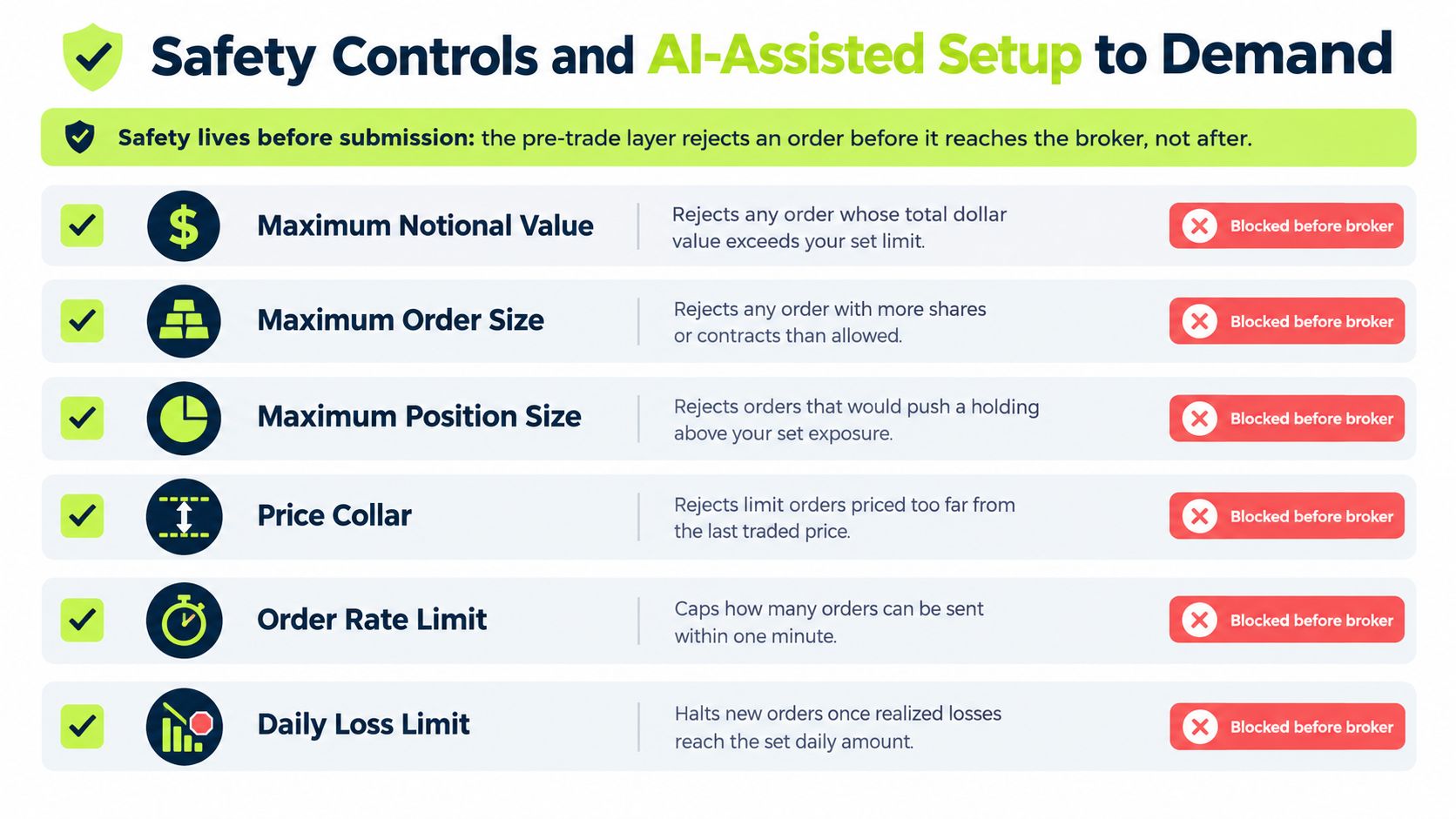
The validation layer should be deterministic, checking maximum notional value, maximum quantity, permitted symbols, allowed order side, and duplicate events against fixed rules rather than model judgment. Say an alert requests more shares than your limit allows: the app rejects it before broker transmission and names the limit it evaluated. The audit record behind that decision should carry the rejection reason, evaluated limit, timestamp, payload hash, and resulting state. Keep these records immutable so you can reconstruct what happened after a malformed, repeated, or out-of-sequence alert.
Duplicates deserve special attention because alerts can arrive late, twice, or not at all. An event ID attached to each alert lets the app guarantee one alert produces at most one order, and when an alert arrives but no order is placed, the signal log should name the reason: paused, duplicate, test mode, plan needed, or broker not connected.
Pause behavior gets the same scrutiny. A useful pause blocks new entries and cancels entry orders the app placed, while keeping valid exits available for risk management. A single switch that disables exits along with entries leaves you unable to manage an open position through the automation. Test the pause before you need it: flip the switch, send an entry signal, and confirm the log shows it blocked while an exit signal still routes.
Practical rule: A control you can't explain from its event log is hard to rely on during an incident.
Keep AI in the configuration role
An AI assistant can speed up setup; it cannot verify meaning for you. A model can read the instrument, entry condition, exit, or position size differently from the original strategy. Require a readable parameter summary, confirm each proposed value yourself, and keep logging-only behavior the default until the live path has been tested.
For an AI-assisted setup, check three things: the proposed configuration preserves the intended entries and exits, ambiguous symbols or sizes get flagged rather than guessed without notice, and pausing new entries leaves exit handling intact. The same market-access rule that demands pre-trade checks also makes authorization and post-trade reporting design questions, which in practice means authenticated account linking, broker-status checks, delivery receipts, and captured fill details.
Pineflows keeps AI on the configuration side. Claude reads your Pine Script and proposes automation parameters for instrument, sizing, entries, and exits; strategies keep TradingView's default alert message, while alert() scripts get a small rules adapter from Claude. Test mode logs alerts without sending orders, and a TradingView test alert leaves placeholders blank, so it never counts as a real fill. Review the alert log in test mode, then verify one real alert: live mode stays refused until the alert is verified, Robinhood is connected, and the free trial or plan is active.
AI earns its place as a reviewable configuration assistant whose output you can inspect, test, and reverse. Model-risk management, data governance, privacy, and supervisory controls all matter when AI touches a securities workflow, and the practical version is simple: keep proposed settings visible, require a human check before live trading, and retain a pause mechanism and event-level records for every order.
Trader Situations and Which App Suits Them
Choose from your workflow, not from a feature list. An app that fits a developer's custom signal engine may be a poor fit for a newer trader who needs simple controls and clear order status.
| Situation | Best-fit category | Non-negotiable check | Watch-out |
|---|---|---|---|
| Pine Script strategy on TradingView, trading U.S. stocks through Robinhood | Charting-platform alert bridge | Confirm supported symbols, order behavior, and alert logs | A bridge may support market orders only and may be long-only |
| Developer with an existing signal engine | Broker API platform | Verify available order types and implement pre-trade checks | You own the risk logic and failure handling |
| Newer trader with simple rules and a small account | Broker strategy builder or test-first bridge | Check position limits, pause behavior, and rejection logs | Historical results don't prove live fills or timing |
| Forex or CFD trader | Retail FX/CFD automation platform | Read margin, leverage, and stop-out rules | Platform-specific order handling can change the risk |
| Trader seeking passive exposure without designing a strategy | Hosted bot or copy-trading service | Verify disclosures, supervision, and how positions are reported | The provider controls the strategy logic |
| Trader with short-selling or options ideas | Broker API or compatible native platform | Confirm short and options support, including actual order behavior | A long-only bridge won't open a short |
For a newer trader, use test mode for several weeks and review the logs daily before committing live capital. Look for late alerts, missed events, and orders that don't match the intended signal. A strategy can look coherent on historical data yet behave differently when a live order arrives after the signal price has moved.
A developer who already owns a tested signal engine may prefer a broker API, provided they can build and maintain the validation and incident-response code. A passive-exposure seeker should be especially careful with hosted services: if the provider controls the rules, you need clear disclosures and a way to understand what the service did with your account.
Short-selling expectations must match the app. A long-only bridge may flatten an existing position on a short signal instead of opening a short. That can be useful for closing a long position, but it's not short execution. Forex and CFD traders should similarly reject an app whose margin rules or position handling they can't explain.
Confirm the Order Path Before Going Live
Use this sequence to verify the full path before you let an app send live orders:
- Choose the right category. Match the connection and execution model to your instruments, strategy, and level of control.
- Backtest with discipline. Use an out-of-sample period, realistic costs, and fill assumptions that resemble your order path.
- Connect the broker carefully. Grant the minimum permissions available and confirm that the account connection is valid.
- Run test mode and send an alert. Confirm the app receives the event before enabling live routing.
- Inspect the record. Read the signal log and determine why the alert did or didn't trade; verify any order at the broker.
- Enable live trading deliberately. Set a capital limit and write down how you'll pause entries, manage exits, and reconcile positions.
If you already write Pine Script and trade U.S. equities or ETFs through Robinhood, Pineflows lets you run this order-verification sequence for TradingView alerts routed as Robinhood market orders. Its 7-day free trial starts after onboarding and requires no card. The monthly plan is called Pineflows Pilot; its price is shown at checkout, billed in advance through Stripe, and renewed automatically until cancelled.
Users must be at least 18, hold the TradingView, Robinhood, and Claude accounts they connect, and follow each provider's terms, including Robinhood's rules for Agentic Trading, as well as applicable local law. Trading carries risk of loss, and a backtest isn't a forecast.
The choice that matters most is simple: an app that proves what happened to every order beats one with the best headline return.
Pineflows turns TradingView strategy alerts into Robinhood market orders with test mode, event-level logs, and pause controls to help you verify the order path before going live. Review the workflow and see whether it fits your strategy at Pineflows.