October 8, 2026 · 15 min read · Pineflows team
Trading Strategy Automation: A Practical 2026 Guide
Learn what trading strategy automation is, how alert-to-broker pipelines work, common risks, and best practices to execute Pine Script strategies safely
You've finished a backtest, configured a Pine Script strategy, and are watching the chart when the entry condition finally appears. TradingView fires an alert. You open your broker app, choose the instrument, calculate the quantity, check the order type, and submit. By then, the price has moved, the setup may have changed, or the candle that created the signal is already closing.
That gap isn't a character flaw. It's a systems problem. Trading strategy automation replaces improvised manual entry with a controlled chain that carries a signal from strategy logic to broker submission and, just as importantly, records what happened afterward. The real objective isn't merely to send orders faster. It's to make every event understandable, testable, recoverable, and safe to stop.
Table of Contents
- The Moment an Alert Fires and You Are Still Typing
- What Trading Strategy Automation Really Means
- The Alerts, Webhooks, and Brokers Architecture
- Reliability Controls Every Automation Pipeline Needs
- Naive Webhook Routing Versus a Verified Test-First Pipeline
- A Staged Workflow From Backtest to First Live Trade
- Why Reliability Controls Beat Marginal Speed Gains
- Pre-Flight Checklist Before You Flip Any Strategy to Live
The Moment an Alert Fires and You Are Still Typing
The alert arrives while you're looking at a five-minute chart. Your Pine Script condition has evaluated as true, and TradingView has sent the notification you configured. The strategy says to enter long, but the broker app still needs your attention.
You search for the symbol, choose buy, decide whether the order should be a market or limit order, enter a quantity, and review the account. If the market is moving quickly, each click adds uncertainty. You might submit the wrong side, use an old quantity, miss the entry entirely, or enter after the setup no longer resembles the one your backtest evaluated.
Manual execution also creates a difficult question: what exactly happened between the signal and the fill? You may remember receiving the alert, but memory won't tell you whether the broker accepted the order, partially filled it, rejected it, or never received it. A later chart review can show the strategy signal, but it can't prove that your live account followed it.
Practical rule: Treat the alert and the fill as separate events. A signal is an instruction candidate, not evidence of execution.
This distinction changes how you design the system. The goal isn't to build a faster keyboard. It's to create an auditable path with a clear identity for each alert, validation before transmission, broker acknowledgment after submission, and a record of the resulting order status.
Manual entry remains useful for discretionary decisions and exceptional situations. It becomes structurally fragile when you expect it to reproduce the same rule at the same moment across repeated signals. A machine-readable strategy can act consistently, but only if the execution layer protects the handoff from chart to broker.
The rest of the system therefore needs to answer four practical questions:
- Did the strategy emit an alert?
- Did the receiver accept and validate it?
- Did the broker accept the resulting order?
- What position and fill resulted?
Without those answers, automation can hide failure instead of removing it.
What Trading Strategy Automation Really Means
Trading strategy automation is a connected pipeline, not a single script or button. The strategy layer decides when a rule is satisfied. The execution layer turns that decision into a broker request, monitors the response, and preserves enough information to investigate discrepancies.
A useful mental model is a recipe and a kitchen. Pine Script is the recipe. It describes the conditions for an entry or exit, the instrument, and the intended risk logic. TradingView is the place where the recipe is evaluated against market data and where an alert can be emitted. The webhook receiver, order builder, and broker API are the kitchen, staff, and delivery service that must turn the instruction into an actual order.
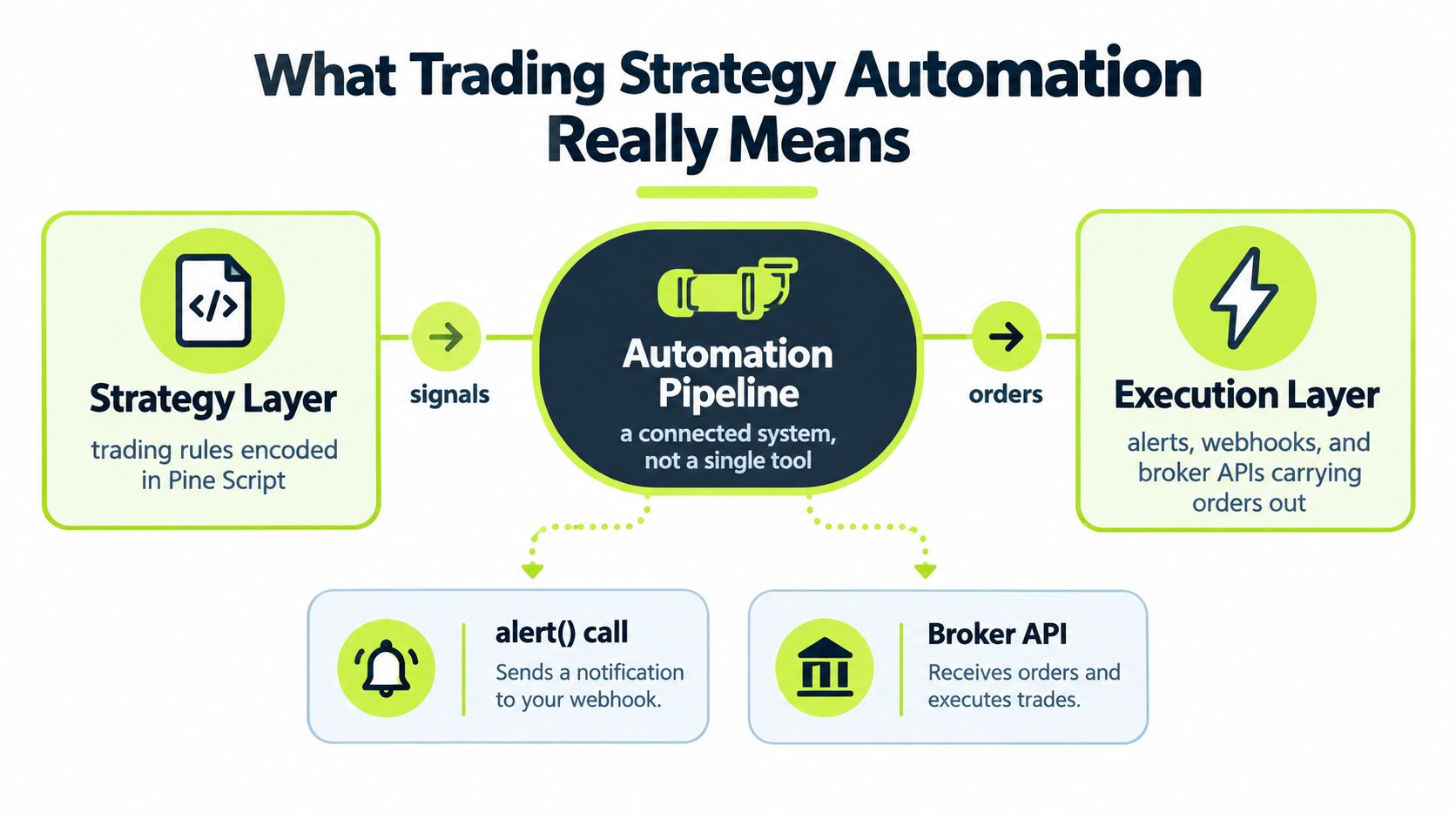
The chain usually contains these links:
- Strategy logic: Pine Script evaluates defined conditions.
- Alert emission: An
alert()call or strategy alert creates a message. - Alert delivery: TradingView sends the configured notification or webhook request.
- Validation and translation: A receiver checks the payload and maps it to the broker's order format.
- Broker submission: The broker API accepts, rejects, or modifies the request.
- Order and fill tracking: The system records status, executions, cancellations, and errors.
Each link has a different responsibility. A valid signal doesn't guarantee a valid symbol. A delivered webhook doesn't guarantee broker acceptance. A broker acknowledgment doesn't necessarily mean the order has filled.
Systematic execution became central to electronic markets long before retail webhook tools became common. A 2011 overview of algorithmic and high-frequency trading reported that more than 50% of U.S. equity trades were algorithmic, while the high-frequency segment alone was estimated at roughly 50% by 2012. That history doesn't make a retail strategy profitable, but it does show that machine-readable execution is a normal market operating model rather than a novelty.
Automation also isn't a profit machine. It won't repair vague rules, unrealistic backtests, poor position sizing, or a strategy that fails under live conditions. It makes the defined behavior more repeatable, which is valuable only when the defined behavior is precise and the controls around it are reliable.
The Alerts, Webhooks, and Brokers Architecture
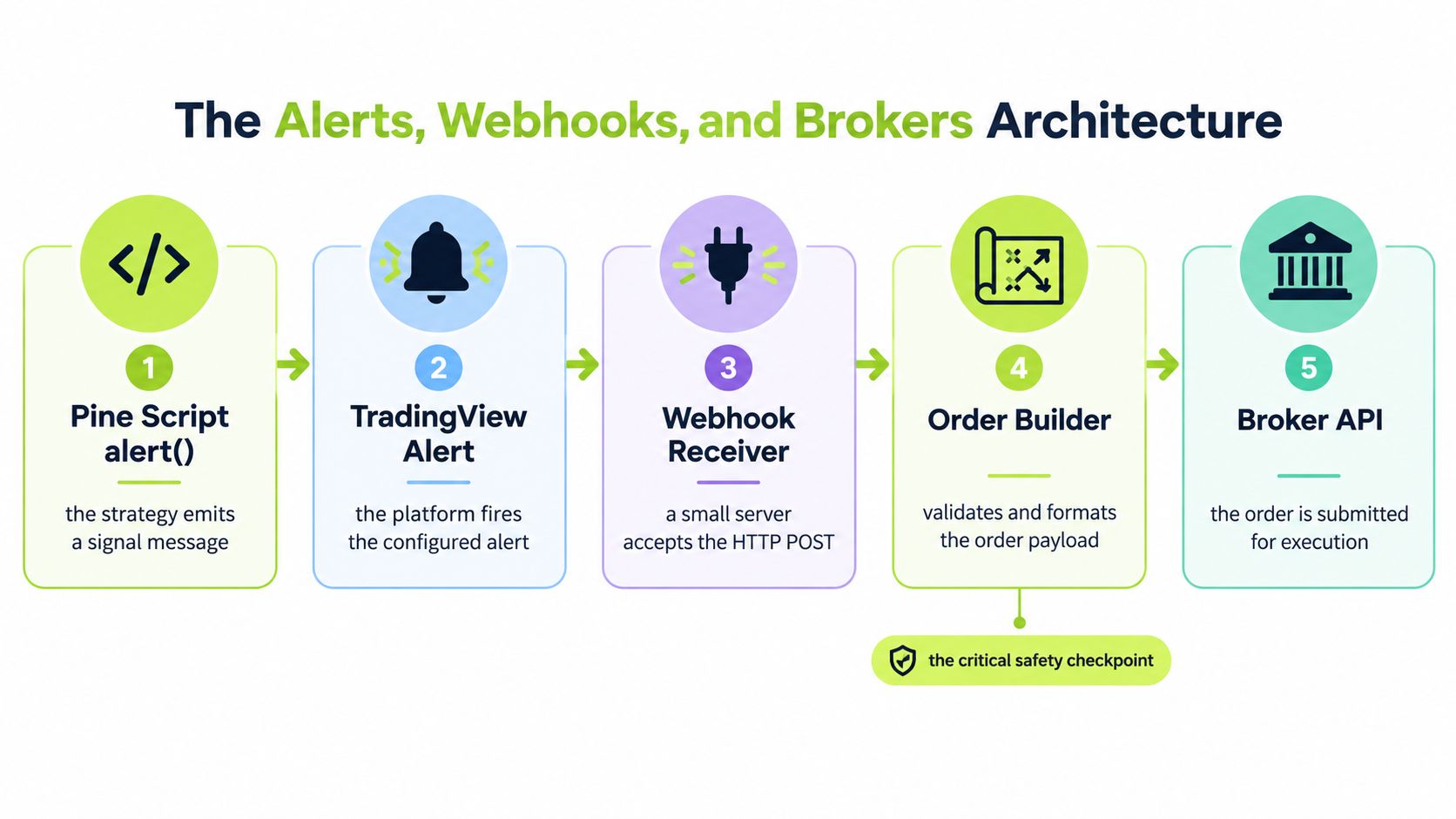
A TradingView-to-broker workflow has several seams. Each seam is a possible failure point, so each should have a visible state and a useful log.
From Pine Script to an alert message
The process begins inside the strategy. Pine Script evaluates the conditions you've encoded, such as a crossover, breakout, position state, or exit rule. When the condition is met, the script emits a message containing the information the execution layer needs.
That message should be explicit. It should identify the instrument, action, intended quantity or sizing instruction, strategy event, and timing context. A vague message such as “buy now” leaves the receiver to guess. Guessing at this boundary turns a deterministic strategy into an ambiguous integration.
TradingView then fires the configured alert. The platform may deliver the webhook, but the receiver still needs to determine whether the request is authentic, complete, fresh, and safe to process. A network retry or repeated delivery can look identical to a new alert unless the message carries a durable event identifier.
For a deeper explanation of the TradingView side, see this guide to TradingView webhook automation.
The receiver and order builder
The webhook receiver is a small application or service that accepts the HTTP request. It shouldn't immediately forward every message to the broker. Its first duties are to preserve the original payload, assign or verify an event ID, validate required fields, and return a delivery response.
The order builder then translates the validated message into the broker's required format. At this stage, the system should check the instrument, side, quantity, account state, buying power, market-hours rules, and whether an equivalent event has already been processed.
A useful design separates acceptance from execution. The receiver can confirm that it stored the event, while a later status records whether the broker accepted, rejected, filled, or canceled the order. Those are different facts and shouldn't be collapsed into one green status.
Why the broker isn't one simple queue
The U.S. equity market is fragmented. In 2019, national securities exchanges executed about 78% of NMS stock trades, 33 alternative trading systems represented roughly 10.2% of share volume, and off-exchange internalization represented approximately 27% of share volume, according to the SEC's report on algorithmic trading.
The implication for a retail pipeline is practical. Your application may submit to one broker API, but the broker operates within a wider execution environment. The pipeline must therefore preserve the event ID, alert time, receipt time, submission time, acknowledgment, order status, and fill details. Those records let you distinguish a strategy decision from a broker-side outcome.
A webhook is a contract between systems, not a magical tunnel. The sender has expectations about the payload and delivery. The receiver has expectations about fields, freshness, and permissions. When either side retries, times out, changes a format, or sends events out of order, the contract needs controls that prevent an accidental position.
Reliability Controls Every Automation Pipeline Needs
An alert can arrive twice, arrive late, contain the wrong field, or meet an account in an unexpected state. A reliable pipeline treats each message as unverified input until it passes checks. These controls create a visible, stoppable path between a webhook and a live order.
Controls that protect the handoff
Durable event IDs give each alert a stable identity. If the receiver sees the same ID again, it can return the earlier processing result instead of creating another order.
Idempotent processing makes retries safe. The system can accept the same request more than once without submitting more than one corresponding order. This matters when a timeout leaves the sender unsure whether the receiver acted.
Test mode records and displays incoming events without transmitting them to the broker. Before live permissions are enabled, inspect the payload, symbol mapping, side, quantity, and timestamp. A test event should show what the system would have sent.
Validation gates check required fields and account conditions. A stale alert, unsupported instrument, excessive quantity, insufficient buying power, or unknown action should be rejected or quarantined. The system must not guess at an incomplete instruction.
Delivery receipts expose each transition. A useful interface separates received, validated, submitted, acknowledged, filled, rejected, canceled, and partially filled states. “Received” confirms only that the system got the message. It does not confirm that a broker accepted or filled the order.
A global pause switch blocks new entries when the strategy behaves unexpectedly or the broker becomes unreliable. Where the design permits it, the switch should still allow valid risk-reducing exits so an existing position is not left without a control path.
FINRA's algorithmic-trading guidance discusses pre-production testing, software validation, implementation controls, and post-deployment review. It also warns that automated decisions can create significant losses before users realize transactions occurred, particularly when unregistered services request brokerage credentials. A retail tool should explain how credentials are handled and should never require broker passwords in chat or an unfamiliar form.
A control checklist in the interface
| Control | Failure it prevents | How it appears in the UI |
|---|---|---|
| Event ID and duplicate detection | Repeated delivery creating repeated orders | Stable event identifier with a duplicate or already-processed status |
| Test mode | An unverified payload reaching the broker | Visible test status and a log of the order that would have been sent |
| Payload validation | Missing, stale, or ambiguous instructions | Field-level errors, quarantine status, and the original payload |
| Account and quantity checks | Orders exceeding configured limits or account capacity | Results for quantity, exposure, and account checks |
| Broker status tracking | Confusing alert receipt with a confirmed fill | Separate submission, acknowledgment, and fill timestamps and states |
| Pause control | New entries continuing during an incident | Live switch that blocks entries and records who activated it |
| Post-trade audit log | Inability to reconstruct a disputed event | Searchable payload, order ID, status history, and fill details |
The automated trade execution guide can help when you assess how a product represents these states. Ask whether the interface shows the full path from the original alert to the final broker result, rather than relying on a single “automated” label.
Execution controls must reflect market conditions as well as software failures. A simulation study found that larger execution volumes increasingly affected market prices, while lower latency had the potential to reduce volatility, as described in this study of algorithmic trading and market impact. Faster routing can reduce delay, but it cannot remove slippage when an order is large relative to available liquidity. Set quantity and exposure limits, reject stale alerts, and define the response when only part of an order fills. Reliability is the layer that makes an alert verifiable before it becomes a position.
Naive Webhook Routing Versus a Verified Test-First Pipeline
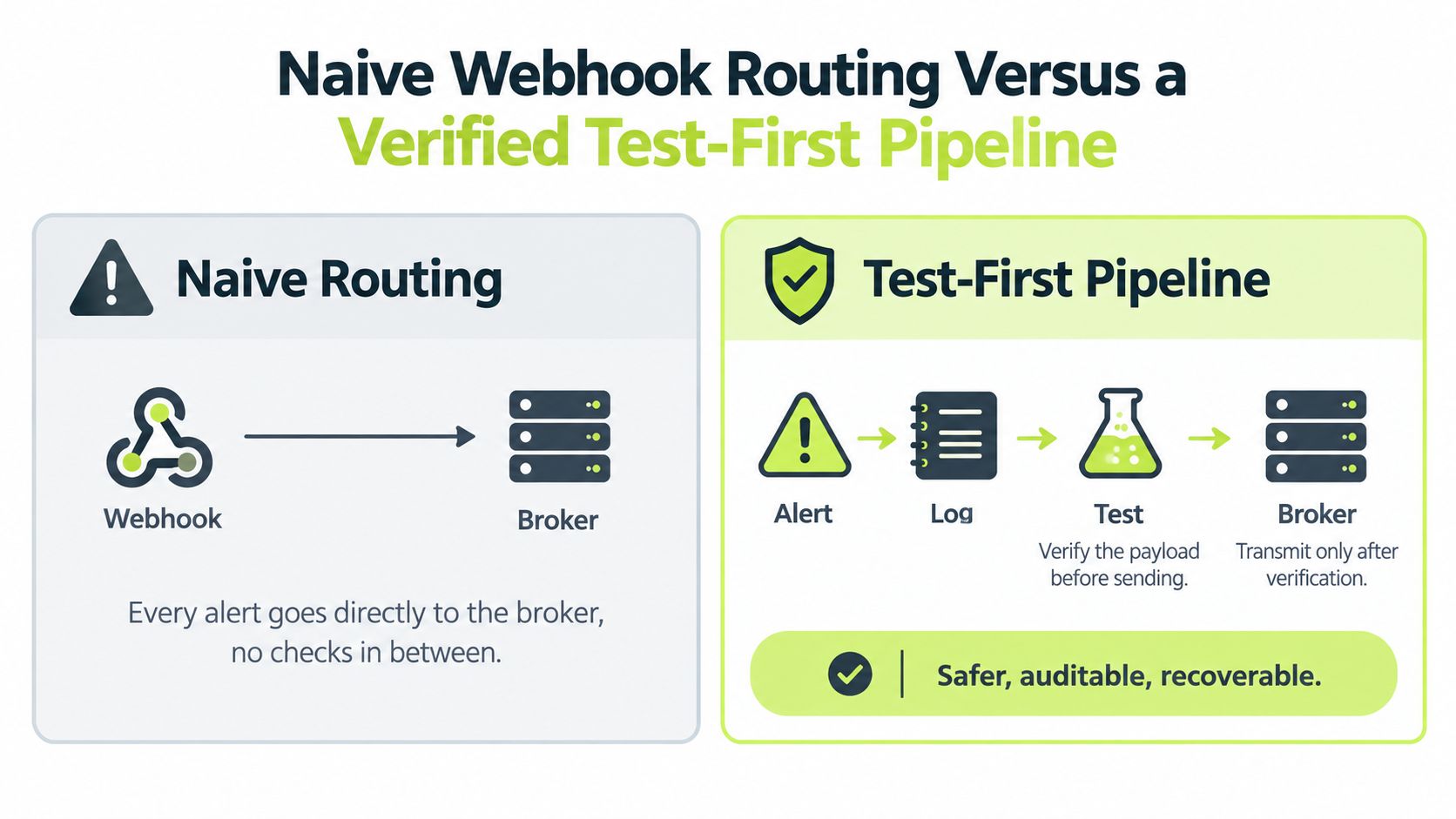
An alert fires while you are away from the screen. A raw webhook can pass that message straight to a broker before you confirm what it contains. TradingView sends the alert, the receiver maps it to an order, and the broker receives the request. That short path assumes the alert is authentic, current, unique, and executable.
A verified pipeline places evidence between each decision. It records the original event, checks its contents, confirms that the event has not already been processed, and permits transmission only after those checks pass. The added work creates a record you can inspect when the live account differs from the chart.
The two paths in practice
Naive routing follows a short sequence:
- TradingView sends an alert.
- The webhook forwards it.
- The broker receives the order.
- The trader discovers the result later.
The original request may be difficult to inspect. A duplicate barrier may not exist, and a network acknowledgment can be mistaken for an executed fill. If the broker rejects the order, the strategy log can still appear correct because it records the signal rather than the broker's final state.
A test-first pipeline separates those decisions:
- The receiver stores the original payload.
- The system assigns or verifies the event ID.
- Validation checks the action, instrument, quantity, timestamp, and account state.
- Test mode displays the proposed order without sending it.
- Live mode transmits only after the configuration is explicitly enabled.
- The system reconciles broker acknowledgment, status, cancellation, and fill.
- An operator can pause new entries while preserving the audit trail.
Test mode works like a rehearsal before opening the gate. You can inspect the proposed order while the broker remains untouched.
The practical advantage is diagnosis. If the chart shows an entry but the account has no position, the verified record can show whether delivery failed, validation rejected the alert, the broker declined it, or the order remains open. A raw forwarder leaves those possibilities spread across separate screens.
Why speed isn't the whole objective
Execution volume can affect available prices, and lower latency may influence trading conditions. Measure routing delay, but do not remove checks to improve it. A fast duplicate remains a duplicate, while a fast submission based on a stale alert can still create an unintended position.
Choose the pipeline that can prove what it did. A short validation delay is easier to manage than an unknown order state, an unrestricted quantity, or a position created by a retry. Reliability and verifiability are the edge between an alert on a chart and a controlled live order.
A Staged Workflow From Backtest to First Live Trade
A backtest gives you a candidate for deployment. It doesn't give the pipeline permission to trade. Treat the release as a staged process, with a clear condition for moving from one phase to the next.
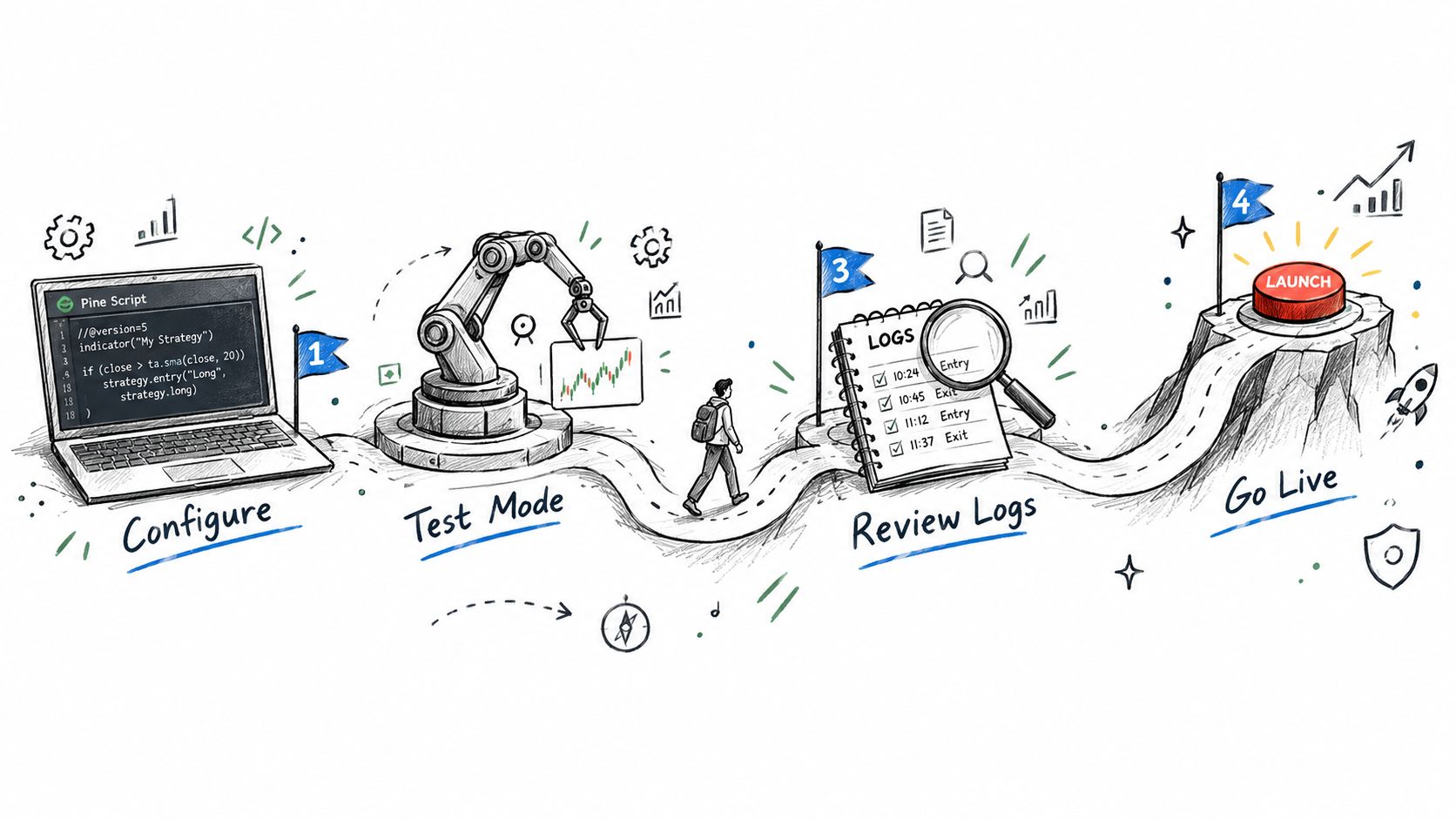
Configuration review
Start with the script and the execution contract. Confirm that the entry and exit events are explicit, the instrument mapping is correct, and the intended quantity or sizing rule is represented in the alert. Decide how the system should handle repeated signals, exits without an open position, partial fills, stale messages, and orders outside permitted market conditions.
A Pine Script strategy guide can help you review the distinction between strategy logic and alert routing. Keep the review concrete. If the script says “enter on confirmation,” define what confirmation means in the payload and in the receiver. If the broker expects a different symbol format or order field, map it before enabling live transmission.
Test mode and payload inspection
Send representative alerts through the full receiver path while test mode is active. The system should record the raw message, parsed fields, event ID, validation outcome, and proposed broker request.
Inspect the result as if you were debugging someone else's system:
- Signal identity: Can you find the exact event again?
- Order intent: Does buy or sell match the strategy event?
- Instrument: Did the receiver map the intended symbol?
- Quantity: Does the proposed size obey your configured limits?
- Timing: Can you see when the alert was created and received?
- Failure behavior: Does an invalid or duplicate event stop safely?
Don't move forward because the dashboard says “connected.” Move forward when the logged event is understandable without opening the source code.
First-live-alert verification
Enable live trading only after the test results are clear. The first live alert should be treated as a release verification, not as a routine signal. Confirm that the broker acknowledgment appears, that the order status changes as expected, and that the account position matches the recorded outcome.
Keep the position sizing within limits you've deliberately chosen for verification. The objective at this stage is to confirm the complete chain, including permissions, symbol mapping, account state, order status, and fill reporting. If any state is missing, pause new entries and investigate before allowing another event through.
Ongoing monitoring
After the first live event, keep monitoring active. Compare expected strategy events with broker acknowledgments and fills. Look for unmatched alerts, repeated event IDs, rejected orders, stale messages, unexpected quantity, and position differences.
A useful production view shows both the strategy side and broker side:
- Expected event: What the script intended.
- Processed event: What the receiver validated.
- Broker order: What the API accepted or rejected.
- Account result: What filled and remains open.
The pause control belongs in this phase as much as during incidents. It should be easy to activate, visible when active, and accompanied by a record of the change. Reliability comes from making the safe action faster than continued guessing.
Why Reliability Controls Beat Marginal Speed Gains
Many traders approach automation as a race to reduce the time between alert and order. Speed matters, but it isn't the only variable shaping the result. A duplicate event, stale price, incorrect quantity, or unrecognized rejection can matter more than a modest routing delay because it changes the position itself.
The retail knowledge gap makes this especially important. A 2025 retail-investor study reported a composite familiarity score of 58.46 out of 100, and only about one-third of respondents answered all regulatory questions correctly, according to FINRA's retail auto-trading investor guidance. That finding points to a practical priority: traders need systems that make control states visible, not systems that demand deep infrastructure knowledge before revealing what happened.
A faster pipeline that you can't audit is harder to trust than a slightly slower pipeline that explains every order.
Reliability controls improve the quality of your decisions after deployment. Event IDs prevent one alert from becoming multiple orders. Test mode lets you inspect a configuration before it can affect the account. Pause controls limit damage during a strategy or broker incident. Audit logs let you compare the chart event, webhook payload, broker response, and fill.
That's the core edge of execution-control thinking. It doesn't promise a better signal. It makes the signal's live behavior less mysterious.
Pre-Flight Checklist Before You Flip Any Strategy to Live
Run this checklist before enabling live orders:
- Rules: Can you describe every entry, exit, quantity, and exception as an explicit condition?
- Payload: Does each alert contain a unique event ID, action, instrument, quantity, and relevant timestamp?
- Validation: Does the receiver reject missing, stale, duplicated, unsupported, or oversized instructions?
- Test mode: Have you inspected the logged payload and proposed order without transmission?
- Broker state: Can you distinguish submission, acknowledgment, rejection, cancellation, partial fill, and completed fill?
- Pause control: Can you block new entries quickly while preserving appropriate exits?
- Audit trail: Can you reconstruct one event from alert creation through the resulting account position?
- Monitoring: Will you notice a mismatch between strategy events and broker results?
Automation is a release process, not a shortcut around trading judgment. If the system can't show what it received, what it sent, and what the broker did, it isn't ready for live responsibility.
Pineflows converts TradingView Pine Script alerts into Robinhood orders through a test-first pipeline with event IDs, payload inspection, delivery receipts, and pause controls. If you want to verify the alert-to-fill chain before relying on it in live trading, visit Pineflows and review the guided setup.