October 13, 2026 · 14 min read · Pineflows team
10 Quant Trading Software Tools Compared for 2026
Compare 10 quant trading software tools for backtesting, execution, and data. Review use cases, tradeoffs, and limits to find your fit in 2026.
You're staring at a stack of quant trading software tabs, and every vendor promises the same thing, faster research, better backtests, cleaner execution. In practice, the failure usually happens at one step, not everywhere. A backtest looks great until costs and slippage show up, a data feed matches history but not live bars, or an execution bridge sends orders you can't audit when something goes wrong. This list sorts ten tools by the stage where they usually break in real workflows, so you can pick the narrowest stack that survives the trip from signal to fill.
Table of Contents
- 1. Pineflows
- 2. QuantConnect LEAN
- 3. QuantRocket
- 4. NinjaTrader
- 5. MultiCharts
- 6. AmiBroker
- 7. MetaTrader 5
- 8. Quantower
- 9. Hummingbot
- 10. AlgoTrader
- Top 10 Quant Trading Software Comparison
- Choosing the Right Stack for Your Workflow
1. Pineflows
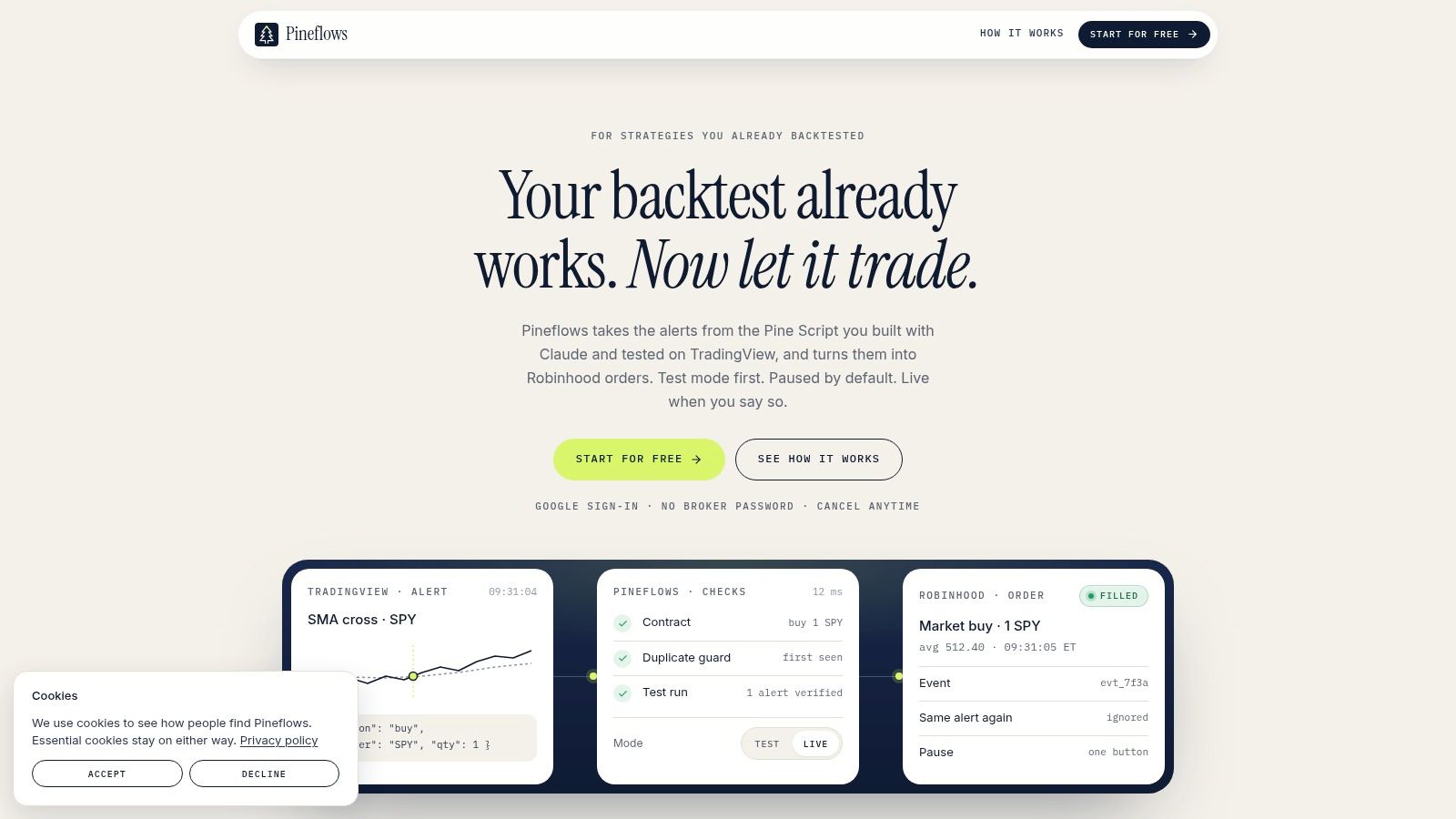
Pineflows is the cleanest answer when the strategy is already built and the pain starts at execution. It takes TradingView Pine Script alerts and turns them into Robinhood market orders, with a test mode that logs alerts before anything touches the broker. The workflow is narrow on purpose, which is exactly why it's useful for retail traders who want one-alert-to-one-order behavior instead of a general automation kitchen sink.
Where it breaks in practice
Its limits are also clear. Pineflows is built around TradingView to Robinhood market orders, so if you want multi-broker routing, complex order types, or a broad execution layer, this isn't that tool. That trade-off is intentional, because a smaller surface area is easier to audit, and auditability is the main reason to use it.
Practical rule: use Pineflows when your biggest risk is not strategy design, but whether the alert reached the broker, got duplicated, or got lost in transit.
The product leans hard into traceability. It supports per-alert event IDs, delivery receipts, payload inspection, timestamps, status checks, and a global pause control, which lines up with the actual operational problems of automated execution. It also uses Google sign-in and says it never stores Robinhood credentials, which reduces the trust burden for a retail workflow.
For setup, the internal path is simple enough to be practical, sign in, connect the Claude connector, point TradingView at the webhook, and verify the first alert in test mode before going live. Pricing is also straightforward, with Pineflows Pilot at $29/month and a 7-day free trial that begins after onboarding, with no card required. That makes it especially attractive for traders who already know their signal logic and just need a safer bridge into live orders.
2. QuantConnect LEAN
If Pineflows is an execution bridge, QuantConnect is where many people build the strategy before they ever think about routing orders. The LEAN engine covers research, backtesting, optimization, and live deployment, which makes it a strong all-around platform for people who want to move from notebook logic to a working algorithm without rebuilding the stack each time. It's also one of the better fits when you want local control through open-source tooling and a hosted path when you don't.
Its breaking point is abstraction
QuantConnect starts to struggle when a team wants a very opinionated, broker-specific execution workflow or a highly customized operational layer. The platform is broad enough to be useful across many use cases, but that breadth also means it's not laser-focused on one execution path the way a narrow bridge is.
One practical advantage is flexibility. You can run LEAN locally or in the cloud, which helps if you prefer to keep research close to your own environment. That flexibility is a major reason it fits both serious hobbyists and teams that need more structured workflows.
For a trader comparing stacks, QuantConnect is the place to use when the workflow still includes strategy design, data research, and model testing. It is less compelling when the hard problem has already shifted to event-level reliability, because that's where a dedicated execution layer earns its keep.
The best way to think about it is simple. QuantConnect handles the strategy machine well, but the handoff to a broker still deserves separate scrutiny, especially if your real worry is whether an alert became the exact intended order. For a retail path that ends in broker execution, the workflow discussion pairs well with this retail automation guide.
3. QuantRocket
QuantRocket fits traders who want a Python-first, Docker-based stack and are comfortable making the environment behave the way they want. It is especially compelling if Interactive Brokers is the center of gravity, because the platform is built around data collection, research, backtesting, and live execution in an IBKR-centric workflow. That design keeps the stack modular, which matters when you care more about control than polish.
Where it fails for some users
Its breaking point is usually the same thing that makes it powerful, the amount of environment control it expects from you. If you want broad broker optionality or a managed experience with very little infrastructure work, QuantRocket can feel heavier than necessary. It asks you to think like an operator, not just a signal author.
That said, the architecture is practical for people who want credentials local and encrypted, and who would rather own their own infrastructure than depend on a black box. The documentation style also suits traders who read setup instructions carefully instead of skipping straight to live mode.
A controlled environment helps only if you can maintain it. If you won't keep an eye on data ingestion, broker connectivity, and container health, a flexible stack becomes a fragile one.
QuantRocket works best when the issue is not “can I make a strategy?” but “can I run this research-to-execution stack on my terms?” That's a different question from the one Pineflows answers. QuantRocket is broader and more technical, Pineflows is narrower and more execution-specific.
4. NinjaTrader
NinjaTrader is a familiar name for futures traders because it combines charting, strategy development, simulated trading, and broker/clearing services in one environment. It earns a place in this list because it solves a very real problem for active futures users, a lot of desktop platforms are either too generic or too disconnected from order flow work. NinjaTrader is not vague about its target user.
The weak spot is breadth
Its limitation is also obvious. If you need broad multi-asset brokerage support, especially outside futures, the platform is less comfortable than tools built for multi-broker or multi-asset stacks. It also assumes you'll stay close to its ecosystem, which is fine if futures are your world and awkward if they're not.
The product's strength is that it gives you a simulated environment before live use, which is the right habit in any automation workflow. That matters because backtest confidence and live reliability are not the same thing. A trader can like the charting and still need to verify the order path carefully before funding a live setup.
A practical note for stock-oriented readers is that NinjaTrader's value is not in replacing a broker-neutral bridge. It's in giving futures traders a mature workstation with order flow tools and a large user base. For stock automation, this overview of automated stock trading software is the more relevant comparison point.
5. MultiCharts
MultiCharts sits in the zone where desktop traders want serious charting, PowerLanguage scripting, portfolio backtesting, and optimization without moving into a cloud-native workflow. It is a strong choice if you like the feel of classic trading terminals and need dependable desktop tooling with strategy automation attached. Traders coming from EasyLanguage often find the transition easier here than in more code-heavy environments.
The failure mode is platform gravity
MultiCharts tends to break down for people who want modern, cloud-first collaboration or a lighter operational footprint. It is still very much a desktop-first tool, and that is a feature for some users and a drag for others. If your workflow depends on switching machines, sharing projects across a team, or minimizing local setup, the desktop gravity becomes noticeable.
The product works well for multi-market analysis and strategy refinement. Where it becomes less attractive is when the user wants a simple deployment path that abstracts away environment maintenance. In other words, it excels at analysis, but the convenience layer is narrower than the strategy layer.
That's not a weakness if you value control and visual clarity. It is a weakness if your main goal is to reduce operational friction. For many practitioners, that's the true dividing line between desktop charting software and workflow software.
6. AmiBroker
AmiBroker is the speed-first option in this group. People pick it when they want extremely fast portfolio backtesting, screening, and analysis on large universes, not when they want a glossy all-in-one workflow. It has a reputation for performance because it does the heavy lifting that slower desktop tools can choke on.
Its breaking point is the live layer
AmiBroker is excellent for research, but live trading usually depends on third-party bridges or broker integrations. That makes it powerful, but not self-contained in the way some users expect. If you want a single vendor to own the full research-to-broker path, this will feel more assembled than integrated.
The scripting language, AFL, also comes with a learning curve. That's not a flaw, it's just the cost of using a specialized desktop platform with a lot of capability. If you're willing to learn it, the research speed is often worth the effort.
The practical trade-off is easy to understand. AmiBroker is a serious backtesting machine with a one-time license model, but the live execution piece is not where it shines. Traders who need a fast analytics core often pair it with something else for order routing and broker communication.
7. MetaTrader 5
MetaTrader 5 remains one of the most accessible on-ramps for automated trading, especially in FX and CFD environments. The appeal is obvious, it bundles the IDE, strategy tester, algorithmic trading features, and a huge ecosystem of robots and indicators into one platform. That combination makes it easy for new users to move from idea to executable code without stitching together multiple tools.
Its constraint is broker dependence
MT5's biggest weakness is that execution quality and asset access depend heavily on the broker behind it. The platform itself may be familiar, but the actual trading experience can vary a lot based on who is carrying the order flow. That makes it a good on-ramp, but not always a clean long-term institutional choice.
It is also less convenient for U.S. equity and options routing than it is for FX or CFD setups. That means traders who want broad stock-market flexibility often outgrow it or use it in a narrower role.
The ecosystem is the main reason it keeps showing up in comparisons. There's a lot of community knowledge, a lot of existing code, and a low barrier to starting. The downside is that easy entry can hide operational complexity, so the tester and the live environment still need careful validation.
8. Quantower
Quantower is a good fit for traders who want a single desktop terminal over multiple brokers and data feeds, especially for order flow and volume-based analysis. It mixes advanced analytics with modular licensing, which gives users more control over what they pay for and what they use. That makes it attractive to active traders who care about intraday structure.
The gap is standardization
Quantower's automation layer is improving, but it doesn't feel as standardized as dev-centric platforms. That matters if you want a repeatable code-first workflow with a strong community convention around deployment. If your use case leans more toward terminal analysis than software engineering, the platform makes more sense.
The other constraint is that data is a separate concern. The license doesn't erase the need to manage market data costs and quality, which is often where traders underestimate the total stack cost. A polished UI does not eliminate feed management.
For order flow traders, the value is in the tools, not the marketing. Cluster charts, volume profiles, and time statistics are the reason people stay. The point where it breaks is usually when someone expects a fully standardized developer platform rather than a powerful trading terminal with automation attached.
9. Hummingbot
Hummingbot is the most open and developer-friendly option here for crypto market making and exchange-connected execution. It's open source, Python-based, and built for people who want to customize strategies rather than rent a closed system. That makes it especially relevant for liquidity provision and arbitrage workflows.
It breaks where crypto gets messy
The problem with Hummingbot is not the software, it's the environment it operates in. Exchange nuances, risk handling, and operational responsibility sit with the user, and that's a different burden than using a managed platform. If you're not ready to handle the engineering and the risk controls, the flexibility can turn into self-inflicted complexity.
It's also a crypto-only tool, so anyone looking for traditional asset coverage should move on quickly. That specificity is a strength for the right user and a hard stop for everyone else.
Standout point: Hummingbot is for people who want to own the bot, the infrastructure, and the exchange logic. If that sounds like too much, it probably is.
For readers who are new to bots in general, the learning curve is worth respecting. This beginner guide to trading bots is a better fit if you're still deciding how much infrastructure responsibility you really want.
10. AlgoTrader
AlgoTrader belongs at the institutional end of the list. It is built for firms that need an OEMS, portfolio and strategy management, pre-trade checks, and integrations across traditional and digital assets. That puts it in a different category from retail platforms, because governance and operational control are part of the product, not an afterthought.
The point of failure is complexity, not capability
For retail traders, AlgoTrader is usually too much platform. The pricing is quote-based, the implementation effort is heavier, and the operational model is designed for firms that have processes, controls, and integration requirements already in place. That isn't a knock on the product, it's just a mismatch for most individual users.
Its advantage is that it handles institutional workflow expectations better than lighter tools. If you need custody integrations, venue adapters, and a unified system for traditional and digital assets, this is the kind of platform that belongs on the shortlist.
The key trade-off is simple. AlgoTrader solves governance and connectivity problems that retail traders rarely need to solve, while smaller tools focus on getting alerts into orders with less ceremony. If your business depends on those controls, the heavier platform makes sense. If your workflow starts in TradingView and ends at a single broker, it does not.
Top 10 Quant Trading Software Comparison
| Product | Core focus | Safety & audit (★) | Unique features (✨) | Target audience (👥) | Price/value (💰) |
|---|---|---|---|---|---|
| 🏆 Pineflows | TradingView Pine Script alerts → Robinhood market orders; test‑first webhook pipeline | ★★★★★, end‑to‑end logs, delivery receipts, idempotent event IDs | ✨ Claude connector for Pine Script config; global pause; no Robinhood creds stored | 👥 Retail traders, quant hobbyists using TradingView → Robinhood | 💰 $29/mo (Pineflows Pilot), 7‑day trial |
| QuantConnect (LEAN) | LEAN engine for research, backtest, optimization & multi‑broker deploys | ★★★★, mature tooling, cloud logs; enterprise features available | ✨ Open‑source LEAN, large data catalog & marketplace | 👥 Quant developers & algo traders needing multi‑broker support | 💰 Free/core + cloud fees & paid datasets |
| QuantRocket | Python/Docker stack for IBKR data, Moonshot backtesting & live execution | ★★★★, local control, encrypted credentials, modular services | ✨ Moonshot backtester, automated IBKR data ingestion | 👥 Self‑hosting quants focused on IBKR | 💰 Subscription + infra/data costs (self‑hosted) |
| NinjaTrader | Futures-focused charting, strategy dev, order flow, DOM & brokerage | ★★★, paper trading, simulated testing, good ecosystem | ✨ Advanced order‑flow/DOM tools; large 3rd‑party ecosystem | 👥 Futures retail & semi‑pro traders | 💰 Free sim; brokerage/clearing & data fees apply |
| MultiCharts | Desktop charting, PowerLanguage scripting, portfolio backtesting & auto‑trade | ★★★, stable desktop workflows, local execution control | ✨ PowerLanguage (EasyLanguage‑like); lifetime license option | 👥 Discretionary/systematic traders preferring desktop tools | 💰 Perpetual license or subscription (Windows) |
| AmiBroker | High‑performance desktop backtesting (AFL), Monte Carlo & walk‑forward | ★★★★, extremely fast portfolio backtests; local traceability | ✨ Fast Monte Carlo/walk‑forward; one‑time license packs | 👥 Quants needing very fast backtests (Windows) | 💰 One‑time license + optional packs |
| MetaTrader 5 (MT5) | Multi‑asset FX/CFD platform with MQL5 IDE, strategy tester & marketplace | ★★★, integrated tester; execution quality is broker‑dependent | ✨ Massive marketplace for robots, indicators & copy trading | 👥 FX/CFD retail traders and EA developers | 💰 Usually free via brokers; broker fees apply |
| Quantower | Multi‑broker desktop terminal with advanced analytics & .NET API | ★★★, improving automation APIs; modular traceability | ✨ Cluster/volume tools, modular licensing, many connectors | 👥 Intraday/volume traders wanting one UI across brokers | 💰 Modular licenses + market‑data costs |
| Hummingbot | Open‑source crypto market‑making & execution framework | ★★★, community audited; self‑hosted risk management required | ✨ Strategy templates, exchange connectors; Apache‑2.0 | 👥 Crypto quants & market‑makers; developers | 💰 Free (open‑source); infra & exchange fees |
| AlgoTrader | Institutional OEMS for enterprise trading, governance & custody integrations | ★★★★, enterprise governance, pre‑trade checks & audit trails | ✨ Custody/venue adapters, enterprise connectors & workflows | 👥 Banks, brokers and institutional quant teams | 💰 Quote‑based enterprise pricing |
Choosing the Right Stack for Your Workflow
Pick the narrowest tool that covers your current stage, then test the full path from data to fill before you scale. That advice sounds basic, but it's where a lot of automation setups fail. The most dangerous mistake is buying a broad platform because it looks complete, then discovering that the weak point was never research or charting, it was the handoff between alert, broker acknowledgment, order status, and fill.
The right stack depends on where your workflow is breaking. If you're still building and refining, QuantConnect, QuantRocket, AmiBroker, or MultiCharts make more sense than a broker bridge. If you're trading futures, NinjaTrader is a serious desktop option. If you're in crypto, Hummingbot fits better than a general-purpose platform. If you're running a larger firm, AlgoTrader belongs in the conversation. And if your strategy is already proven and your real problem is safe live execution, Pineflows is the narrow tool that addresses the audit gap without pretending to be everything else.
Use paper or test mode first. Verify one round trip. Check timestamps, duplicates, rejections, and final fill behavior before you let the stack handle real capital. That's the difference between a clever backtest and a workflow you can trust.
Pineflows turns TradingView alerts into verifiable Robinhood orders with test mode, pause controls, duplicate protection, and an audit trail you can inspect. If your workflow ends in execution instead of more backtesting, visit Pineflows and see how a narrow, test-first bridge fits into your quant stack.