# What Is an OCO Order and How the Link Works
> What is an OCO order? A profit limit and a stop linked so one fill cancels the other. See bracket differences and when both legs can stay live.
Source: https://pineflows.com/blog/what-is-an-oco-order
Published: 2026-11-02
Updated: 2026-11-02
Tags: what is an oco order, OCO order, bracket order, stop loss, order types
An OCO order is two or more live orders treated as one unit, so a fill of either cancels the others, usually a profit-taking limit paired with a protective stop. If you already own shares and want to set an exit above the market and a protective trigger below it, the linked order can put both plans in place without leaving you to cancel one manually.
The detail that matters at the trading desk is what “cancels” means in practice. The broker manages the link, and the cancellation may not be instantaneous. Understanding the order types and checking the live order status can help you avoid treating a price trigger as proof that your position has closed.
## Table of Contents
- [What Is an OCO Order](#what-is-an-oco-order)
- [The broker link is part of the order](#the-broker-link-is-part-of-the-order)
- [How One Fill Cancels the Other Leg](#how-one-fill-cancels-the-other-leg)
- [Choosing the Stop, Stop-Limit, or Trailing Leg](#choosing-the-stop-stop-limit-or-trailing-leg)
- [When the trigger should move](#when-the-trigger-should-move)
- [OCO Versus Brackets, Trigger Chains, and Broker Labels](#oco-versus-brackets-trigger-chains-and-broker-labels)
- [Read the broker's label carefully](#read-the-brokers-label-carefully)
- [A 100-Share OCO Through Full and Partial Fills](#a-100-share-oco-through-full-and-partial-fills)
- [Follow the order through each outcome](#follow-the-order-through-each-outcome)
- [Watch the cancellation window](#watch-the-cancellation-window)
- [Pre-Send Checks Before the Pair Goes Live](#pre-send-checks-before-the-pair-goes-live)
## What Is an OCO Order
**OCO** means “one-cancels-the-other.” It's a group of conditional orders that a broker treats as one unit: when one order executes, the broker automatically tries to cancel the remaining order or orders. Fidelity describes an OCO as **two live orders**, with execution of either causing the other to be automatically canceled ([Fidelity's guide to conditional order types](https://www.fidelity.com/learning-center/trading-investing/trading/conditional-order-types)).
For a long stock position, a common setup is a **sell limit** above the current market to take profit, paired with a **sell stop** below it as a protective exit. If the stock rises to the limit and that order fills, the stop is the unused leg. If the stop activates first, the profit-taking order is the one the broker should cancel.
The purpose is practical. Suppose your limit sells shares at your target, but you forget that a separate stop is still working. If the stock later falls to that stop, the extra sell order could create a short position because you no longer own those shares. The OCO link is meant to prevent that leftover exit from remaining active.
### The broker link is part of the order
Two ordinary order tickets don't become an OCO just because you plan to cancel one after the other fills. The cancellation relationship has to be established by the broker's order-management system. A chart, strategy, or alert can describe the desired behavior, but that doesn't itself confirm the broker has linked the orders.
And “automatically canceled” doesn't mean “instantly gone in every circumstance.” Treat the broker's order status as the record of which protection is live. Before sending the pair, check whether the broker supports the order structure you intend and how it handles cancellation.
The order types matter, too. A limit expresses the price you're willing to accept, while a stop sets a trigger that can become a market order. An OCO normally manages exits for a position you already hold. When an entry is included with linked exits, the broader arrangement is commonly called a bracket order. The next distinctions are how the two exit legs behave, how stop choices change the risk, and what happens when only part of an order fills.
## How One Fill Cancels the Other Leg
Say you own **100 shares bought at $100** and place a sell limit at **$110** alongside a sell stop at **$95**. The table shows what those orders are meant to do across different price paths.
| Market path | Profit limit | Protective leg | Position result |
|---|---|---|---|
| Trades up to $110 first | Sells at $110 or better if filled | Canceled | Flat, about $10 a share before fees if fully filled |
| Trades down to $95 and the stop fills | Canceled | Stop becomes a market order | Flat near $95, but the fill can be worse |
| Gaps from $100 to $90 | Canceled once the stop triggers | Stop becomes a market order and may sell near $90 | Flat with about $10 a share lost, not the $5 stop distance |
| Stop-limit at $95 / $94.50 never trades | Often canceled when the stop activates, not when it fills | Rests unfilled if quotes are below $94.50 | Shares can stay open with no linked target |
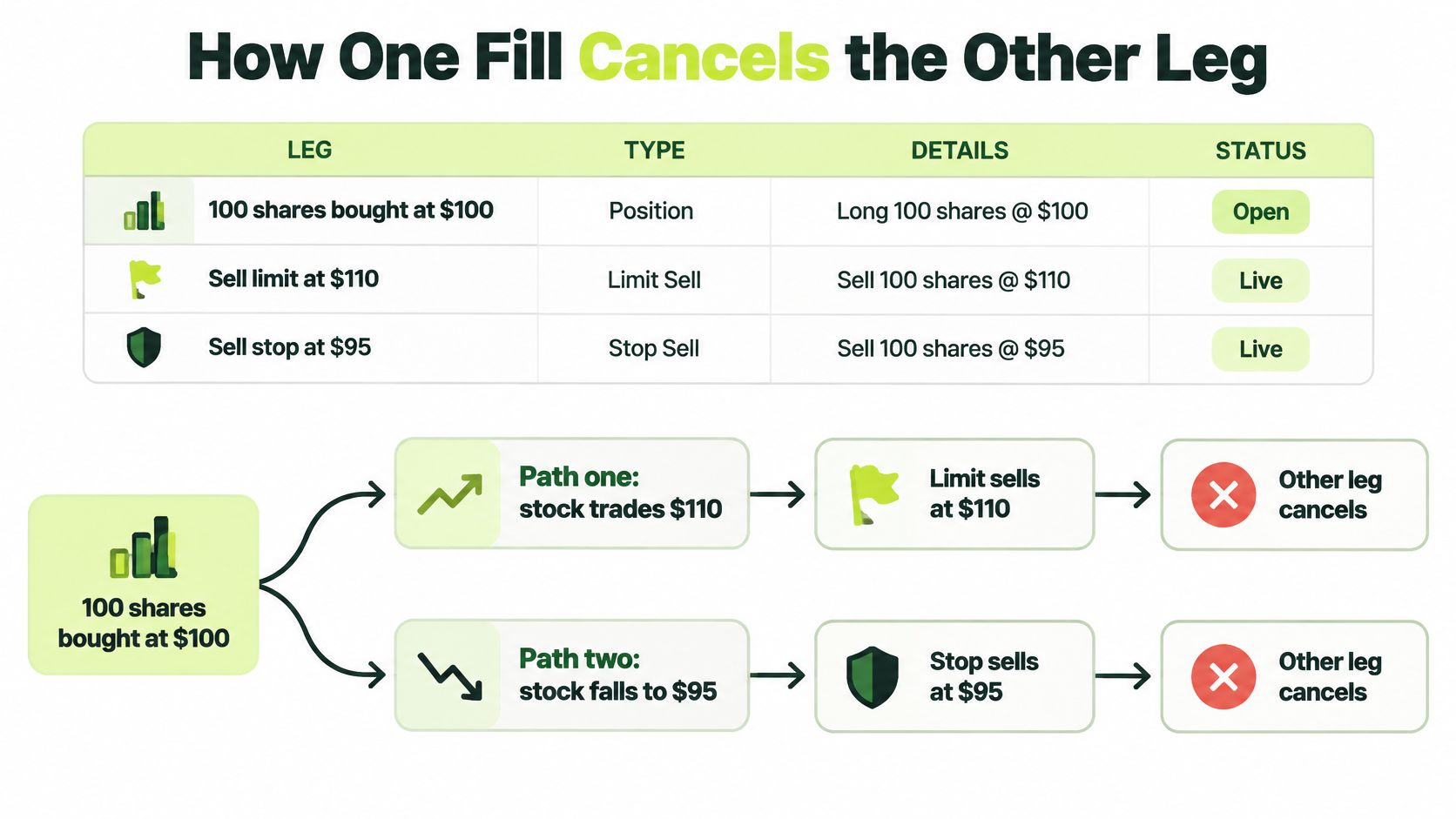
The first two paths show the intended pairing: one exit takes precedence, and the broker cancels the other. But the stop leg doesn't promise a sale at its trigger price. A [SEC-filed description of OCO order behavior](https://www.sec.gov/file/exhibit-5-6589) explains that a stop becomes a market order when its stop price is reached, while a limit order seeks its specified price or better. A market order can fill at a different price, especially if the market is moving quickly.
That difference is clear in the gap example. A stop at $95 can trigger when trading resumes below that level, but the resulting market sell may execute near $90. The stop price identifies when the order activates; it doesn't cap the loss at $5 per share.
A stop-limit adds another possible outcome. If the stop triggers at $95 and the limit is $94.50, the order can remain unfilled when available prices are below $94.50. The OCO target may already have been canceled when the stop activated, leaving the shares open without that linked exit.
A video can help visualize how the two paths are arranged, but the order status still determines what is live:
**Triggered isn't the same as filled.** Treat the actual order and position status as your protection, not just the two prices you entered.
## Choosing the Stop, Stop-Limit, or Trailing Leg
| Leg type | After the price is reached | Price control | Main failure |
|---|---|---|---|
| Stop | Becomes a market order | None after the trigger | Slippage or a gap fill far from the stop |
| Stop-limit | Becomes a limit order | Limit price or better | No fill if the market runs through the limit |
| Trailing stop | Trigger ratchets only in the favorable direction | Dollar or percent offset | Same gap risk once it becomes a market order |
| Plain limit | Rests until that price is available | Limit price or better | Never trades if price doesn't reach it |
Choose the leg based on what you need more: **a greater chance of getting out, price control, or a trigger that follows a favorable move**. A standard stop prioritizes getting an order into the market after activation. It doesn't guarantee a fill at the stop price, so a fast decline or gap can leave the actual sale below the trigger.
A stop-limit prioritizes the price you'll accept. For example, a sell stop at $95 with a $94.50 limit won't sell below $94.50. That control comes with a trade-off: if the market moves through the limit without an executable quote at that price or better, the order may not fill. Decide whether you can tolerate that possibility before placing the pair.
### When the trigger should move
A trailing stop adjusts its trigger as the market moves in your favor, then holds that level when the market moves against you. It can use a dollar offset or a percentage offset. Once triggered, it still has the execution risk of a market order, so the trailing feature doesn't guarantee a particular sale price. The [FINRA guide to stock order types](https://www.finra.org/investors/investing/investment-products/stocks/order-types) describes stop, stop-limit, and trailing-stop behavior.
A plain limit order has a different job: it waits for the price you specify or better. It doesn't convert into a market order if the price never arrives, so the position may remain open.
> **Decision rule:** Use a stop when exiting matters more than controlling the exact sale price. Use a stop-limit when price control matters more than certainty of exit. Use a trailing stop when you want the trigger to follow a rising position.
If you automate order placement, verify broker-confirmed states rather than relying on a strategy alert alone. Record each order's identifier and status, including whether a leg was activated, filled, canceled, or rejected. After a partial fill or a change to the remaining quantity, reconcile the open position with the protection that remains. For more on routing strategy alerts into broker orders, see [Robinhood stock trading with Pineflows](https://pineflows.com/blog/robinhood-stock-trading).
## OCO Versus Brackets, Trigger Chains, and Broker Labels
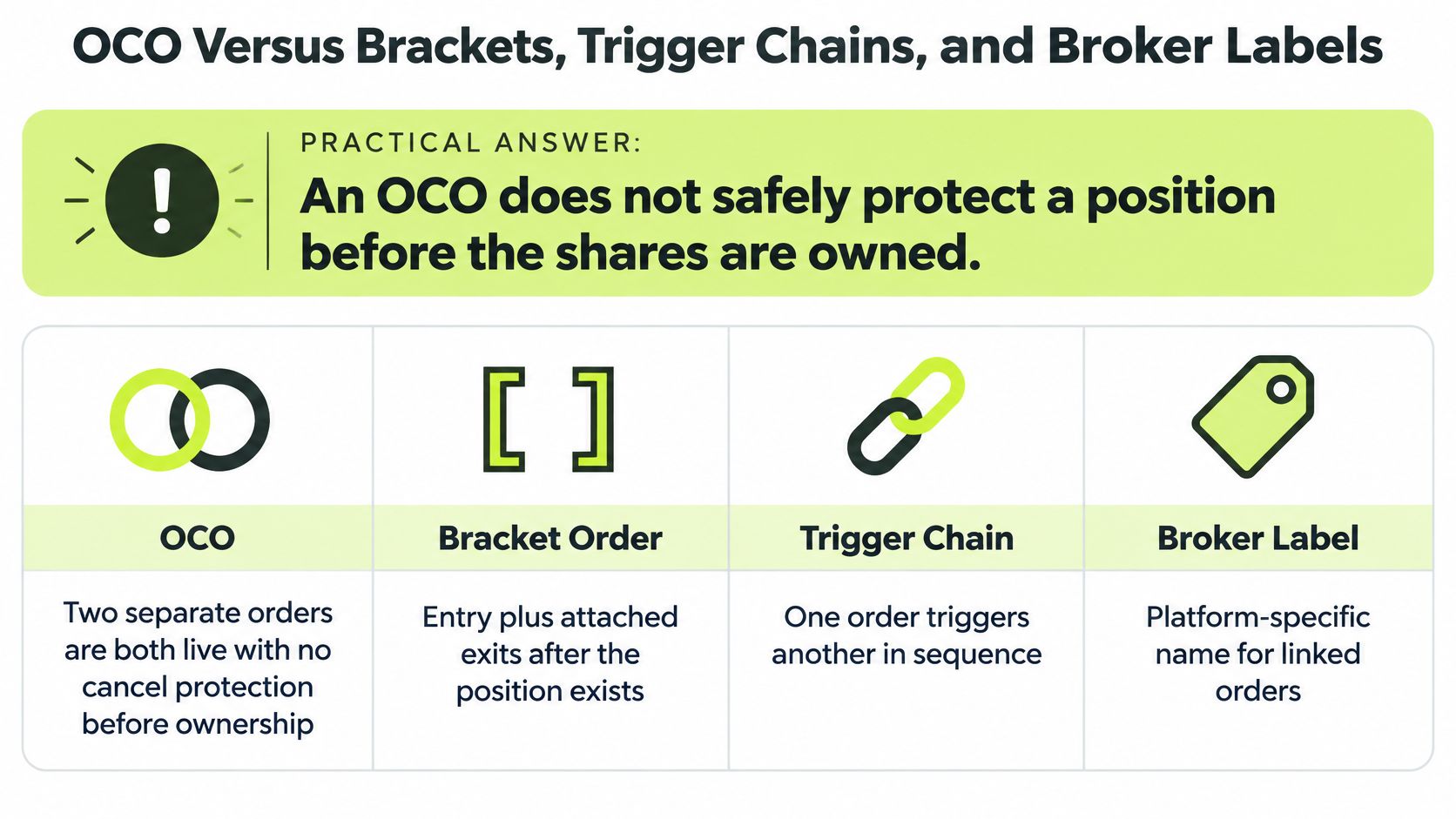
**A standard exit OCO doesn't safely protect shares you don't own yet.** Its two sell exits are generally meant to manage an existing long position. If you send them before an entry fills, the quantities may not match the shares you eventually buy, or an exit could be submitted without the position it's meant to close.
| Structure | When orders are live | What it includes | Use it when |
|---|---|---|---|
| Two separate orders | Both immediately, with no cancel link | Whatever tickets you send | You'll cancel the unused order yourself |
| Standard OCO | Both legs at once | Two or more exits and no entry | The shares are already held |
| Bracket order | Entry and linked exits as one plan | Entry, profit target, and stop | You want the whole trade packaged |
| 1st Triggers OCO | Exit pair submits only after the entry fills | An entry, then an OCO | You don't own the shares yet |
The key difference is **sequencing**. With a broker-supported “1st Triggers OCO” structure, the entry comes first; the profit target and stop are submitted only after the entry fills. That is different from placing both exits at once for shares you haven't bought. [thinkorswim's order-type guide](https://toslc.thinkorswim.com/center/howToTos/thinkManual/Trade/Order-Entry-Tools/Order-Types.html) distinguishes a standard OCO from “1st Triggers OCO,” where the initial order fills before the exit pair is submitted.
A bracket includes an entry as well as its linked exits. That makes it the broader trade package, but it still doesn't automatically solve every quantity issue. A partial entry may require the exit quantities to be adjusted, and the order structure won't necessarily rebuild protection if the position changes.
### Read the broker's label carefully
Broker names can differ for structures with similar purposes. Read the order details to confirm what submits immediately, what waits for an entry fill, how the order quantities are set, and whether cancellation is best-efforts. Don't rely on a label alone to tell you whether your shares are protected.
The useful distinction is narrow: an OCO helps coordinate two exits so you don't have to manage their cancellation as unrelated tickets. It doesn't guarantee a target price, cap a loss, size an entry, or ensure that protection is resized after a partial fill.
## A 100-Share OCO Through Full and Partial Fills
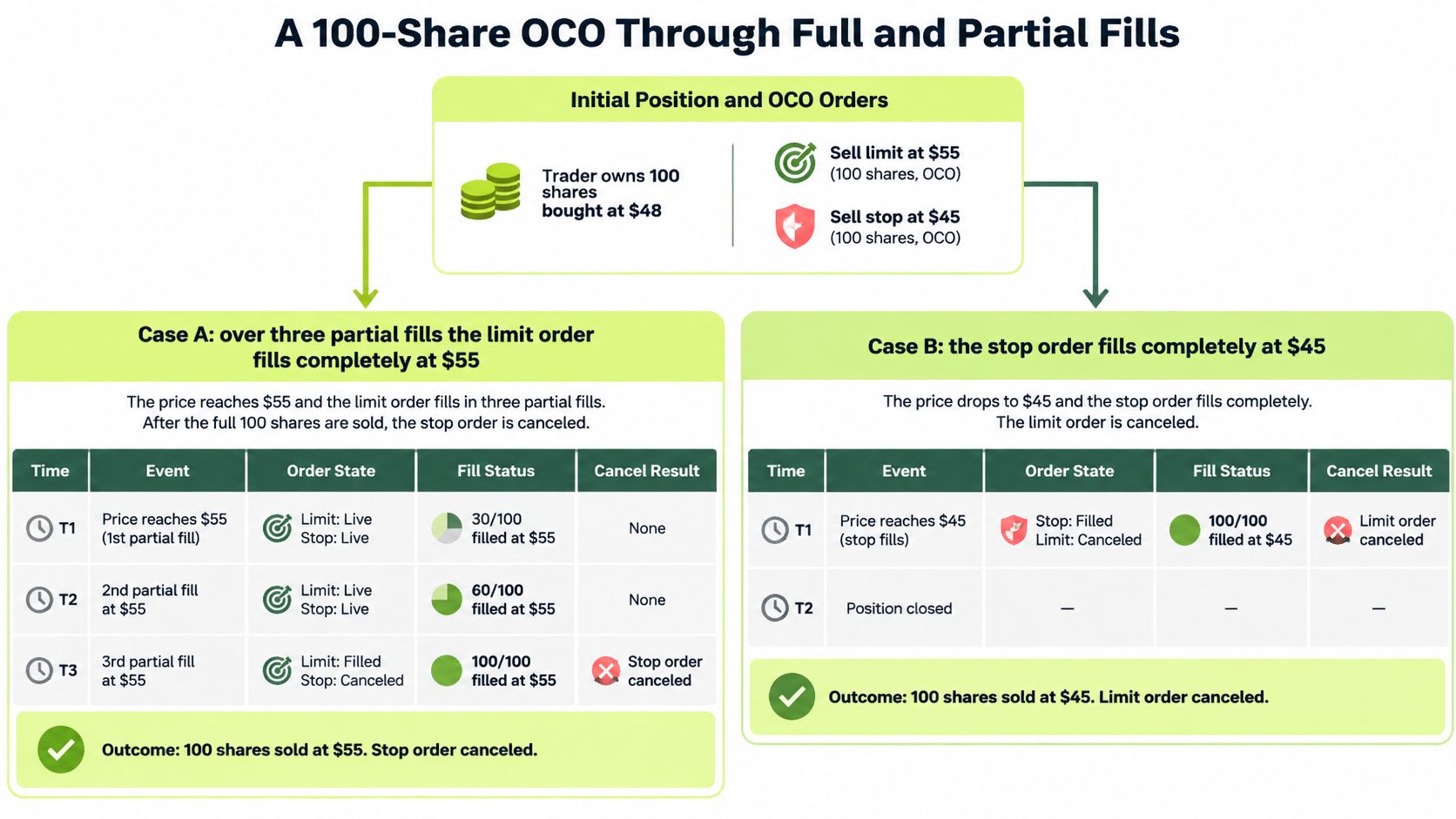
Consider a hypothetical position: you own **100 shares bought at $48**, and you place a sell limit at **$55** with a sell stop at **$45**. The outcomes depend not just on which price is reached, but on how much fills and what the broker confirms about the other leg.
| Case | Order result |
|---|---|
| A | 100 sold at $55 or better and stop canceled |
| B | Stop becomes a market order and $55 limit is canceled |
| C | 40 sold at $55; 60 remain, so the stop should be reduced to 60 shares |
### Follow the order through each outcome
**Case A:** Over several sessions, the stock trades at $55.10. If the full 100-share limit order fills at $55 or better, the position is closed. At $55 exactly, the gain is about **$700 before fees**, calculated as the $7 difference between the sale and purchase prices for each of 100 shares. Check that the broker confirms the stop is canceled.
**Case B:** Disappointing news sends the stock through $45, and it prints at $44.20. The stop activates and becomes a market order, while the $55 limit is the leg to be canceled. If all shares sell at $44.20, the loss is about **$380**, calculated from the $3.80 difference per share, rather than the $300 implied by a fill exactly at $45. Those figures illustrate the scenario, not a guaranteed execution price.
**Case C:** Only 40 shares fill at $55. You still own 60 shares, so the remaining protective stop should match those 60 shares. If an unchanged 100-share stop later sells, it could sell 40 shares you no longer hold.
### Watch the cancellation window
A partial fill can start a cancellation or adjustment while the remaining quantity is still working. Until the broker confirms the cancellation or revised size, the position may be only partly closed and both order legs may remain live. Fidelity says cancellation is on a **best-efforts** basis and that both orders may be live simultaneously ([Fidelity's conditional-order disclosures](https://www.fidelity.com/webcontent/ap002390-mlo-content/19.09/help/learn_trading_conditional.shtml)).
That window matters in fast markets, opening gaps, thinly traded stocks, broker outages, or when executions are split across venues. Don't assume that a partial fill instantly removes the other order. Track the fills, quantities remaining, and cancellation confirmations, then compare them with the shares you hold.
For a short position, the sides reverse: the profit-taking order is a buy limit below the market, and the protective order is a buy stop above it.
## Pre-Send Checks Before the Pair Goes Live
Before you submit an exit pair, confirm that it matches the position and the broker's order behavior. A quick review can catch a quantity mismatch or an order structure that doesn't sequence the way you expect.
1. **Confirm ownership or entry sequencing.** If you don't already hold the shares, use a broker-supported bracket or trigger chain that submits exits after the entry fills, rather than sending a naked exit pair.
2. **Match both quantities to the position.** Account for any partial entry or exit already filled. The remaining orders should reflect the shares still open.
3. **Choose the stop behavior deliberately.** A stop accepts the possibility of a worse market fill. A stop-limit keeps price control but accepts the possibility of no fill.
4. **Read the cancellation terms.** Check whether the broker describes cancellation as best-efforts. Don't assume the unused leg disappears at the exact instant a fill occurs.
5. **Reconcile after a price test.** Compare the filled quantity, remaining quantity, and other leg's cancellation status. Those are the facts that show what protection is active.
A TradingView alert routed through Pineflows is a separate process from a broker-native OCO. **Pineflows places market orders only for US equities and ETFs**, so an alert can submit an exit market order but doesn't create a linked limit-and-stop pair at the broker. Keep the broker's own OCO or bracket for linked exits, and use [trade execution software](https://pineflows.com/blog/trade-execution-software) to understand the separate alert-routing workflow.
If an alert arrives but no order is placed, Pineflows' signal log names the reason, such as paused, duplicate, test mode, plan needed, or Robinhood not connected. Pausing blocks new entries immediately, cancels Pineflows' own open entry orders, and keeps valid exits available. That pause control doesn't replace checking the broker's order statuses when you're managing an OCO.
---
Pineflows turns TradingView strategy alerts into executable Robinhood orders, with status checks and fill details to help you audit the alert-to-order path. If you use that workflow, keep linked profit and stop exits in your broker's native OCO or bracket order, and [visit Pineflows](https://pineflows.com) to learn how its alert routing works.