# TradingView Webhook Guide: Automate Your Alerts in 2026
> Learn how to set up a TradingView webhook for automated alerts and Robinhood execution. Streamline your trading workflow with this comprehensive 2026 guide.
Source: https://pineflows.com/blog/tradingview-webhook
Published: 2026-10-04
Updated: 2026-10-04
Tags: tradingview webhook, algorithmic trading, pine script automation, tradingview alerts, robinhood api
A paid TradingView plan, enabled two-factor authentication, and a unique webhook URL are the essential prerequisites for sending alerts to an external execution service such as Pineflows. Your receiving server must also acknowledge each request within **3 seconds**, or TradingView cancels the delivery.
You may already have a Pine Script strategy that looks convincing in backtests. The alert condition triggers, the chart marks an entry, and then live market hours expose the weak point: someone still has to notice the signal, decide whether to act, and submit the Robinhood order. That manual gap is where hesitation, timing errors, and uncertainty about whether an alert arrived can undermine an otherwise disciplined system.
A production-ready **TradingView webhook** is more than a URL pasted into an alert form. It's a controlled message pipeline. TradingView generates the event, your receiving service validates it, the execution layer decides whether it's new and permitted, and Robinhood receives an order only after the workflow passes its checks. The difference between a demo and a dependable live system is the safety surrounding that message.
## Table of Contents
- [Why Webhooks Bridge the Gap Between Charts and Execution](#why-webhooks-bridge-the-gap-between-charts-and-execution)
- [The bridge is a message, not a magic trade](#the-bridge-is-a-message-not-a-magic-trade)
- [Setting Up Your TradingView Environment for Alerts](#setting-up-your-tradingview-environment-for-alerts)
- [Configure the alert in a controlled order](#configure-the-alert-in-a-controlled-order)
- [Understanding Webhook Payloads and Server Limits](#understanding-webhook-payloads-and-server-limits)
- [The server must answer before it processes everything](#the-server-must-answer-before-it-processes-everything)
- [Debugging Failed Alerts and Throttling Issues](#debugging-failed-alerts-and-throttling-issues)
- [Read the evidence in order](#read-the-evidence-in-order)
- [Routing Alerts to Robinhood with Automated Execution](#routing-alerts-to-robinhood-with-automated-execution)
- [Manual entry and automation serve different stages](#manual-entry-and-automation-serve-different-stages)
- [Best Practices for Reliable Live Automation](#best-practices-for-reliable-live-automation)
- [Build an audit trail that answers uncomfortable questions](#build-an-audit-trail-that-answers-uncomfortable-questions)
- [Protect the strategy from the adapter](#protect-the-strategy-from-the-adapter)
## Why Webhooks Bridge the Gap Between Charts and Execution
TradingView alerts are useful even when they only notify you. They become operationally different when they send an HTTP POST request to a service that can interpret the signal and route it toward execution. TradingView describes webhook alerts as a way to trigger external bots or scripts, which turns a chart event into a machine-readable handoff rather than another notification competing for your attention.
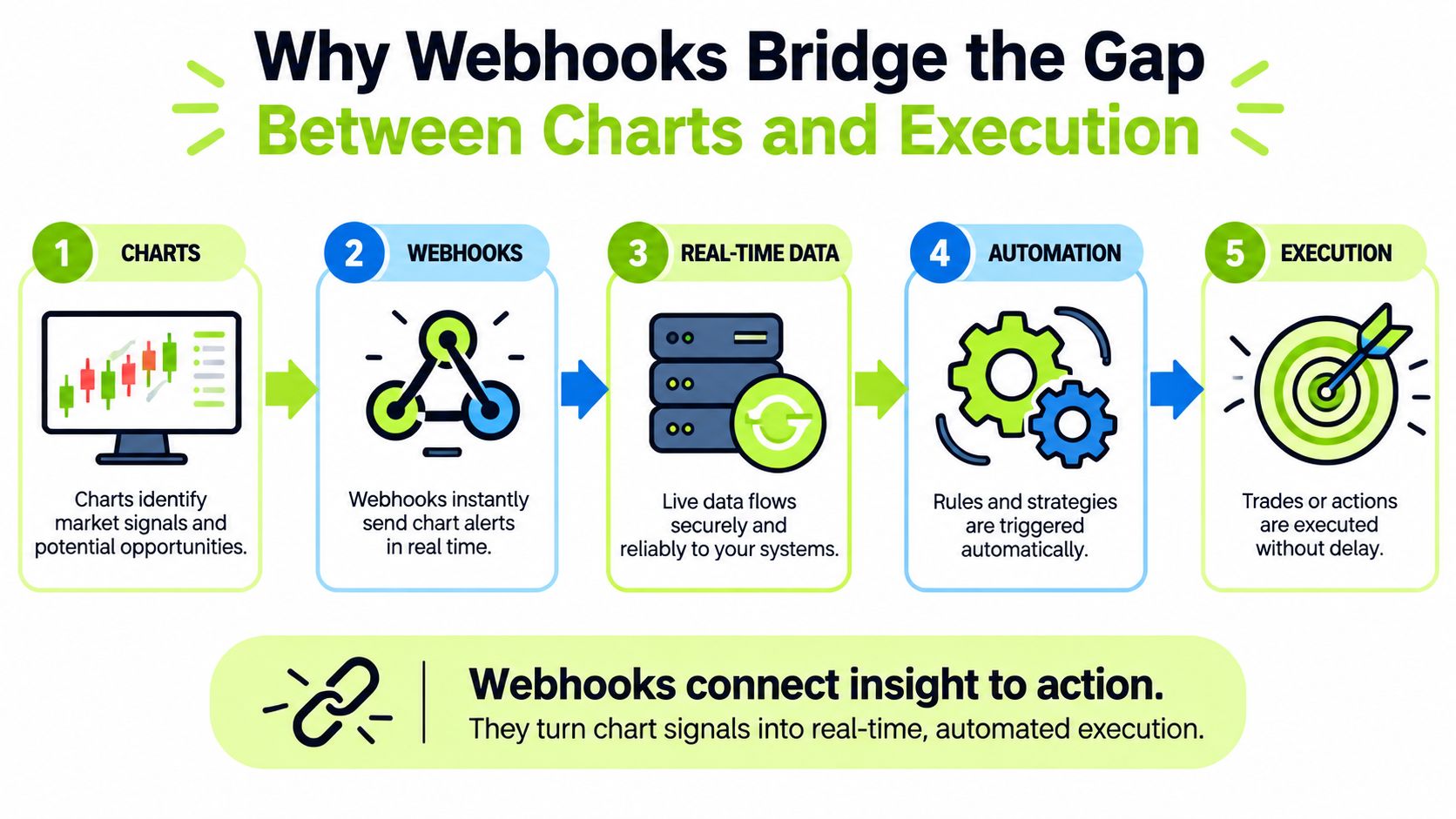
The practical advantage is consistency. A backtested Pine Script strategy makes decisions according to defined conditions, but manual execution adds a second decision-maker at the worst possible moment. A webhook preserves the strategy's signal and passes it to an external service without requiring you to keep the chart open or copy values into a broker ticket.
### The bridge is a message, not a magic trade
A webhook doesn't guarantee a fill, remove market risk, or make a weak strategy profitable. It only transports an alert. The receiving system still needs to validate the symbol, action, event identity, and account state before it can safely request an order from Robinhood.
That distinction matters because a reliable pipeline must handle failure deliberately. It should know whether a request was received, whether the payload was valid, whether the event was already processed, and whether the broker accepted or rejected the order. A simple “alert fired” notification answers only the first question.
> **Practical rule:** Treat every TradingView alert as an untrusted instruction that must pass validation before it can become an order.
TradingView's webhook configuration is built into the normal alert creation and editing workflow, rather than requiring a separate native integration product. You provide a destination URL, define the alert message, and allow the receiving service to process the event. That simplicity is useful, but it also makes testing essential. The fewer visible steps between chart and broker, the more important it is to record what happened at each hidden step.
## Setting Up Your TradingView Environment for Alerts
Start with account access and security, not Pine Script changes. TradingView requires **two-factor authentication** for webhook alerts, and the workflow also depends on a plan that supports the feature. If either condition is missing, a carefully designed payload won't solve the problem.
TradingView's [webhook configuration guidance](https://www.tradingview.com/support/solutions/43000529348-how-to-configure-webhook-alerts/) places the webhook URL inside the alert creation and editing interface. Use a dedicated, unique endpoint supplied by your execution service. Don't paste a shared URL copied from a public tutorial, and don't reuse an endpoint across unrelated strategies if the receiving system uses the URL to identify an account or workflow.
### Configure the alert in a controlled order
1. **Enable two-factor authentication:** Confirm the security requirement before troubleshooting alert delivery.
2. **Open the alert editor:** Choose the exact indicator, strategy condition, symbol, and timeframe that your backtest represents.
3. **Select the webhook notification option:** Enter the unique endpoint supplied by your execution service.
4. **Define the message deliberately:** Include only fields the receiving system expects, such as the action, instrument, and strategy event identifier.
5. **Save and document the configuration:** Record the alert name, condition, timeframe, message template, and destination without exposing the endpoint publicly.
The message should match the receiver's contract. A buy signal that says “buy” but omits the instrument may be unusable, while a symbol formatted for one market can be rejected by another. Keep the strategy logic stable during this setup. Changing entry conditions and routing configuration at the same time makes it difficult to tell whether a later problem comes from the strategy or the transport layer.
Use the [TradingView alert setup documentation for Pineflows](https://docs.pineflows.com/tradingview-alert) as a configuration reference when the service's expected fields differ from your own assumptions. The goal is a reproducible alert, not a clever one. Create one known signal, send it through the pipeline, and inspect the received message before enabling live order transmission.
## Understanding Webhook Payloads and Server Limits
A TradingView webhook request is only useful when the receiving server can interpret it quickly and accurately. In a typical workflow, the payload identifies an action such as an entry or exit, the symbol associated with the signal, and any strategy values required by the execution layer. The exact field names depend on the receiving service, so the message format should come from its documentation rather than from a generic JSON example.
A useful payload design separates **identity**, **intent**, and **context**. Identity tells the receiver which event it is processing. Intent describes what the strategy wants to do. Context can include values such as the chart symbol, signal price, or strategy state. The receiver should validate each category independently instead of assuming that syntactically valid JSON is also a valid trading instruction.
### The server must answer before it processes everything
TradingView sends an HTTP POST to the URL you specify when the alert triggers. The receiving endpoint must acknowledge that request within **3 seconds**, otherwise TradingView cancels it, as explained in the [TradingView webhook delivery documentation](https://www.tradingview.com/support/solutions/43000529348-about-webhooks/). Webhook URLs are restricted to **ports 80 and 443**, so an endpoint listening elsewhere won't satisfy the platform's delivery requirements.
That timing constraint changes the architecture. The endpoint should receive the request, validate the minimum required structure, record the event, and return an acknowledgement quickly. Longer work, such as broker communication or extensive logging, should happen behind that initial response when the service supports asynchronous processing.
> A fast acknowledgement is not the same as a successful trade. It confirms transport handling, not broker acceptance or execution.
The [webhook integration documentation](https://docs.pineflows.com/webhooks) should define the expected payload and response behavior for the service you choose. Test malformed JSON, an unknown action, an unsupported symbol, and a repeated event. A receiver that accepts every request may appear convenient during setup, but it creates avoidable risk once alerts reach a live account.
The alert log provides a dedicated webhook status column for delivery monitoring. Use it alongside your own event records. TradingView can tell you about delivery status, while your execution service should show whether it parsed the message, rejected it, identified it as a duplicate, or sent an order request onward.
## Debugging Failed Alerts and Throttling Issues
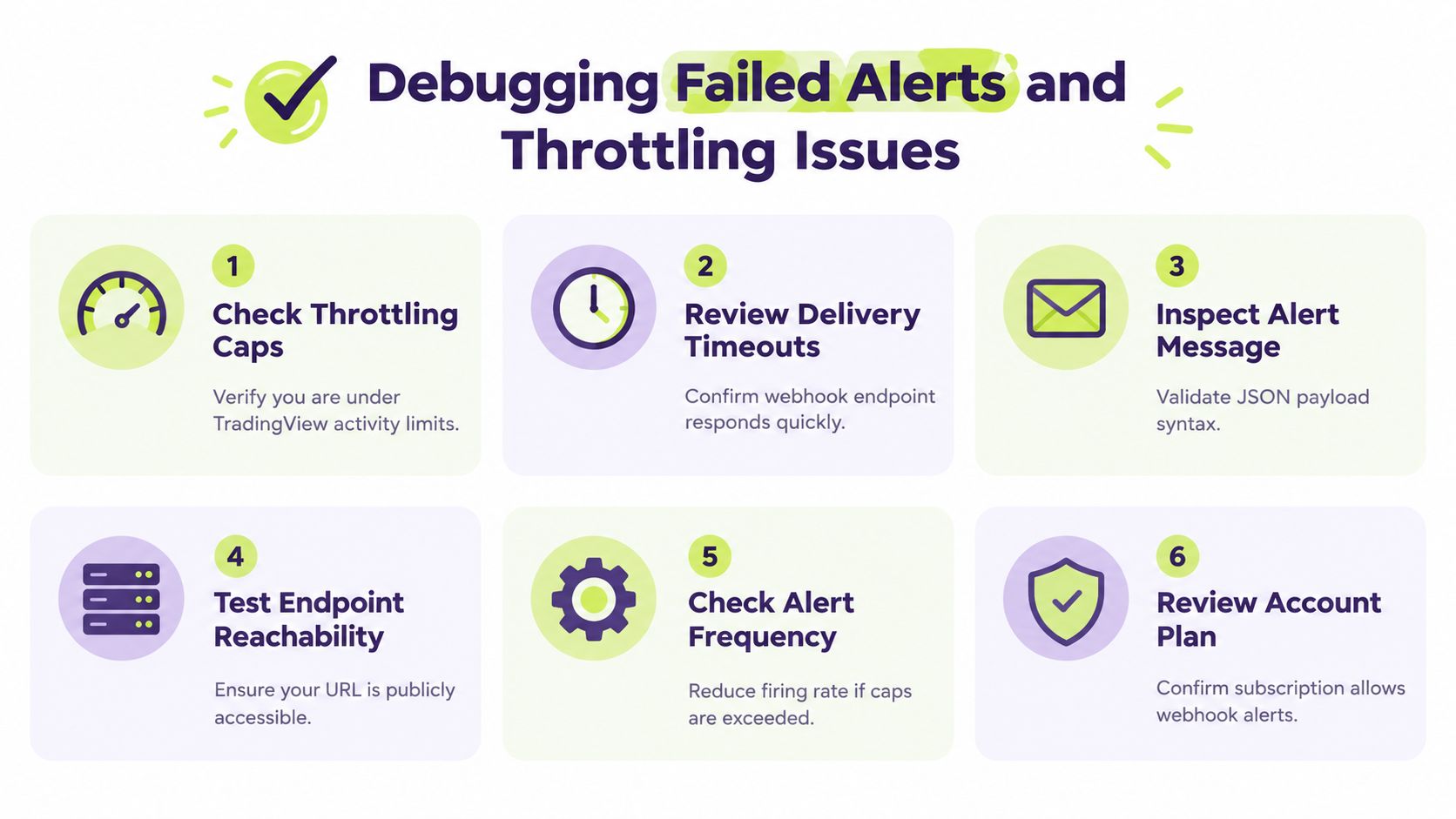
When a strategy stops producing trades, don't immediately rewrite the Pine Script. First separate the failure into four layers: the alert condition, TradingView's delivery attempt, the receiving endpoint, and the broker execution response. Each layer can fail independently, and a chart that visibly triggered an alert doesn't prove that the webhook reached the server.
TradingView's alert system automatically halts further alerts when activity exceeds **15 alerts within 3 minutes**, according to the [Pine Script alerts FAQ](https://www.tradingview.com/pine-script-docs/faq/alerts/). That cap makes noisy conditions dangerous. A strategy can behave acceptably in a quiet replay and then generate enough repeated signals during volatile movement to stop its own alert flow.
### Read the evidence in order
- **Check the alert state:** Confirm the alert remains active and that the condition still matches the intended symbol and timeframe.
- **Inspect webhook status:** Use TradingView's alert log to determine whether delivery was attempted and whether the request was cancelled.
- **Review endpoint timing:** A server that takes longer than the allowed response window can lose the request even when the alert itself is valid.
- **Validate the message:** Parse the exact body received by the server. Look for invalid JSON, missing fields, unexpected symbols, and action values the receiver doesn't support.
- **Look for throttling:** If the strategy emits bursts of signals, reduce unnecessary repetitions and review whether the alert condition fires once per intended event.
- **Compare broker records:** A received webhook may still produce a rejected or unfilled order, so inspect the downstream status separately.
Independent latency measurements over **34,174 webhook alerts** found a median end-to-end delay of **4.03 seconds**, with about **one-third** exceeding **5 seconds** and **9%** exceeding **8 seconds**. Those measurements make buffering, deduplication, and server-side observability practical safeguards rather than optional engineering refinements.
The right response to latency isn't to assume every delayed event is lost or to submit a second order automatically. A retry without an event identity can create duplicate positions. Record the original event, decide whether it remains actionable, and let the execution layer determine whether a safe retry is possible.
## Routing Alerts to Robinhood with Automated Execution
Manual Robinhood execution gives you direct control, but it inserts a human checkpoint between every signal and order. That can be appropriate for discretionary review, especially while validating a new strategy. It also creates a predictable failure mode: the alert arrives while you're away from the screen, the market moves, and the order no longer reflects the condition that generated it.
Automated routing removes that manual handoff, but it should add controls rather than remove judgment. The execution service needs to know whether the event is permitted, whether it has already processed the signal, and whether the account or workflow is paused. A signal should never become a live order merely because its JSON parsed successfully.
### Manual entry and automation serve different stages
| Workflow | Strength | Main risk |
|---|---|---|
| Manual Robinhood entry | You can inspect each alert before acting | Delays, hesitation, and inconsistent handling |
| Automated webhook routing | The same validated instruction follows a repeatable path | A flawed condition or payload can act repeatedly |
| Test-first automation | You can inspect events before allowing broker orders | Requires deliberate test cases and review |
A sensible progression starts with a non-live mode that records incoming alerts without transmitting orders. Trigger a known condition, inspect the payload, verify the symbol and action, and confirm that the service records the event correctly. Then test a repeated delivery and confirm that the second event doesn't create another order.
Pause controls matter after launch as well. A global pause should block new entries while preserving the ability to handle valid exits or risk-management actions, depending on the service's design. That lets you stop fresh exposure without treating every open position as if it no longer needs attention.
For the Robinhood connection, use the [Robinhood connection instructions](https://docs.pineflows.com/connect-robinhood) supplied by the execution service. Keep broker authentication within the broker's approved sign-in flow, and avoid placing passwords or reusable credentials in alert messages. Your audit record should show the TradingView event, validation result, order request, broker response, and final fill status as separate steps.
## Best Practices for Reliable Live Automation
A live webhook system should be designed around failure, not around the successful demo. The most important question isn't whether a buy alert can reach Robinhood once. It's whether the system behaves safely when the same event arrives again, arrives late, contains an unexpected value, or reaches the endpoint while execution is paused.
**Idempotency comes first.** Give every alert a stable event identifier and store the processing result against that identifier. If TradingView or an intermediary delivers the same event again, the receiver can recognize it and avoid submitting another order. This protection should apply to entries, exits, and other actions, not just the most obvious buy signal.
### Build an audit trail that answers uncomfortable questions
A useful record should let you reconstruct the event without opening the chart again. Capture the received timestamp, payload, validation outcome, duplicate decision, pause state, broker request status, and fill details. Human-readable records are valuable because a status such as “processed” doesn't explain whether the broker accepted the order or whether the trade filled.
Out-of-order events need an explicit policy. A late exit may still be valid, while a late entry could create exposure after the strategy has already reversed. Compare event identity and strategy state before acting. Don't assume that network arrival order equals market or strategy order.
### Protect the strategy from the adapter
Keep Pine Script logic and alert routing conceptually separate. If a backtested strategy needs a new entry condition, change and retest the strategy. If the execution service only needs a field added to the message, change the routing layer. Mixing both changes makes post-test results difficult to interpret.
Use this final review before enabling live orders:
- **Payload review:** Confirm required fields, symbol conventions, action values, and event identifiers.
- **Duplicate test:** Send the same event again and verify that it cannot create a second order.
- **Pause test:** Confirm that new entries stop when paused and that the service handles exits according to its documented behavior.
- **Failure test:** Exercise invalid JSON, missing fields, rejected actions, and unavailable broker responses.
- **Audit review:** Trace one event from TradingView delivery through validation, order handling, and fill status.
- **Strategy check:** Verify that the alert condition still represents the logic you tested, without accidental changes to entries or exits.
Production readiness comes from observable decisions. A dependable system doesn't hide uncertainty behind a green webhook status. It tells you what arrived, what the service accepted, what it rejected, and what Robinhood ultimately did.
---
Pineflows provides a test-first pipeline for turning TradingView strategy alerts into auditable Robinhood orders, with duplicate detection, delivery checks, payload inspection, and pause controls. If you're ready to validate your alert flow before allowing live execution, visit [Pineflows](https://pineflows.com) and start with the test workflow.