# Trade Execution Software for Retail Traders: What to Know
> Learn what trade execution software does, how reliability and audit features work, and how retail traders pick the right option for their strategy in 2026.
Source: https://pineflows.com/blog/trade-execution-software
Published: 2026-10-02
Updated: 2026-10-02
Tags: trade execution software, order routing, TradingView automation, Robinhood execution, retail algo trading
Your Pine Script strategy has finally produced a clean backtest. The alerts are configured, the chart is open, and then a signal fires while the market is moving quickly. You switch to the broker tab, check the symbol, second-guess the position size, and submit the order manually. By the time the confirmation appears, the fill no longer resembles the price that made the alert attractive.
That gap between a validated signal and an actual position is where **trade execution software** earns its keep. The important question isn't whether a tool can send an order quickly. It's whether the system can show what happened, prevent duplicate submissions, pause safely, recover from failures, and preserve the difference between your backtested rules and an improvised live trade.
## Table of Contents
- [Why a Manual Order Entry Is the Riskiest Part of Your Strategy](#why-a-manual-order-entry-is-the-riskiest-part-of-your-strategy)
- [The bridge between signal and position](#the-bridge-between-signal-and-position)
- [What Trade Execution Software Actually Does](#what-trade-execution-software-actually-does)
- [Where the pathway breaks](#where-the-pathway-breaks)
- [Reliability Features That Separate Fragile Tools from Trustworthy Ones](#reliability-features-that-separate-fragile-tools-from-trustworthy-ones)
- [Deduplication stops one signal becoming two positions](#deduplication-stops-one-signal-becoming-two-positions)
- [Idempotent retries make uncertainty safer](#idempotent-retries-make-uncertainty-safer)
- [Pause controls contain a bad session](#pause-controls-contain-a-bad-session)
- [Audit trails turn confusion into evidence](#audit-trails-turn-confusion-into-evidence)
- [Timestamps, Latency, and Knowing What Really Happened](#timestamps-latency-and-knowing-what-really-happened)
- [Using Transaction Cost Analysis Without Becoming a Quant](#using-transaction-cost-analysis-without-becoming-a-quant)
- [How Retail Traders Can Compare Execution Tools](#how-retail-traders-can-compare-execution-tools)
- [Start with credentials and test mode](#start-with-credentials-and-test-mode)
- [Test retries and pauses deliberately](#test-retries-and-pauses-deliberately)
- [Check broker coverage and fee reporting](#check-broker-coverage-and-fee-reporting)
- [Going Live Without Regret and What to Check First](#going-live-without-regret-and-what-to-check-first)
- [The first live-session review](#the-first-live-session-review)
## Why a Manual Order Entry Is the Riskiest Part of Your Strategy
A TradingView alert fires during a fast candle. You see the notification, open your broker, and start typing. The intended order is simple, but the workflow isn't. You may hesitate over quantity, select the wrong order type, or discover that the price has already moved away from the level used by the strategy.
The first cost is often **execution drift**. The alert represents a decision at a particular point in time, while the manual order represents a later decision made by a person. That delay can produce slippage, a missed partial fill, or no fill at all. The exact outcome depends on the instrument, liquidity, order type, and market conditions, but the structural problem is consistent: the backtest generated one event, while the live workflow created another.
> **Practical rule:** If your strategy depends on a signal but requires calm manual intervention before it becomes a position, the manual step is part of the strategy whether you model it or not.
Manual entry also creates operational errors that Pine Script never introduced. Under pressure, a trader can transpose a symbol, enter the wrong quantity, click buy instead of sell, or use a market order where a limit order was intended. Even a careful trader can lose track of whether an alert was already acted upon, especially when several alerts arrive close together.
The emotional override is more subtle. A trader who sees the price move before submitting may reduce size, skip the order, or enter late because the original setup now feels less certain. That turns a rules-based system into a discretionary workflow. The live result can then be blamed on the strategy, even though the strategy never received the intended execution.
### The bridge between signal and position
Execution software connects the event produced by the strategy to the order pathway at the broker. It can translate an alert into a defined order object, record the event, submit it through an API, and track what the broker reports back. The benefit is **repeatability**, not an abstract promise of perfect fills.
A reliable pipeline should answer basic questions after every alert:
- **Was the alert received?** The raw payload should be available for inspection.
- **Was the event accepted once?** Repeated delivery shouldn't create repeated positions.
- **Was an order submitted?** The broker request and response should be recorded.
- **What happened afterward?** Pending, rejected, partially filled, and filled states should remain visible.
- **Can new entries be paused?** A trader needs a control that doesn't depend on the alert behaving correctly.
Those controls become more important as automation moves from a backtest into live conditions. The order-routing button is only one part of the product. **Deduplication, idempotency, auditability, and pause controls** determine whether you can trust the result when something goes wrong.
## What Trade Execution Software Actually Does
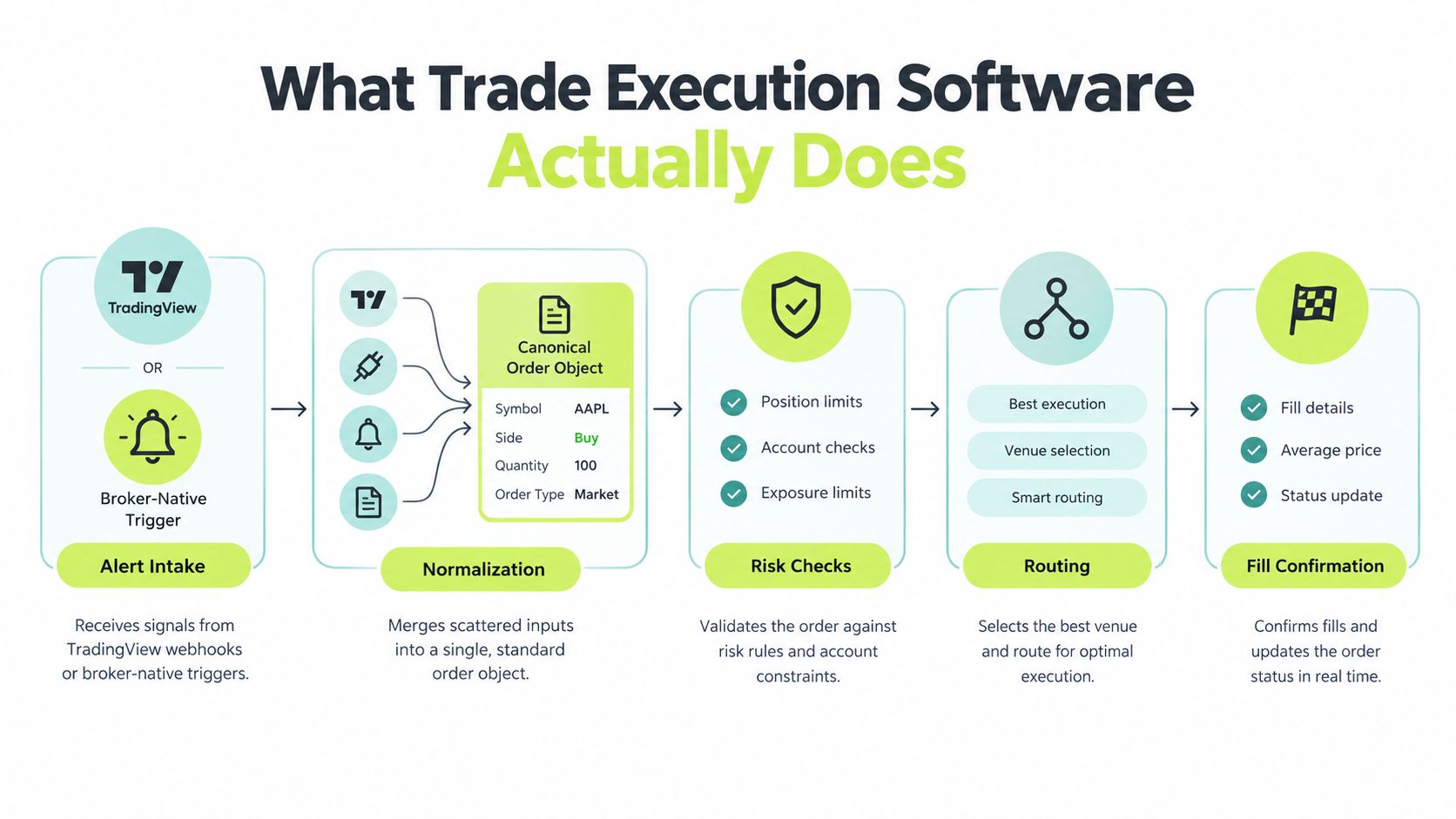
Think of trade execution software as a stateful pipeline, not a single button. It receives an instruction, turns that instruction into a standard order representation, sends it to a broker or router, observes the responses, and records the changing state of the order.
A typical pathway looks like this:
1. **Alert intake:** A TradingView webhook or broker-native trigger produces an event.
2. **Normalization:** The event becomes a canonical order object containing the symbol, side, quantity, order type, and time-in-force.
3. **Validation and routing:** The system applies configured checks and sends the request to a broker API or smart-order router.
4. **Broker acknowledgement:** The broker accepts or rejects the request and may return an order ID.
5. **Fill and status reporting:** The system records partial fills, full fills, cancellations, rejections, and pending states.
For TradingView users, the webhook is the boundary between the strategy and the execution layer. The [TradingView alert documentation](https://docs.pineflows.com/tradingview-alert) is useful when you need to understand how alert messages are formed and delivered, but the alert itself doesn't prove that a broker accepted an order.
### Where the pathway breaks
Each stage has a distinct failure mode. A webhook can be dropped or malformed. A normalization step can misread a field. A broker API can throttle requests, return an authentication error, reject an order, or accept it without an immediate fill. A status stream can disconnect while the order remains active at the broker.
That last case causes many false assumptions. A timeout isn't the same as a rejection. If the client sent a request but didn't receive the response, the order may have been accepted. Retrying blindly can create a second order.
Execution software generally focuses on sending and tracking orders. An **order management system**, or OMS, usually goes further by aggregating positions, orders, and workflows across brokers, desks, or asset classes. A retail trader using one broker and one strategy may not need the complexity of a full OMS. Buying more features won't fix a pipeline that can't explain a single order.
## Reliability Features That Separate Fragile Tools from Trustworthy Ones
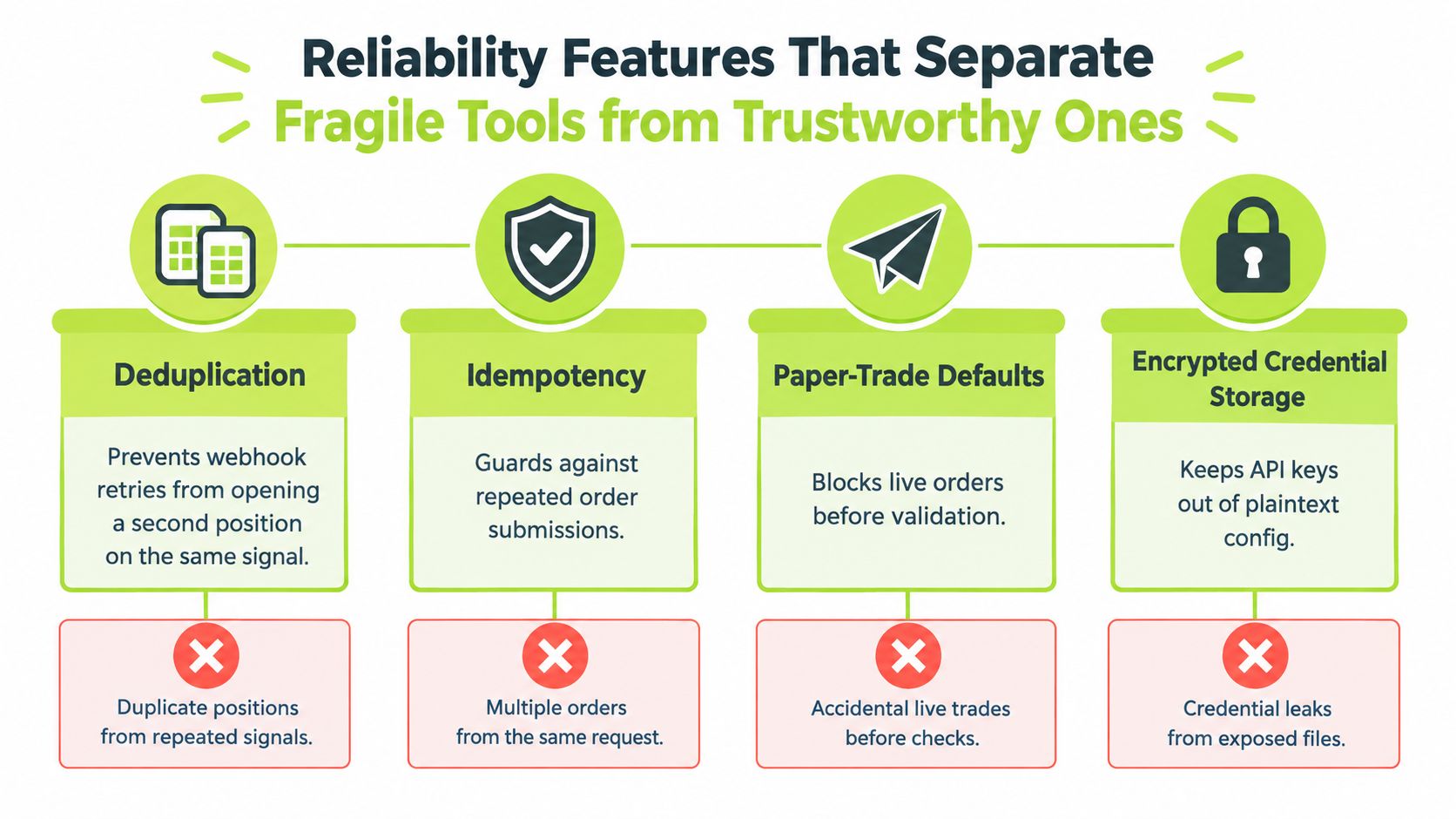
A fragile automation tool treats an alert as a command and assumes the network, broker, and application will cooperate. A trustworthy tool treats the alert as an event that must move through controlled states. The distinction becomes obvious when delivery is repeated, a response is delayed, or a trader needs to stop new entries immediately.
### Deduplication stops one signal becoming two positions
Webhook systems can retry delivery. Broker APIs commonly treat each new submission as a new order unless the client supplies a mechanism that identifies the original request. If the same breakout alert arrives twice and the execution layer submits both events, the resulting position can be larger than the strategy intended.
Deduplication requires a stable event identity and a record of whether that identity has already been processed. The system should distinguish a new alert from a repeated delivery, even if the messages arrive out of order.
### Idempotent retries make uncertainty safer
A timeout creates an uncomfortable state: you don't know whether the broker received the request. An **idempotent retry** lets the system resend a request associated with the same client order ID without treating it as a new economic instruction. That prevents the common failure mode where a recovery action creates a duplicate position.
The implementation details vary across brokers, so test the behavior in a paper or sandbox environment. A button labeled “retry” isn't enough. You need to know what identifier the retry uses and how the system handles an acknowledgement that arrives after the retry.
### Pause controls contain a bad session
A kill switch should stop new entries without forcing you to shut down every process. Useful controls include a global pause, strategy-level switches, and a clear policy for existing orders. A trader may want to block new entries while keeping valid exits available for risk handling.
Pause controls matter when a broker starts returning authentication errors, a connection becomes unstable, or a strategy begins firing unexpectedly after a market regime change. The control should be reachable outside the running chart or terminal, because the system you're trying to stop may be the system that has failed.
### Audit trails turn confusion into evidence
An audit trail should preserve the signal payload, normalized order payload, broker response, fill events, and timestamps. Human-readable logs make it possible to reconstruct whether the strategy generated the wrong instruction, the adapter transformed it incorrectly, or the broker returned an unexpected state.
> **A reliable system doesn't merely say that an order failed. It shows which event produced it, which request was sent, what the broker returned, and what happened next.**
These features matter more to most retail traders than a small difference in routing speed. A fast submission that can't be reconciled is operationally weak. A slightly slower pipeline with controlled retries, visible states, and a dependable pause path is easier to validate and safer to operate.
## Timestamps, Latency, and Knowing What Really Happened
Latency isn't one number. It's a chain of intervals that starts when the strategy makes a decision and ends when the broker reports an execution. A useful log separates the alert timestamp, the time the execution service received it, the submission time, the broker acknowledgement time, each fill timestamp, and the final status time.
The [latency guidance for execution dashboards](https://www.luxalgo.com/blog/latency-optimization-in-trade-execution-dashboards/) distinguishes decision-to-submit timing, broker acknowledgement latency, and execution-report latency. It also highlights why precise timestamps matter for transaction cost analysis, including the possibility that a **500 ms fill-timestamp error** can shift arrival-price analysis by several basis points in volatile markets.
Clock differences complicate the picture. TradingView, an intermediary server, and a broker may record events using different clocks or timestamp conventions. If the clocks aren't synchronized or the application rounds timestamps, a later review may make the order appear faster or slower than it really was.
| Pathway Stage | Timestamp Captured | What It Reveals |
|---|---|---|
| Strategy decision | Alert creation time | When the script generated the trading instruction |
| Alert intake | Webhook receipt time | Whether delivery introduced a delay |
| Order submission | API request time | When the execution layer sent the order |
| Broker acknowledgement | Broker response time | How long acceptance or rejection took |
| Fill event | Exchange or broker fill time | When execution actually occurred |
| Final status | Completion or reconciliation time | When the system reached a known state |
A breakout illustrates why this matters. If the alert fires on a confirmed bar close, the decision time differs from an alert generated on a live tick. A backtest may treat those events as equivalent unless your live logging preserves the distinction. The resulting “late fill” may be an execution problem, or it may be a signal-timing mismatch.
For practical debugging, export the raw timestamps rather than relying only on a dashboard's summary. The [webhook integration documentation](https://docs.pineflows.com/webhooks) can help clarify the delivery boundary, but your own records should show what arrived, when it arrived, and what the broker reported.
## Using Transaction Cost Analysis Without Becoming a Quant
Transaction cost analysis, or TCA, doesn't require an institutional research stack. It requires consistent reference points and a record of what your strategy intended to do. TCA separates explicit costs, such as commissions, fees, and taxes, from implicit costs, such as spread, market impact, timing cost, and opportunity cost, as described in this [institutional TCA overview](https://www.quodfinancial.com/transaction-cost-analysis-tca-institutional-trading/).
For a retail workflow, start with three benchmarks:
| Benchmark | Data Inputs Required | What It Measures |
|---|---|---|
| Arrival price | Alert timestamp, bid, ask, and intended side | The price available when the strategy made its decision |
| VWAP | Trade prices and volumes over a defined window | How the fill compares with the volume-weighted market price during that period |
| Implementation shortfall | Intended quantity, decision price, fills, fees, and missed quantity | The total difference between the planned trade and the realized outcome |
**Arrival price** is a timing benchmark. For a buy order, you might use the mid-quote at the alert time, provided you have both bid and ask. Comparing that reference with the fill helps separate market movement after the signal from poor routing or slow submission.
**VWAP** provides context rather than a verdict. A fill above the volume-weighted average may indicate unfavorable execution, but the comparison only makes sense when the measurement window matches the strategy's holding or execution period.
**Implementation shortfall** is the broadest measure. It captures the gap between the intended entry and the completed result, including slippage, fees, and the cost of quantity that never filled. The precise calculation should match your order direction and treatment of partial fills.
After each session, export the fills and place them beside the alert records. Compute the three benchmarks in a spreadsheet, label the market and order conditions, and investigate days where the shortfall exceeds **two ticks**. That threshold is a review trigger, not a universal standard. Different instruments and strategies can justify different tolerances, so use it to find anomalies rather than to declare every result good or bad.
The purpose is diagnosis. If arrival price is reasonable but implementation shortfall is poor, fees, spread, or incomplete fills may be responsible. If the alert itself arrives after the intended decision point, changing the router won't repair the signal-generation process.
## How Retail Traders Can Compare Execution Tools
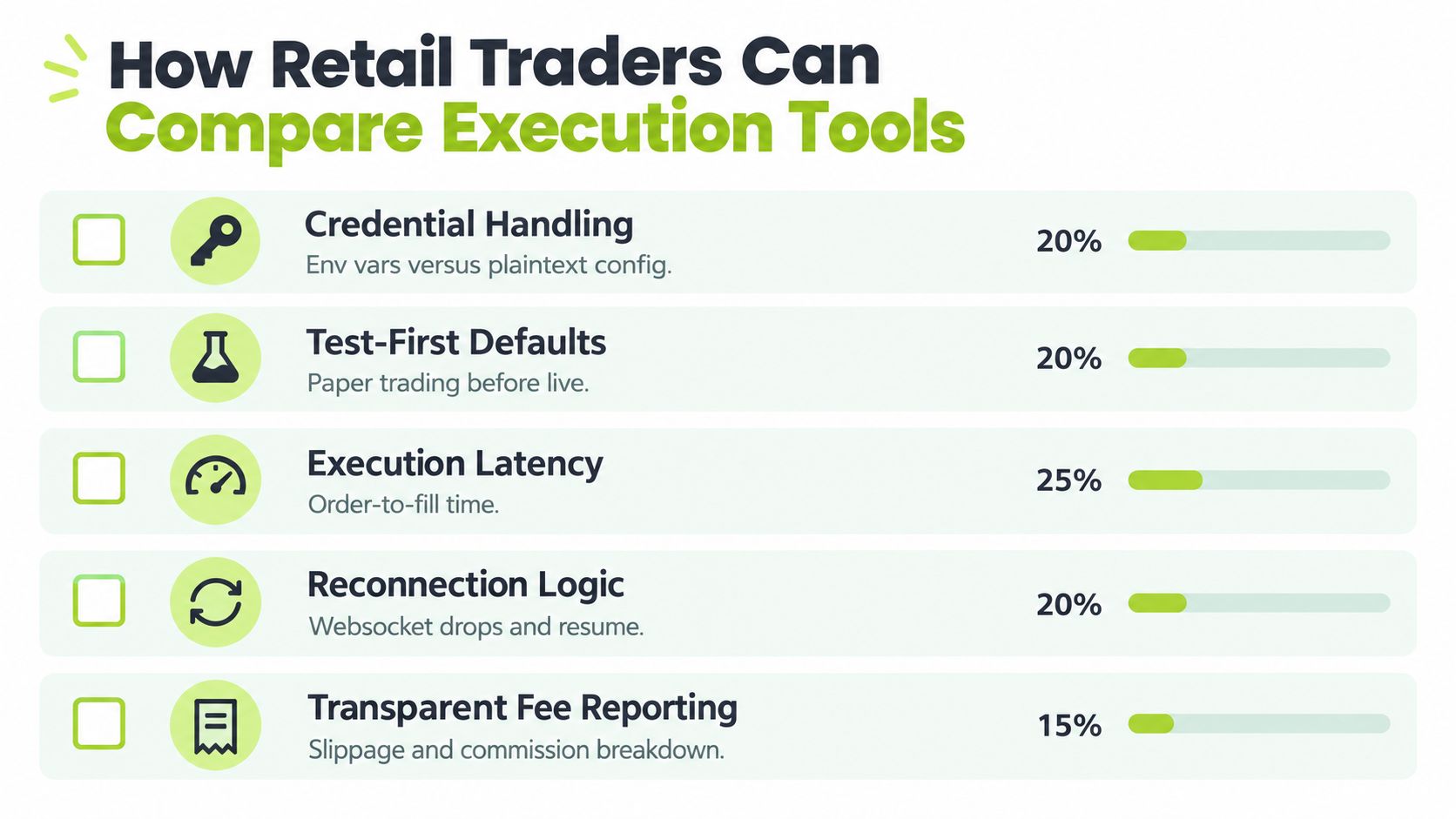
Compare execution tools by observing their behavior under controlled failure, not by reading the fastest latency claim on a landing page. A demo account or paper environment lets you test whether the system protects you when messages repeat, connections break, or a broker rejects an order.
### Start with credentials and test mode
Check whether credentials stay in a protected broker authorization flow or appear in plaintext configuration, chat, or logs. Then look for a genuine paper-trading gate. A test mode that merely changes a label but still permits live transmission isn't a safety control.
Ask these questions:
- **Credential handling:** Can you see a broker password, reusable token, or secret in application logs?
- **Test-first behavior:** Does the system refuse live submission until you explicitly enable it?
- **Payload visibility:** Can you inspect the normalized symbol, side, quantity, and order type before transmission?
### Test retries and pauses deliberately
Send the same event twice. Disconnect the status stream after submission. Simulate a delayed response, then check whether the tool retries with the same client identity or creates another order. Trigger a broker rejection and verify that the final state isn't incorrectly reported as filled.
A pause test should be equally direct. Activate the global switch, send a new entry alert, and confirm that the system records the event without submitting it. If the tool can't show what happened to the blocked event, the pause is harder to audit.
> **Red flag:** A retry control without an idempotency key is an invitation to test duplicate-order behavior before trusting live capital.
### Check broker coverage and fee reporting
Broker support isn't just a list of logos. Confirm whether the integration uses REST, WebSocket, or both, and find out how it handles rate limits, dropped connections, delayed fills, and reconciliation. A tool that supports a broker in ordinary conditions may still fail during a burst of alerts or a disconnected stream.
Pricing also needs a complete view. Look for the platform charge, per-order costs, exchange pass-throughs, market-data charges, and any fee that appears only after execution. A transparent report should let you reconcile the broker statement with the execution log.
Use a simple yes-or-no scorecard:
1. Can the tool identify one alert uniquely?
2. Can it pause new entries without destroying visibility?
3. Can it recover from a timeout without duplicating an order?
4. Can you export raw events and broker responses?
5. Can you explain the total cost of a completed trade?
A tool that scores well on these observable behaviors is more useful than one that only promises speed. You aren't selecting a marketing category. You're selecting the control layer that stands between a Pine Script event and a real position.
## Going Live Without Regret and What to Check First
Going live should feel like a controlled change, not a dramatic switch. Keep the first rollout small enough that an operational mistake is survivable, while still large enough to exercise the alert, broker, status, and reconciliation paths.
Before enabling live orders, verify four conditions:
- **Dry-run evidence:** The system has accepted alerts and produced understandable simulated order records.
- **Persistent logs:** Raw events, payloads, responses, fills, and timestamps are stored somewhere you can access without relying only on a vendor dashboard.
- **Reachable controls:** You can pause new entries and manage the strategy even if the primary chart session or execution process becomes unavailable.
- **Recovery rehearsal:** You know how the system behaves after an API rejection, delayed acknowledgement, dropped connection, or duplicate alert.
For broker-specific setup, consult the [Robinhood connection documentation](https://docs.pineflows.com/connect-robinhood) and verify that the account authorization and order permissions match the intended test. Don't assume that a successful login proves the entire order lifecycle works.
### The first live-session review
Compare the first live fills with the dry-run records from the prior session. Review the arrival-price relationship, inspect slippage, and confirm that the live status sequence moves through the states you expect. Send a controlled duplicate alert in a safe environment and confirm that deduplication prevents a second submission.
Two questions should gate any increase in size:
1. **Can you reproduce the audit trail from raw logs alone?**
2. **Can another person reconstruct the system state from those logs?**
If either answer is no, the pipeline isn't ready for more complexity. Backtests validate strategy logic. A staged live rollout validates the operational system that turns that logic into orders.
---
Pineflows turns TradingView alerts from Pine Script strategies into executable Robinhood orders with test-first mode, duplicate detection, pause controls, timestamps, status checks, and human-readable execution records. If you want to validate the path from alert to broker without giving up traceability, visit [Pineflows](https://pineflows.com) and review the workflow before enabling live trading.